Introduction
Digital products are one of the easiest ways to start selling online, especially if you are a beginner. You do not need inventory, shipping, or advanced technical skills. What most beginners struggle with is not how to sell, but what to sell.
If you have searched for digital product ideas before, you have probably seen advice that feels overwhelming or unrealistic. Courses that take months to build. Products that assume you already have an audience. Tools that feel more complex than helpful.
This guide focuses on digital product ideas that beginners can actually create. These ideas are simple, low-cost, and proven to work without prior experience. By the end, you will have clear options and a better sense of which type of digital product fits you best.
Key Takeaways
- Beginners succeed faster with digital products that are simple and narrow in scope.
- You do not need advanced skills, a large audience, or expensive tools to start.
- Many profitable digital products are based on organization, clarity, or time-saving, not expertise.
- The best first digital product is one you can create quickly and improve over time.
- Choosing the right idea matters more than choosing the perfect platform.
Disclaimer: I am an independent Affiliate. The opinions expressed here are my own and are not official statements. If you follow a link and make a purchase, I may earn a commission.
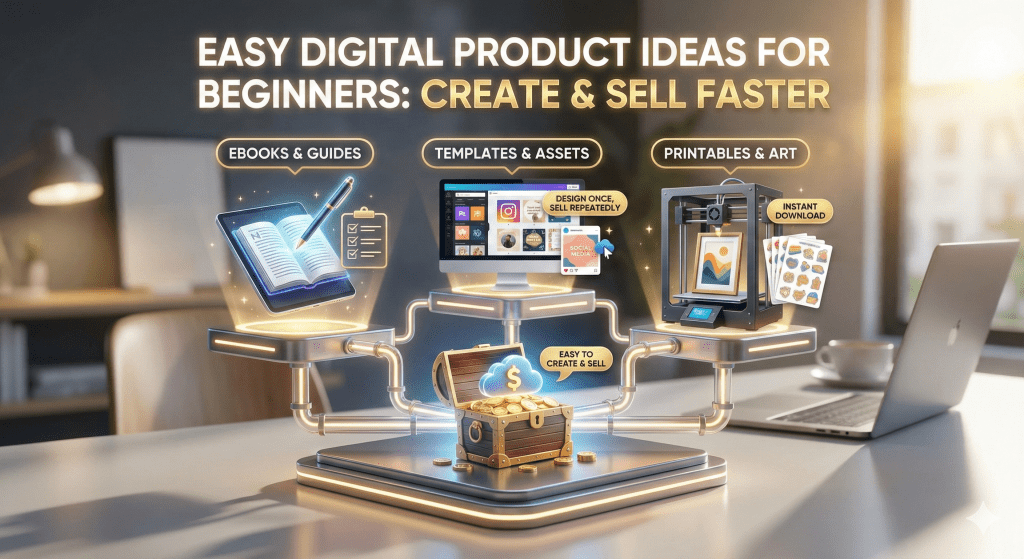
Why Digital Products Are Ideal for Beginners
Digital products work well for beginners because they remove many of the risks that stop people from starting. You do not need to manufacture anything. You do not need storage space. You do not need to handle shipping, returns, or customer logistics.
Once a digital product is created, it can be sold repeatedly without extra work. That makes it easier to experiment and learn without pressure. If your first idea is not perfect, you can update it, refine it, or replace it without starting over.
Another advantage is speed. Many beginner-friendly digital products can be created in days, not months. This allows you to test ideas quickly and get real feedback instead of guessing what people want.
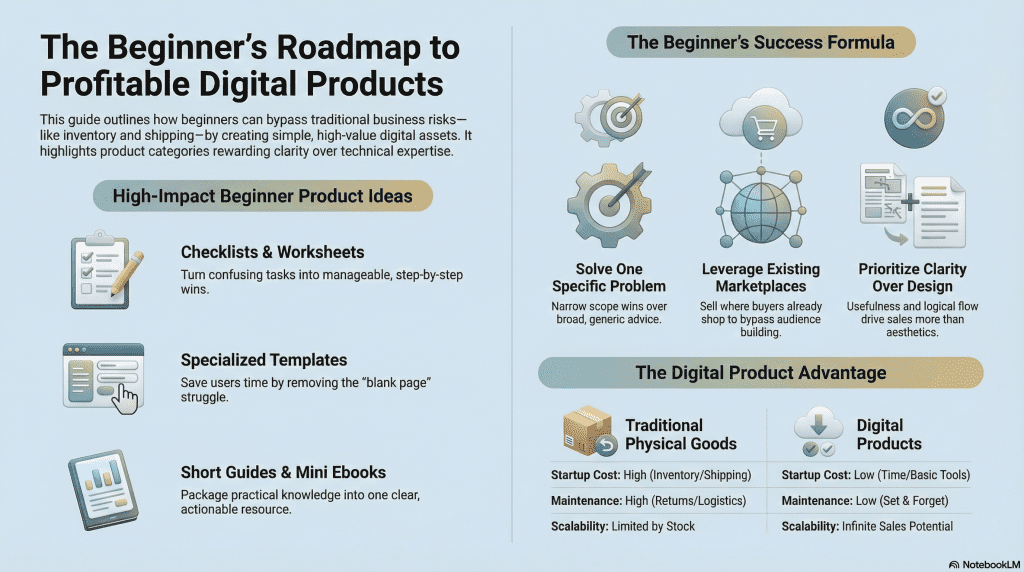
Digital products also reward clarity over complexity. The most successful beginner products usually solve one small, specific problem. They save time, reduce confusion, or organize information. You do not need to be an expert. You need to be helpful and clear.
Most importantly, digital products let beginners start where they are. Skills, experiences, and everyday knowledge can all be turned into something useful when packaged simply.

Simple Digital Products You Can Create With No Technical Skills
Checklists That Reduce Mistakes and Guesswork
Checklists are one of the most beginner-friendly digital products because they focus on clarity, not creativity. People buy checklists when they feel unsure, overwhelmed, or afraid of missing an important step. A good checklist turns a stressful or confusing task into something manageable and predictable.
For beginners, the strength of a checklist lies in its specificity. Broad checklists feel generic and are easy to ignore. Narrow checklists feel useful and actionable. A checklist works best when it applies to one clear situation and walks the user from start to finish in a logical order.
You do not need original ideas to create a valuable checklist. You only need to organize steps that already exist and present them clearly. Many buyers are not looking for new information. They want confirmation that they are doing things correctly.
From a creation standpoint, checklists are fast to produce and easy to update. You can test different versions, improve clarity, and refine wording without rebuilding the product. This makes them an ideal first product for beginners who want to learn by doing.
Worksheets That Turn Thinking Into Action
Worksheets are designed to guide people through decisions, planning, or reflection. They work because they prompt the user to engage actively instead of passively consuming information. For beginners, this makes worksheets both effective and forgiving.
A strong worksheet asks the right questions in the right order. It does not overwhelm the user with too many prompts at once. Instead, it breaks a process into small, manageable steps that build on each other. This structure creates value even if the content itself feels simple.
Worksheets are especially useful when people feel stuck. Writing things down helps users clarify their thoughts and move forward. That emotional relief is often what they are paying for.
From a creation perspective, worksheets do not require advanced design. Clear spacing, readable text, and logical flow matter more than visual style. This allows beginners to focus on usefulness rather than presentation while still delivering a product people are willing to pay for.
Printables That Support Daily Structure and Consistency
Printables are digital products created to be downloaded and used repeatedly. Their value comes from helping users stay organized, consistent, or focused over time. These products appeal to people who like structure and routine.
For beginners, printables are appealing because they rely on simple formats. The goal is usability, not innovation. A printable works when it fits naturally into someone’s daily or weekly life and makes a task easier to manage.
The most effective printables focus on one habit or responsibility. When a printable tries to do too much, it often becomes confusing or unused. Simplicity increases the chance that buyers will actually use the product and feel satisfied.
Printables are also easy to revise based on feedback. You can adjust layout, wording, or structure without changing the core idea. This flexibility makes printables a low-risk option for beginners who want to experiment and improve over time.
Templates That Save Time and Mental Effort
Templates are valuable because they remove the need to start from a blank page. People buy templates when they already know what they want to do but want a faster, easier way to do it.
For beginners, templates are powerful because they reward organization rather than expertise. A good template provides structure, guidance, and flow. It tells the user where to start and what comes next without explaining everything in detail.
Templates work best when they match a real-world task people repeat often. The more frequently a task appears, the more valuable the template becomes. This creates strong perceived value even when the template itself is simple.
From a creation standpoint, templates are forgiving. They do not need to be perfect on the first version. You can refine layout, wording, and usability over time. This makes templates an excellent option for beginners who want to create something useful without technical complexity.
Beginner-Friendly Educational Digital Products
Short Guides That Teach One Specific Outcome
Short guides are ideal for beginners because they focus on solving one clear problem instead of covering everything. Buyers choose short guides when they want quick answers, not deep theory. This makes them easier to create and easier to sell.
A strong beginner guide does not try to impress. It explains one outcome clearly, using simple language and logical steps. The value comes from organization and focus, not length. Many people prefer a concise guide they can finish in one sitting over a long resource they never complete.
For beginners, short guides are forgiving. You can start with a basic version, learn from feedback, and improve it over time. This allows you to launch faster and reduce pressure to be perfect.
Mini Ebooks That Package Practical Knowledge
Mini ebooks work well when they collect practical information into one clear resource. Unlike traditional ebooks, these are short, focused, and designed to be actionable. Buyers choose mini ebooks when they want a complete answer to a narrow question.
You do not need to be an expert to create a mini ebook. You need to understand a specific problem well enough to explain it clearly. Personal experience, lessons learned, or simplified explanations often perform better than complex analysis.
From a beginner perspective, mini ebooks help build confidence. They feel substantial without requiring months of writing. They also create a strong perception of value while remaining manageable to produce.
Email Courses That Teach in Small Steps
Email courses are educational products delivered over time instead of all at once. This format works well for beginners because it breaks learning into small, manageable pieces.
People choose email courses when they feel overwhelmed. Receiving one lesson at a time reduces friction and increases follow-through. This makes the format valuable even when the content itself is simple.
For creators, email courses are flexible. You can start with a short sequence and expand later. You can adjust lessons based on engagement and feedback. This makes email courses a low-risk way for beginners to teach without building a large product upfront.
Tutorials Based on Process, Not Credentials
Beginner-friendly tutorials focus on showing how something works step by step. They do not rely on authority or advanced expertise. Buyers are often more interested in seeing a clear process than hearing from an expert.
These tutorials work best when they mirror real-world tasks. They explain what to do, what to expect, and what mistakes to avoid. This practical approach builds trust quickly.
For beginners, tutorials are powerful because they come naturally. If you have figured something out yourself, you can usually explain it to someone else. Turning that explanation into a digital product is often easier than expected.

Done-for-You Digital Assets People Already Pay For
Social Media Templates That Remove Daily Friction
Social media templates are valuable because they reduce the mental effort required to post consistently. Many people know what they want to share but struggle with structure, formatting, or starting from a blank page. Templates solve that problem by providing a repeatable framework.
For beginners, these templates work well because they focus on organization rather than creativity. The value comes from clarity and flow, not design expertise. When templates help users move faster or feel less stuck, they become easy to justify as a purchase.
This type of product also benefits from real-world use. If you have created simple systems for your own posting, you can adapt that structure into a sellable asset without reinventing anything.
Planning and Productivity Dashboards That Centralize Information
Planning dashboards help users keep related information in one place. These products are popular because they reduce scattered notes and mental clutter. People buy them to feel more in control of their time and responsibilities.
For beginners, dashboards are approachable because they are based on logic and structure. You are not inventing new methods. You are organizing existing ones into a clearer system. This makes them easier to create and easier for buyers to understand.
Dashboards also benefit from iteration. You can start simple and expand features based on feedback, which makes them a flexible first product for beginners.
Resume, Cover Letter, and Career Templates That Save Time
Career-related templates are purchased by people who want to move quickly and confidently. These buyers are often more concerned with efficiency than originality. A clear structure helps them present information in a professional way without overthinking it.
For beginners, this category works well because it relies on clarity and formatting. You do not need to be a hiring expert. You need to understand what information belongs where and how to present it cleanly.
Because these templates address high-stakes situations, they often carry strong perceived value even when the product itself is simple.
Business and Personal Organization Templates That Reduce Overwhelm
Organization templates help users manage tasks, projects, or responsibilities more effectively. These products are popular because they turn vague plans into concrete actions.
For beginners, organization templates are forgiving. You can build them based on how you already manage your own work or life. Buyers appreciate practical systems that feel realistic and easy to follow.
These assets work best when they focus on one area of life or work. Narrow scope increases clarity and makes the product easier to use and sell.

Digital Products Based on Personal Experience, Not Expertise
Products That Document What You Have Already Figured Out
Some of the strongest beginner digital products come from documenting personal experience rather than teaching theory. People often assume they need credentials to sell educational content, but buyers frequently prefer practical insight from someone who has already gone through the process.
If you have solved a problem for yourself, you can often help someone else who is a few steps behind. The value is not authority. The value is relatability and clarity. Buyers want to know what worked, what did not, and what to focus on first.
For beginners, this approach removes pressure. You are not positioning yourself as an expert. You are sharing a clear path based on real experience.
Guides Built Around Transitions and Life Changes
Life changes create uncertainty. When people go through transitions, they actively look for guidance that feels realistic and supportive. Digital products that address these moments often perform well because they meet emotional and practical needs at the same time.
These products work best when they focus on one transition and provide structure. Instead of offering broad advice, they help users think through decisions, priorities, or next steps.
For beginners, transition-based products feel natural to create. If you have navigated a change successfully, you already understand the questions people ask and the mistakes they want to avoid.
Systems You Created to Stay Organized or Consistent
Personal systems are valuable because they are tested through use. If you have built a simple way to manage tasks, habits, or routines, that system can often be turned into a digital product.
Buyers appreciate systems that feel realistic and flexible. They are not looking for perfection. They want something they can adapt to their own life.
For beginners, turning a personal system into a product is efficient. You are refining something that already exists instead of starting from nothing.
Lessons Learned From Trial and Error
Many people are willing to pay to avoid common mistakes. Digital products that highlight lessons learned can be especially valuable when they save time, money, or frustration.
These products work when they are honest and specific. Instead of presenting polished success stories, they focus on what went wrong and how to avoid it.
For beginners, this format reduces pressure to appear successful. Transparency builds trust, and trust increases perceived value even when the product is simple.
Now that we have covered the different types of products, you might be wondering which one fits your specific situation. Use this quick guide to match your goal with the right format:
| Product Option | The Customer’s “Struggle” | Your “Winning” Focus | Why It Works for Beginners |
|---|---|---|---|
| Checklists | “I’m afraid I’ll miss a step.” | Accuracy & Specificity. (Don’t be creative; be precise.) | You just need to list the right steps in the right order. |
| Worksheets | “I’m stuck in my head and can’t start.” | Prompting Action. (Focus on asking the right questions.) | You don’t need answers; you just need to guide their thinking. |
| Printables | “I can’t stick to my routine.” | Usability. (Focus on simple layouts that fit daily life.) | You can fix “messy” habits with simple structure. |
| Templates | “I don’t want to start from scratch.” | Speed & Convenience. (Remove the “blank page” problem.) | You provide the skeleton; the customer adds the meat. |
| Career Templates | “I need to look professional—fast.” | Formatting & Standards. (Focus on clean, industry-standard layouts.) | Buyers care more about the result (the job) than the author. |
| Dashboards | “My information is scattered everywhere.” | Centralization. (Focus on bringing data into one view.) | You are organizing existing chaos, not inventing new data. |
| Short Guides | “I just want the answer, not the theory.” | Brevity. (Focus on the solution, cut the fluff.) | You can outperform experts simply by being faster to read. |
| Mini Ebooks | “I need a complete overview of this topic.” | Curation. (Focus on packaging practical lessons.) | It feels substantial but is shorter (and easier) than a book. |
| Process Tutorials | “Show me exactly how you did it.” | Transparency. (Focus on “over-the-shoulder” reality.) | You build trust by showing the process, not just the result. |
Digital Product Ideas That Work Even Without an Audience
Products That Solve an Immediate, Search-Driven Problem
Some digital products sell because people are actively searching for a solution, not because they follow a creator. These products work well without an audience because they meet a clear, urgent need.
When someone feels stuck or confused, they look for answers right away. A focused digital product that addresses that exact problem can convert even if the buyer has never heard of you before. Clarity and relevance matter more than personal brand.
For beginners, this approach is powerful because it removes the pressure to build an audience first. You can focus on usefulness instead of visibility.
Products Designed for Marketplaces, Not Personal Platforms
Marketplaces already have buyers. When you create a digital product specifically for a marketplace, you are tapping into existing demand rather than trying to create it yourself.
These products work best when they are easy to understand and quick to evaluate. Buyers scroll quickly, so the value must be obvious. Clear titles, focused use cases, and simple descriptions matter more than storytelling.
For beginners, marketplace-first products are attractive because they shorten the path to the first sale. You do not need email lists or social media reach to validate an idea.
Tools and Templates That People Buy Out of Convenience
Many buyers are not looking for inspiration. They are looking to save time. Products that replace effort with convenience often sell regardless of who created them.
These products succeed because they fit into an existing workflow. The buyer already knows what they want to do. They just want to do it faster or with less friction.
For beginners, convenience-based products reduce risk. You are not asking buyers to trust your opinion. You are offering a shortcut.
Products That Compete on Clarity, Not Personality
Audience-driven products often rely on trust and familiarity. Non-audience products rely on clarity. When buyers can quickly understand what a product does and why it helps, they are more likely to purchase.
This means the product must be focused and well-defined. Vague or overly broad products struggle without an audience to explain them.
For beginners, this is an advantage. You can compete by being clearer and more specific than existing options, even without name recognition.
Common Mistakes Beginners Make When Choosing Digital Product Ideas
Starting With an Idea That Is Too Broad
One of the most common beginner mistakes is choosing an idea that tries to help everyone. Broad ideas feel safer, but they usually fail because they lack clarity. When a product tries to solve too many problems at once, buyers struggle to understand its value.
Beginners benefit from narrowing the scope. A product that solves one specific problem for one specific situation is easier to create, easier to explain, and easier to sell. Focus creates confidence for both the creator and the buyer.
Overestimating the Need for Expertise
Many beginners delay starting because they believe they are not qualified enough. This belief often leads to unnecessary research, certifications, or overbuilding products that never launch.
Most buyers are not looking for experts. They are looking for clarity and guidance. If you are a few steps ahead of someone else, you can often help them. Waiting until you feel fully qualified usually slows progress instead of improving results.
Choosing Complexity Over Usefulness
Beginners often assume that more content equals more value. This leads to large products that are difficult to finish and difficult for buyers to use. Complexity increases friction and reduces completion.
Simple products that solve one clear problem often perform better than complex ones. Usefulness comes from relevance and clarity, not size. A small product that delivers a clear outcome builds more trust than a large product that overwhelms.
Ignoring How the Product Will Be Used
Some ideas fail because the creator focuses on what to include instead of how the buyer will use it. A product can be informative but still ineffective if it does not fit naturally into someone’s routine or workflow.
Thinking about usage early helps avoid this mistake. Ask how often someone will use the product, when they will use it, and what problem it removes. Products that feel practical and easy to use are more likely to succeed.
Waiting Too Long to Validate the Idea
Perfection is another common trap. Beginners often spend weeks refining an idea instead of testing whether people want it. This increases emotional investment and makes feedback harder to accept.
Validation does not require a finished product. Sharing a simple version, description, or outline is often enough to learn whether an idea resonates. Starting small allows beginners to learn faster and adjust without frustration.

Bonus: The Beginner’s Execution Toolkit
If you are ready to start but stuck on what to make or which tool to use, use this quick reference guide to get unstuck.
Category 1: Checklists & Worksheets
The Article Says: “Focus on clarity… specific situations… remove mistakes.”
Specific Product Examples:
Real Estate: “First-Time Homebuyer’s Closing Day Checklist” (prevents missing documents).
Health: “7-Day Anti-Inflammatory Grocery List” (removes decision fatigue).
Travel: “The Ultimate ‘Carry-On Only’ Packing List for Europe” (saves luggage fees).
Business: “New Employee Onboarding Checklist for Remote Teams” (saves manager time).
Tools to Build It:
Google Docs / Sheets (Free): Create the list, export as PDF. Best for functional, non-pretty lists.
Canva (Free/Paid): Search for “Checklist Template.” Best for visual lists you want to look professional.
Notion (Free): Create a duplicatable page. Best for digital-native users who want to check boxes on their phone.
Category 2: Templates (Time Savers)
The Article Says: “Remove the need to start from a blank page.”
Specific Product Examples:
Email Marketing: “5 ‘Fill-in-the-Blank’ Emails to Welcome New Subscribers” (Swipe File).
Career: “Modern Resume & Cover Letter Template for Creative Jobs.”
Social Media: “30 Days of Instagram Reel Hooks for Realtors.”
Finance: “Debt Snowball Calculator (Google Sheet).”
Tools to Build It:
Google Sheets: Essential for calculators or trackers.
Canva: The gold standard for social media or resume templates. You share a “Template Link” so the buyer gets their own copy.
Google Docs: Best for text-based templates (scripts, emails, contracts).
Category 3: Printables (Organization)
The Article Says: “Support daily structure… used repeatedly.”
Specific Product Examples:
Home: “Weekly Meal Planner & Grocery List (Fridge Magnet size).”
Kids: “Homeschool Daily Schedule & Chore Chart.”
Wellness: “90-Day Habit Tracker (Wall Art).”
Finance: “Bill Pay Tracker & Password Keeper.”
Tools to Build It:
Canva: Perfect for anything visual. Make sure to set the document size to standard paper sizes (A4 or US Letter) so it prints easily for the customer.
PowerPoint / Keynote: Surprisingly good for layout design if you find Canva frustrating.
Category 4: Mini-Guides & Tutorials
The Article Says: “Teach one specific outcome… based on process, not credentials.”
Specific Product Examples:
Tech: “How to Set Up Your First OBS Stream for Twitch (Step-by-Step).”
Food: “The Weekend Bread Guide: Sourdough for Busy Parents.”
Lifestyle: “Apartment Gardening: How to Grow Herbs on a Balcony.”
Tools to Build It:
Google Docs -> PDF: Write it, add screenshots, export as PDF.
Loom (Video): Record your screen explaining a process. Sell the video link or embed it in a PDF.
Scribe (Browser Extension): Automatically turns your clicks into a step-by-step PDF guide with screenshots. (Huge time saver).
Where to Actually Sell These (For Beginners)
The article mentioned “Marketplaces” vs “Personal Platforms” but didn’t name them.
- For “Search-Driven” Products (Templates, Printables): Etsy. People go there and search “Resume Template.” You don’t need an audience.
- For “Knowledge” Products (Guides, Courses): Gumroad or Lemon Squeezy. These are free to start (they take a small fee from sales) and handle the file delivery for you.
Conclusion
Starting with digital products does not require expertise, a large audience, or complex tools. What it requires is choosing the right kind of idea. Beginners succeed when they focus on simplicity, clarity, and usefulness rather than scale or perfection.
The strongest beginner digital products solve small, specific problems. They save time, reduce confusion, or provide structure where people feel stuck. Many of these products come directly from personal experience, everyday systems, or lessons already learned.
The goal is not to find the perfect idea. The goal is to choose one idea you can create quickly, test realistically, and improve over time. Momentum matters more than polish at the beginning.
Digital products reward action. The fastest way to learn what works is to start small, release early, and let real feedback guide your next step.

Frequently Asked Questions
What is the easiest digital product to create for beginners?
The easiest digital products for beginners are simple files like checklists, templates, worksheets, or short guides. These products focus on clarity and usefulness rather than design or technical complexity. They can often be created using basic tools and improved over time.
Do I need an audience before selling a digital product?
No. Many digital products sell without an existing audience, especially when they solve a specific, search-driven problem or are listed on marketplaces with built-in traffic. Clarity and relevance matter more than personal brand at the beginner stage.
How much money can beginners make from digital products?
Earnings vary widely, but beginners should focus on learning and validation rather than income goals. A small, well-defined digital product can generate its first sales quickly, which is often more valuable than immediate profit because it proves demand.
Should I start with one product or multiple products?
Beginners should start with one product. Creating and launching a single, focused product helps you learn faster and avoid overwhelm. Once you understand what buyers respond to, expanding becomes easier and more strategic.
Do digital products need to be perfect before selling?
No. Digital products do not need to be perfect to be valuable. Many successful products start simple and improve based on feedback. Launching early allows you to learn what matters to buyers instead of guessing.
What tools do I need to create my first digital product?
Most beginner digital products can be created using tools you already have, such as document editors or basic design software. The tool matters less than the structure and clarity of the product itself.

0 Comments