Introduction
Managing a modern website involves more than publishing a few pages. Businesses need to update content, organize media, maintain site structure, and keep teams aligned without rebuilding the site every time something changes.
That is why content management systems have become a core part of how websites are run. They make publishing, editing, and maintaining digital content more practical at scale.
In this guide, you’ll learn how content management systems work, why they matter, the main types of CMS platforms, and how to decide whether a CMS is the right fit for your website.
Key Takeaways
- A Content Management System (CMS) allows users to create, manage, and publish website content without needing to write code.
- CMS platforms simplify website management by providing dashboards, templates, and publishing tools.
- Businesses use CMS software to manage blogs, company websites, ecommerce stores, and digital platforms.
- Popular CMS platforms include WordPress, Shopify, Wix, and HubSpot.
- CMS systems help teams collaborate, scale content publishing, and maintain websites more efficiently.
- Different CMS types exist, including traditional CMS, headless CMS, and open-source platforms.
- Choosing the right CMS depends on your technical needs, content strategy, and website goals.
Disclaimer: I am an independent Affiliate. The opinions expressed here are my own and are not official statements. If you follow a link and make a purchase, I may earn a commission.
What Is a Content Management System?
A Content Management System (CMS) is software that allows users to create, edit, organize, and publish digital content on a website without needing to build every page manually through code.
Instead of managing files, databases, and layouts separately, a CMS provides a centralized interface where content can be updated through a dashboard.
This means website owners can:
- Publish new pages or articles
- Edit existing content
- Upload images and media
- Manage website structure
- Control user permissions
All without modifying the underlying codebase.
Most CMS platforms separate content management from website design. Content is stored in a database, while templates determine how that content appears on the site.
For example, when a blog post is published through a CMS, the system stores the content in the database and automatically applies the appropriate layout.
Many modern websites rely on CMS platforms such as WordPress, Shopify, Wix, and HubSpot to manage content efficiently.
Without a CMS, updating a website would often require editing code files directly, which can slow down publishing and limit collaboration.

Why Content Management Systems Matter
Content Management Systems matter because modern websites require continuous updates. Businesses publish articles, update product pages, manage media, and maintain site structure regularly. Without a CMS, each change would require editing code files directly, which slows down publishing and increases technical dependency.
A CMS simplifies this process by separating content management from technical development.
1. They Simplify Website Management
A CMS allows users to update content through an interface instead of modifying code. Teams can publish blog posts, edit pages, upload images, and manage categories using a dashboard.
This makes website management accessible to marketers, editors, and content teams.
2. They Enable Team Collaboration
Many websites require multiple contributors.
CMS platforms allow organizations to assign roles such as:
- Administrator
- Editor
- Author
- Contributor
This ensures content workflows remain organized and secure.
3. They Support Scalable Content Publishing
As websites grow, the amount of content increases.
CMS platforms organize content through:
- Categories
- Tags
- Templates
- Media libraries
This structure helps large websites maintain consistency and organization.
4. They Reduce Technical Dependency
Without a CMS, businesses must rely heavily on developers for even small updates.
A CMS allows non-technical users to manage content while developers focus on infrastructure, performance, and custom features.
5. They Integrate With Modern Marketing Tools
Modern CMS platforms often integrate with tools for:
- Search engine optimization
- Analytics
- ecommerce
- marketing automation
This allows websites to function as part of a larger digital ecosystem.
Content Management Systems matter because they transform websites from static projects into dynamic platforms that support continuous publishing, collaboration, and growth.
How a Content Management System Works
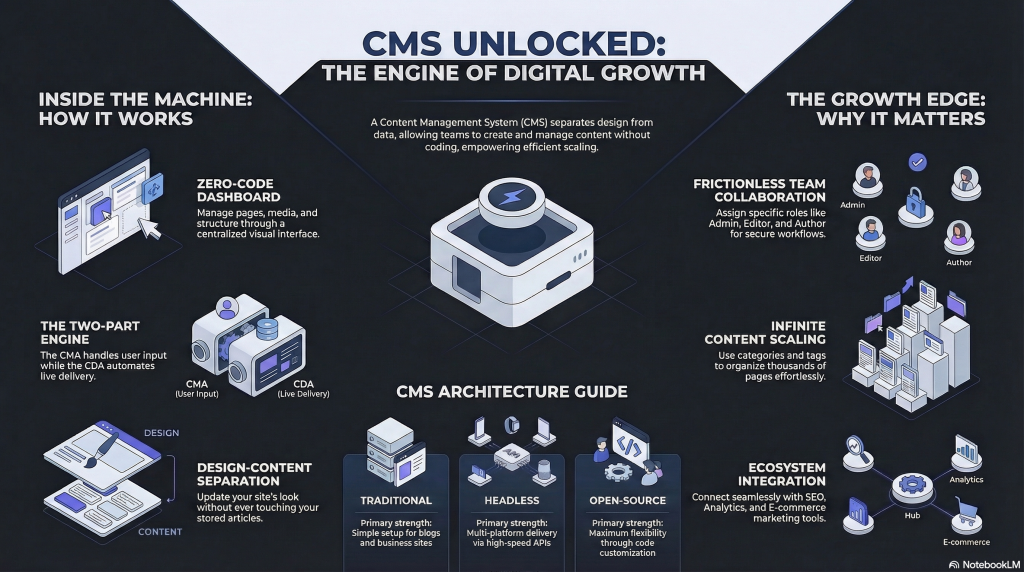
A Content Management System works by separating content creation, content storage, and content presentation. This structure allows users to manage websites through a dashboard while the system handles the technical processes behind the scenes.
Most CMS platforms consist of two main components: the content management application and the content delivery application.
1. Content Management Application (CMA)
The Content Management Application is the interface users interact with.
It allows website owners and editors to:
- Create pages and blog posts
- Edit existing content
- Upload images and media
- Organize categories and tags
- Manage user permissions
This interface typically looks like a dashboard where content can be added or modified without writing code.
Platforms like WordPress provide editors, media libraries, and publishing tools within the CMS dashboard.
2. Content Delivery Application (CDA)
The Content Delivery Application handles what happens after content is published.
It takes the stored content and:
- Retrieves it from the database
- Applies design templates
- Generates web pages
- Displays them to visitors in the browser
This process happens automatically whenever someone visits a page on the website.
3. Database and Templates
Most CMS platforms store content in a database and use templates to control how the content appears.
For example:
- A blog post is saved in the database
- A theme or template determines layout
- The CMS combines both to render the final page
This structure allows the same design template to be reused across hundreds or thousands of pages.
The Key Advantage
Because content and design are separated, updates become easier.
You can:
- Update a page without redesigning the site
- Change the theme without rewriting content
- Publish new content quickly
This architecture is what allows modern websites to scale efficiently.

Types of Content Management Systems
Not all content management systems work the same way. Different CMS architectures are designed to support different technical needs, development workflows, and content strategies.
Understanding these categories helps businesses choose the right platform.
1. Traditional CMS
A traditional CMS combines content management and website presentation within a single system. Users create and manage content through a dashboard, while the CMS handles page generation and display.
This is the most common type of CMS.
Popular traditional CMS platforms include WordPress and Wix.
Advantages of traditional CMS platforms:
- Simple setup
- Integrated design themes
- Built-in publishing tools
They are widely used for blogs, business websites, and content-driven platforms.
2. Headless CMS
A headless CMS separates the content management backend from the frontend presentation layer.
Content is stored and managed in the CMS, but it is delivered to websites, mobile apps, or other platforms through APIs.
This architecture allows developers to build custom front-end experiences using different technologies.
Headless CMS systems are commonly used in modern application-driven environments where content needs to be distributed across multiple platforms.
3. Decoupled CMS
A decoupled CMS is similar to a headless CMS but still includes an optional front-end delivery system.
It separates the backend content management from the presentation layer while allowing some built-in rendering capabilities.
This provides more flexibility while maintaining some traditional CMS features.
4. Open-Source CMS
An open-source CMS allows developers to access and modify the underlying source code.
This enables customization, plugin development, and extended functionality.
One of the most widely used open-source CMS platforms is WordPress.
Open-source systems offer flexibility but may require more technical expertise.
Choosing the Right CMS Type
The right CMS depends on factors such as:
- Technical resources
- Content scale
- Development flexibility
- Platform integration needs
Small businesses often prefer traditional CMS platforms, while large organizations may adopt headless or decoupled architectures.
Benefits of Using a Content Management System
Content Management Systems provide practical advantages that make website management easier, faster, and more scalable. Instead of relying on manual coding for every update, organizations can manage digital content through structured workflows and publishing tools.
1. Easier Content Publishing
A CMS allows users to publish and update website content through a dashboard. Pages, blog posts, and media files can be created and edited without modifying the website’s code.
This simplifies publishing for marketing teams, editors, and content creators.
2. Faster Website Updates
Without a CMS, updating a website often requires editing code files and redeploying the site. A CMS allows content changes to be made quickly through the interface.
This enables businesses to keep their websites current with minimal technical effort.
3. Team Collaboration
Most CMS platforms support multiple user roles. Organizations can assign permissions to different contributors, such as administrators, editors, and authors.
This helps teams collaborate while maintaining control over content publishing.
4. Consistent Design and Structure
CMS platforms use templates and themes to control how pages appear. This ensures that new pages automatically follow the same design structure as the rest of the site.
Consistency improves usability and simplifies large-scale content publishing.
5. Scalability for Growing Websites
As websites grow, managing large volumes of content becomes more complex. CMS platforms organize content through categories, tags, and structured data.
This allows websites to scale efficiently as more pages, products, or articles are added.
6. Integration With Other Tools
Modern CMS platforms often integrate with systems for analytics, marketing automation, ecommerce, and search optimization.
For example, platforms like WordPress and HubSpot allow websites to connect with a wide range of plugins and marketing tools.
Content Management Systems improve efficiency, collaboration, and scalability. These benefits are why most modern websites rely on CMS platforms to manage digital content.

CMS vs Website Builders vs Custom Development
A Content Management System is one way to build and manage a website, but it is not the only option. Websites can also be created using website builders or fully custom development. Each approach offers different levels of flexibility, control, and technical complexity.
Understanding these differences helps businesses choose the right solution.
Content Management Systems
A CMS focuses on managing and publishing content through a structured interface. It separates content from design and allows teams to update websites without modifying code.
Platforms such as WordPress provide dashboards, themes, and plugins that simplify publishing and website management.
CMS platforms are commonly used for:
- Blogs and media websites
- Business websites
- Content-driven platforms
- Large websites that require frequent updates
They offer flexibility while still providing structured tools for managing content.
Website Builders
Website builders prioritize ease of use. They typically include drag-and-drop design tools that allow users to create pages visually.
Examples include Wix and Squarespace.
Website builders are often used by individuals and small businesses that want a simple way to launch a site quickly without dealing with technical configuration.
However, website builders may provide less customization compared with traditional CMS platforms.
Custom Website Development
Custom development involves building a website from scratch using programming languages and frameworks.
Developers create the site’s architecture, database, and interface manually. This approach provides the highest level of control and flexibility.
Custom development is commonly used for:
- Large web applications
- enterprise platforms
- highly specialized digital products
However, custom websites typically require dedicated development resources for maintenance and updates.
Choosing the Right Approach
The best solution depends on the goals of the project.
- CMS platforms provide a balance of flexibility and usability.
- Website builders focus on simplicity and speed.
- Custom development offers maximum control but requires technical expertise.
Many organizations choose a CMS because it allows them to manage content efficiently while still supporting customization and scalability.
When to Use a Content Management System
A Content Management System is most useful when a website requires regular updates, structured content, and collaboration between multiple contributors. Instead of rebuilding pages manually, a CMS allows teams to manage content efficiently through a centralized system.
1. When Your Website Publishes Content Regularly
Websites that frequently publish articles, guides, news updates, or resources benefit significantly from a CMS.
Blogs, media platforms, and content-focused websites often rely on systems like WordPress to organize and publish large volumes of content.
2. When Multiple People Manage the Website
Many organizations have teams responsible for marketing, publishing, and editing content. A CMS allows different users to contribute while maintaining role-based permissions.
Editors can review content, authors can publish articles, and administrators can manage site settings.
3. When Your Website Needs to Scale
As websites grow, managing hundreds or thousands of pages manually becomes inefficient.
CMS platforms help scale content management by organizing pages through:
- categories
- tags
- templates
- media libraries
This structure allows large websites to remain organized and manageable.
4. When You Want to Separate Content From Development
A CMS allows developers and content teams to work independently.
Developers focus on design, performance, and infrastructure, while marketing teams manage content and updates through the CMS interface.
This separation improves efficiency and reduces dependency on technical teams for routine updates.
5. When Your Website Is Part of a Larger Digital Strategy
Many modern websites integrate with marketing platforms, analytics tools, and ecommerce systems.
CMS platforms like HubSpot allow businesses to connect their website with customer data, marketing automation, and lead generation tools.
Content Management Systems are ideal for organizations that need a scalable, collaborative way to manage digital content while maintaining control over website structure and publishing workflows.

Conclusion
Content Management Systems have become essential tools for managing modern websites. They allow businesses, publishers, and organizations to create, organize, and update digital content without rebuilding their websites from scratch.
By separating content management from technical development, CMS platforms make it easier for teams to publish updates, collaborate on projects, and scale their online presence. Features such as dashboards, templates, and user permissions help streamline workflows and reduce reliance on manual coding.
Different CMS architectures serve different needs. Traditional platforms support blogs and business websites, while headless and decoupled systems offer flexibility for more complex digital environments.
Choosing the right CMS depends on your goals, technical resources, and content strategy. For many organizations, a CMS provides the balance between usability, scalability, and control needed to manage websites effectively.

Frequently Asked Questions
What does CMS stand for?
CMS stands for Content Management System. It refers to software that allows users to create, manage, and publish website content through an interface instead of editing code directly.
What is the most popular content management system?
The most widely used CMS platform is WordPress, which powers a large portion of websites across blogs, business sites, and online publications.
Other well-known CMS platforms include Shopify, Wix, and HubSpot.
Do I need a CMS for my website?
Not every website requires a CMS. Small static websites or highly customized applications can be built without one. However, most modern websites benefit from using a CMS because it simplifies publishing, content updates, and collaboration.
What is the difference between a CMS and a website builder?
A CMS focuses on managing and organizing content while allowing greater flexibility and customization.
Website builders typically emphasize visual design tools that allow users to create pages quickly with drag-and-drop editors. Builders are often easier to start with but may provide less flexibility than a traditional CMS.
Can a CMS be used for ecommerce?
Yes. Many CMS platforms support ecommerce functionality. For example, Shopify is designed specifically for online stores, while other CMS platforms allow ecommerce features through plugins or integrations.
Is a CMS only for blogs?
No. While CMS platforms were initially popular for blogging, they are now used for many types of websites, including business sites, ecommerce stores, news platforms, educational websites, and enterprise content systems.

0 Comments