Introduction
Most people think ChatGPT is bad at answering questions.
In reality, most prompts are bad at giving instructions.
If you type something vague like, “Write a marketing plan,” you’ll get a generic response. If you provide context, structure, and constraints, the output changes dramatically.
ChatGPT does not guess what you mean. It responds to what you tell it.
Learning how to write effective prompts is not about using complicated language. It is about thinking clearly and communicating instructions with precision. When you improve your prompts, you improve your results.
In this guide, you’ll learn why most prompts fail, how to structure stronger ones, and a practical framework you can use immediately to get better answers from ChatGPT.
Key Takeaways
- A ChatGPT prompt is an instruction, not just a question.
- The quality of the output depends on the clarity of the input.
- Specific context dramatically improves accuracy and usefulness.
- Strong prompts define role, goal, constraints, and format.
- Vague prompts produce generic responses.
- Refining prompts through iteration leads to better results.
- Writing better prompts is a thinking skill, not a technical trick.
Disclaimer: I am an independent Affiliate. The opinions expressed here are my own and are not official statements. If you follow a link and make a purchase, I may earn a commission.
What a ChatGPT Prompt Really Is
A ChatGPT prompt is an instruction that tells the model what to do.
It is not just a question. It is a set of directions.
When you write a prompt, you are defining:
- The task
- The context
- The constraints
- The desired format
- The intended audience
ChatGPT generates responses based on patterns it has learned. It does not understand your intent beyond what you explicitly communicate. If the instruction is unclear, the output will reflect that uncertainty.
Think of it this way:
Weak prompt → Weak direction → Generic output
Clear prompt → Clear direction → Useful output
Prompts Are Inputs That Shape Probability
ChatGPT predicts the most likely useful response based on your input. The more precise your input, the more focused the prediction becomes.
For example:
“Write about productivity.”
This leaves everything undefined:
- Who is the audience?
- What format?
- What depth?
- What angle?
Now compare it to:
“Write a 700-word beginner-friendly article about productivity habits for remote workers. Use short paragraphs and actionable examples.”
The second prompt narrows the outcome. It reduces ambiguity.
Prompts Define Boundaries
Every prompt creates boundaries around:
- Tone
- Length
- Perspective
- Structure
- Detail level
Without boundaries, the model defaults to broad and generic.
With boundaries, the response becomes tailored and intentional.
Prompt Writing Is Structured Thinking
Writing better prompts forces you to think clearly.
Before you type, you must decide:
- What exactly do I want?
- Who is this for?
- What outcome am I trying to achieve?
Prompt writing is not about technical tricks. It is about clarity of thought translated into clear instruction.
When you understand that a prompt is a structured instruction set, everything improves.
Why Most ChatGPT Prompts Fail
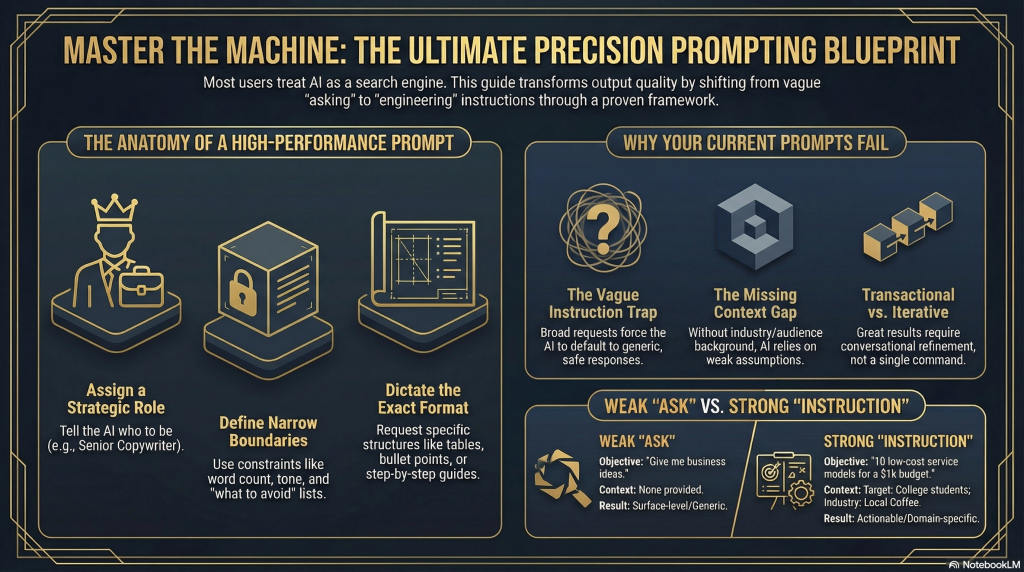
Most poor results from ChatGPT are not caused by the model. They are caused by vague or incomplete instructions.
When prompts lack clarity, the output defaults to safe, general responses. If you want better answers, you must understand what typically goes wrong.
Here are the most common reasons prompts fail.
1. The Prompt Is Too Vague
Vague prompts produce vague results.
Examples:
- “Write about marketing.”
- “Explain AI.”
- “Give me business ideas.”
These instructions leave too many variables undefined. The model does not know:
- Who the audience is
- How detailed the answer should be
- What angle to take
- What format to follow
Without direction, it generates a broad overview.
2. No Context Is Provided
Context shapes output.
If you do not explain:
- Your goal
- Your audience
- Your industry
- Your constraints
The model fills in the gaps with assumptions.
For example:
“Create a content plan.”
Content plan for what? A YouTube channel? A law firm? A fitness coach? A local bakery?
Missing context weakens relevance.
3. No Defined Role
ChatGPT adapts to roles.
If you say:
“You are a startup advisor…”
The tone, depth, and structure change.
If you do not define a role, the response defaults to a general informational tone.
Role framing improves precision dramatically.
4. No Format Instructions
Output format matters.
Do you want:
- Bullet points?
- A step-by-step guide?
- A table?
- A short summary?
- A 1,000-word article?
If you do not specify the structure, the format may not match your expectations.
Always define the desired output format.
5. Overloading the Prompt
Some people try to include everything at once.
For example:
“Write a business plan, marketing strategy, financial forecast, branding guide, and launch roadmap for my startup.”
This overwhelms the scope. The output becomes shallow because the task is too broad.
Break complex requests into focused steps.
6. Expecting the Model to Read Your Mind
ChatGPT does not know:
- Your prior decisions
- Your internal strategy
- Your specific preferences
If you assume it understands unstated details, the output will feel misaligned.
Explicit beats implied.
7. Not Iterating
Strong results often come from refinement.
Instead of asking once and accepting the first answer, improve the instruction:
- Clarify the tone
- Narrow the audience
- Add constraints
- Request revisions
Prompt writing is iterative. Precision improves with feedback.
The Core Pattern
Most prompts fail because they lack:
- Specificity
- Structure
- Constraints
- Clear objectives
When you improve those four elements, your results improve immediately.
Better prompts are not longer for the sake of length. They are clearer by design.

The Core Structure of a High-Quality ChatGPT Prompt
Strong prompts are not random. They follow a structure.
When you understand this structure, your results improve immediately. You stop guessing and start engineering the output.
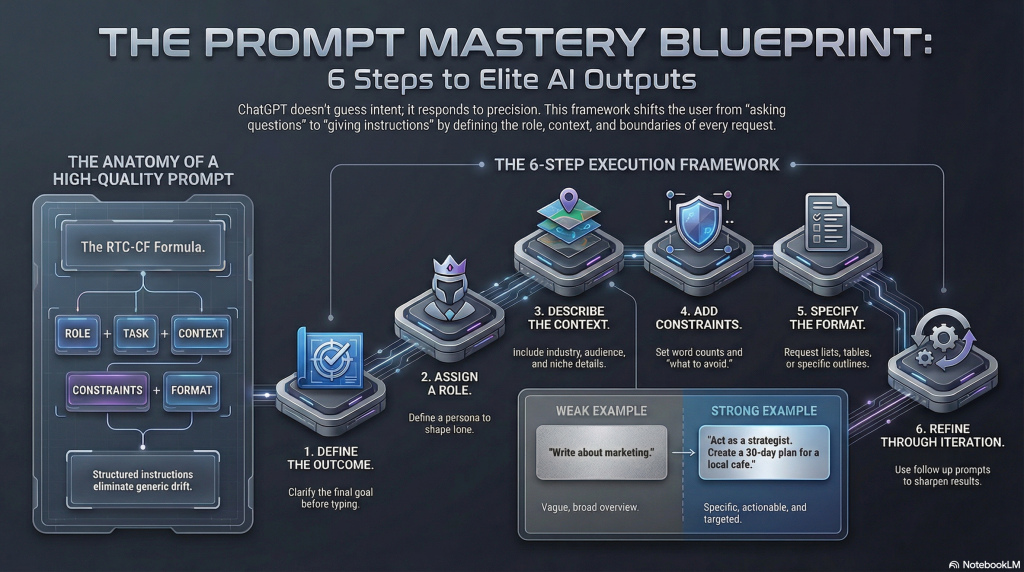
A high-quality prompt usually includes five core components:
- Role
- Task
- Context
- Constraints
- Format
Let’s break them down.
1. Define the Role
Start by telling ChatGPT who it should act as.
Examples:
- “You are a digital marketing strategist.”
- “You are a startup advisor.”
- “You are a productivity coach.”
- “You are a professional editor.”
Why this works:
Role framing influences tone, depth, and perspective. It narrows the type of expertise applied to the task.
Without a role, responses default to general explanations.
2. Define the Task Clearly
State exactly what you want done.
Weak:
“Write something about email marketing.”
Strong:
“Create a 5-email welcome sequence for a new online fitness program.”
Clarity in the task eliminates ambiguity.
3. Add Context
Context improves relevance.
Include details such as:
- Target audience
- Industry
- Business model
- Current situation
- Skill level
Example:
“For beginner freelancers who are just starting out and have no email list yet.”
The more relevant context you provide, the less the model has to assume.
4. Add Constraints
Constraints create boundaries.
You can specify:
- Word count
- Tone
- Reading level
- What to avoid
- What to include
Example:
“Keep the tone conversational and avoid technical jargon.”
Constraints prevent generic drift.
5. Specify the Format
Always define how you want the answer structured.
For example:
- Bullet points
- Step-by-step guide
- Table comparison
- Short summary
- Outline format
Example:
“Present the answer as a numbered step-by-step list.”
Format instructions save editing time later.
The Perfect Prompt Formula
Most prompts fail because they are too vague. Vague instructions create generic answers. You must build your prompt with five clear pieces of information.
1. Role
Assign a specific job to the AI. This sets the right tone and expertise level.
- Example: You are a professional copywriter.
2. Task
State exactly what you need. Be direct and clear.
- Example: Write a welcome email.
3. Context
Share important background details. Explain who the audience is and what the goal is.
- Example: This is for a new fitness app targeting busy parents.
4. Constraints
Set strict boundaries. Define what the AI must avoid and how long the text should be.
- Example: Keep it under 200 words and avoid technical jargon.
5. Format
Explain how the final answer should look. Never leave the structure to chance.
- Example: Present the answer as a numbered list.
The Formula in Action: You are a professional copywriter. Write a welcome email. This is for a new fitness app targeting busy parents. Keep it under 200 words and avoid technical jargon. Present the answer as a numbered list.
Step-by-Step Framework for Writing Better Prompts
Now that you understand the structure, let’s turn it into a repeatable process.
When you sit down to write a prompt, follow these six steps. This removes guesswork and improves output quality immediately.
Step 1: Define the Outcome First
Before typing anything, ask yourself:
- What do I actually want as the final result?
- Is this for learning, planning, writing, analyzing, or generating ideas?
Clarity starts with outcome definition.
Weak thinking: “I need help with marketing.”
Clear thinking: “I need a 30-day organic content plan for my small consulting business.”
Define the end result before writing the instruction.
Step 2: Assign a Role
Tell ChatGPT who it should act as.
Examples:
- “You are a startup advisor.”
- “You are an experienced copywriter.”
- “You are a business analyst.”
- “You are a content strategist.”
Role framing shapes the perspective and tone automatically.
Step 3: Describe the Context
Add relevant background information.
Include:
- Target audience
- Industry or niche
- Skill level
- Constraints
- Current challenges
For example: “My audience is beginner freelancers who struggle to find clients.”
Context improves relevance more than length does.
Step 4: Add Constraints and Preferences
Now define boundaries.
You can specify:
- Word count
- Tone
- Format
- What to avoid
- What to emphasize
Example: “Keep the tone conversational and practical. Avoid technical jargon.”
Constraints increase precision.
Step 5: Specify the Format
Never leave structure to chance.
State clearly whether you want:
- Bullet points
- A numbered list
- A table
- An outline
- A short summary
- A long-form article
Format clarity reduces editing time later.
Step 6: Refine Through Iteration
The first prompt does not need to be perfect.
After receiving a response, you can say:
- “Make it more concise.”
- “Add real examples.”
- “Rewrite this for beginners.”
- “Expand section three.”
Prompt writing is a conversation, not a single command.
Iteration turns average output into strong output.
Putting It All Together
Here is a complete example using the framework:
“You are a digital marketing strategist. Create a 30-day organic content plan for a small online fitness coach targeting busy professionals. Focus on short-form video ideas only. Keep it beginner-friendly and present the output as a weekly calendar.”
This works because:
- The role is clear.
- The task is specific.
- The audience is defined.
- The constraints are included.
- The format is structured.
That combination dramatically improves output quality.
Before and After Examples of Weak vs Strong Prompts
Understanding structure is useful. Seeing it applied makes the difference clear.
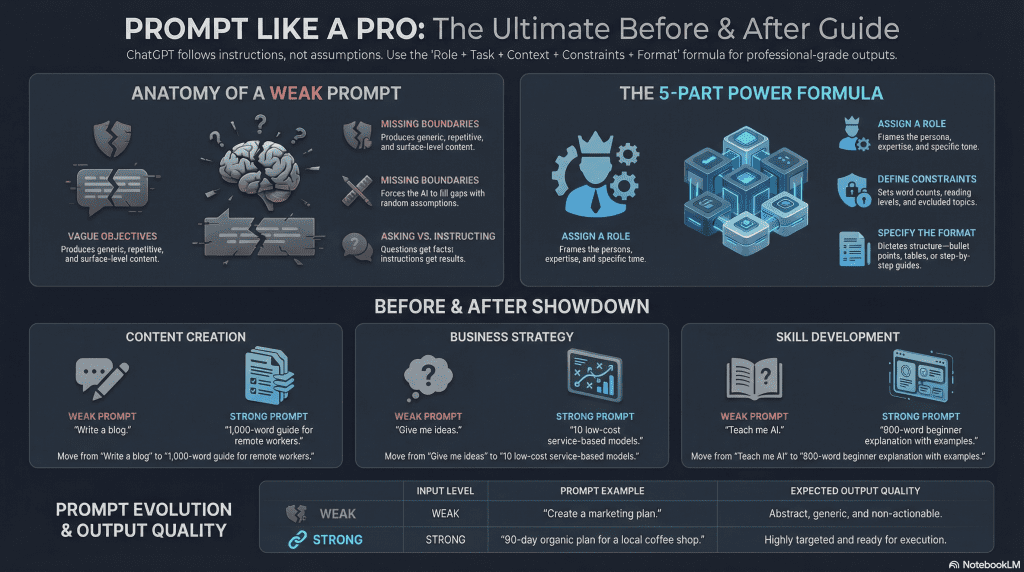
Below are real examples of weak prompts compared to improved versions. Notice how clarity changes the quality of the expected output.
Example 1: Writing Content
Weak Prompt:
“Write a blog post about productivity.”
Problem:
- No audience defined
- No length specified
- No tone indicated
- No structure requested
The result will likely be generic.
Improved Prompt:
“You are a productivity coach. Write a 1,000-word beginner-friendly blog post about daily productivity habits for remote workers. Use short paragraphs, include actionable examples, and structure it with clear H2 subheadings.”
Why this works:
- Role is defined
- Audience is clear
- Word count is specified
- Tone is controlled
- Structure is requested
The output becomes targeted and usable.
Example 2: Business Planning
Weak Prompt:
“Give me business ideas.”
Problem:
- No industry
- No budget
- No skill level
- No constraints
The result will be broad and surface-level.
Improved Prompt:
“You are a startup advisor. Generate 10 low-cost online business ideas for someone with marketing experience and a $1,000 starting budget. Focus on service-based models and explain each idea in 2 to 3 sentences.”
Why this works:
- Context narrows scope
- Budget constraint filters ideas
- Skill level guides relevance
- Output format is defined
Specificity produces practicality.
Example 3: Marketing Strategy
Weak Prompt:
“Create a marketing plan.”
Problem:
- For what type of business?
- What timeline?
- What budget?
- What channel?
The result will be abstract.
Improved Prompt:
“You are a digital marketing strategist. Create a 90-day organic marketing plan for a small local coffee shop targeting college students. Focus only on social media and community engagement. Present the plan as a weekly action list.”
Why this works:
- Role guides expertise
- Business type is clear
- Audience is defined
- Channel is restricted
- Format is structured
The output becomes actionable.
Example 4: Skill Development
Weak Prompt: “Teach me about AI.”
Problem:
- Too broad
- No depth level
- No format
Improved Prompt: “Explain artificial intelligence to a complete beginner with no technical background. Use simple language, short paragraphs, and real-world examples. Keep the explanation under 800 words.”
Why this works:
- Audience skill level defined
- Tone simplified
- Word limit specified
- Format controlled
Clarity improves teaching quality.
The Pattern You Should Notice
In every improved version:
- The role is defined
- The task is specific
- The context is added
- The constraints are clear
- The format is specified
Weak prompts ask. Strong prompts instruct.
When you shift from vague questions to structured instructions, ChatGPT becomes significantly more useful.
Advanced Techniques for Writing More Powerful Prompts
Once you understand the basic structure of a strong prompt, you can move beyond simple clarity and start improving precision, creativity, and depth.
These advanced techniques help you extract higher-quality results.
1. Use Iterative Prompting
Your first prompt does not need to be perfect.
Instead of trying to craft a flawless instruction, think in stages:
- Get a draft
- Refine tone
- Improve structure
- Add constraints
- Expand or reduce
Example:
First prompt: “Create a 30-day content plan for a fitness coach.”
Follow-up refinement: “Now make it more beginner-friendly and focus only on short-form video ideas.”
Iteration transforms average output into high-quality results.
2. Ask for Step-by-Step Reasoning
When solving complex problems, you can instruct ChatGPT to think through the logic.
Example:
“Break this down step-by-step and explain your reasoning clearly.”
This works well for:
- Business decisions
- Strategic planning
- Problem-solving
- Learning technical topics
Structured reasoning improves clarity and depth.
3. Use Perspective Shifting
You can improve insights by changing viewpoints.
Examples:
- “Answer this as a skeptical investor.”
- “Explain this from a customer’s perspective.”
- “Respond as a hiring manager reviewing resumes.”
Perspective shifts generate different angles and highlight blind spots.
4. Provide Examples to Condition Output
If you want a specific style, give a short example.
Example:
“Write product descriptions in this style: Short, benefit-focused, and conversational.”
Even one example conditions tone and structure.
This technique significantly improves formatting and voice control.
5. Break Large Tasks Into Layers
Instead of asking for everything at once, layer your prompts.
For example:
Step 1: “Generate 10 business ideas.”
Step 2: “Now expand idea number three into a detailed execution plan.”
Step 3: “Create a 90-day launch roadmap for that plan.”
Layered prompting increases depth and avoids shallow responses.
6. Control Tone Explicitly
Tone dramatically affects usability.
Specify clearly:
- Formal
- Conversational
- Analytical
- Persuasive
- Technical
- Beginner-friendly
Example:
“Write this in a confident but approachable tone. Avoid jargon.”
Tone control reduces editing later.
7. Ask for Critique and Improvement
ChatGPT can improve its own output if instructed.
Example:
“Review this answer and suggest improvements.”
“Identify weaknesses in this strategy.”
“Challenge this idea and point out risks.”
Self-critique prompts elevate quality.
8. Combine Constraints for Precision
The more intentional your constraints, the more controlled the result.
Example:
“Write a 700-word article for beginner entrepreneurs. Use short paragraphs, active voice, no technical jargon, and include 3 real-world examples.”
Constraint stacking improves output consistency.
The Real Skill Behind Advanced Prompting
Advanced prompting is not about tricks. It is about structured thinking.
When you:
- Define clear outcomes
- Apply roles
- Add context
- Set constraints
- Refine iteratively
You move from casual use to strategic use.
ChatGPT becomes less of a random answer generator and more of a structured assistant.
Common ChatGPT Prompt Mistakes to Avoid
Even after learning structure and advanced techniques, small mistakes can weaken your results.
Most people do not struggle because ChatGPT is limited. They struggle because their prompts lack clarity, boundaries, or intention.
Here are the most common mistakes and how to fix them.
1. Asking Overly Broad Questions
Prompts like:
- “Explain business.”
- “Write about marketing.”
- “Teach me coding.”
Are too wide to produce focused answers.
Fix:
Narrow the scope.
Instead of: “Teach me coding.”
Try: “Explain the basics of Python programming to a complete beginner using simple examples.”
Specific beats broad every time.
2. Skipping Context
Without context, ChatGPT fills in assumptions.
If you do not explain:
- Your audience
- Your industry
- Your skill level
- Your goal
The response may not align with your needs.
Fix:
Always add relevant background.
Even one sentence of context improves accuracy significantly.
3. Not Defining the Output Format
If you do not specify format, you may receive:
- Paragraphs instead of bullet points
- A summary instead of a detailed guide
- A short answer when you need depth
Fix:
Explicitly state the format you want.
Example: “Present the answer as a numbered step-by-step list.”
4. Trying to Solve Everything in One Prompt
Overloading your prompt reduces depth.
Example:
“Create a full business plan, marketing strategy, branding guide, and financial forecast.”
The result will likely be shallow.
Fix:
Break complex tasks into stages. Layer your prompts.
Focused requests produce stronger output.
5. Expecting Perfect Results on the First Try
Prompting is iterative.
Many users stop after the first response instead of refining.
Fix:
Follow up with:
- “Make this more concise.”
- “Expand section two.”
- “Rewrite for beginners.”
- “Add real examples.”
Refinement dramatically improves results.
6. Being Too Minimal
Short prompts are not always better.
Example:
“Improve this.”
Without context, improvement is undefined.
Fix:
Clarify what “improve” means.
Example: “Improve this paragraph for clarity and make it more persuasive.”
7. Ignoring Constraints
Without constraints, answers default to generic safe output.
Fix:
Specify boundaries.
- Word count
- Tone
- Audience
- Depth
- What to avoid
Constraints sharpen results.
8. Treating Prompts Like Casual Questions
ChatGPT performs best when you give it instructions, not vague inquiries.
Weak: “What should I do?”
Strong: “List 5 practical steps a beginner freelancer can take this week to get their first client.”
Structure improves usefulness.
The Core Pattern
Most prompt mistakes come down to one issue:
Lack of clarity.
When you think clearly and communicate clearly, the model performs better.
Better thinking → Better instructions → Better output.

The Future of Prompt Writing and AI Collaboration
Prompt writing is becoming a core digital skill.
As AI tools become more integrated into business, education, and daily workflows, the ability to communicate clearly with AI will matter more than simply knowing how to use the interface.
The future of prompt writing is not about tricks. It is about structured thinking.
1. Prompt Literacy as a Professional Skill
In the same way that search literacy became essential in the early internet era, prompt literacy is becoming essential in the AI era.
Professionals who know how to:
- Define clear objectives
- Provide context efficiently
- Structure instructions logically
- Iterate intelligently
Will extract more value from AI tools than those who rely on vague requests.
Prompt writing is becoming a leverage skill.
2. Collaboration Over Command
The most effective users do not treat ChatGPT as a one-time command system. They treat it as a collaborative partner.
This means:
- Refining outputs
- Asking for alternatives
- Requesting critiques
- Testing variations
- Iterating toward improvement
The future of AI use is conversational and layered, not transactional.
3. Specialized Prompting
As AI becomes embedded in different industries, prompting will become more specialized.
For example:
- Legal prompting
- Marketing prompting
- Coding prompting
- Research prompting
Each field will develop patterns and frameworks optimized for its needs.
Generic prompts will become less competitive compared to structured, domain-specific prompting.
4. Integration With Workflows
Prompt writing will increasingly integrate into:
- Content production
- Business planning
- Data analysis
- Education
- Product development
Instead of replacing thinking, AI will augment structured thought processes.
Those who understand how to guide AI effectively will increase productivity significantly.
5. AI as a Thinking Amplifier
The real shift is not technical. It is cognitive.
Writing strong prompts forces you to:
- Clarify goals
- Define constraints
- Identify assumptions
- Structure ideas logically
This process improves your thinking, not just the output.
The future of prompt writing is less about clever phrasing and more about clear reasoning.
The Long-Term Perspective
As AI tools evolve, interfaces may change. Models may improve. Features may expand.
What will remain constant is this principle:
Clear input produces better output.
Learning how to write effective prompts is not about mastering one tool. It is about mastering communication with intelligent systems.
And that skill will compound over time.
Conclusion
Writing better ChatGPT prompts is not about using complicated language. It is about thinking clearly and giving structured instructions.
Most weak results come from vague requests. When you define the role, clarify the task, add context, set constraints, and specify format, the quality of the output improves immediately.
Prompt writing is a leverage skill. The better your input, the better the response. Over time, this compounds. You spend less time rewriting and more time refining.
The key principles are simple:
- Be specific
- Provide context
- Set boundaries
- Control format
- Refine through iteration
ChatGPT does not need perfect wording. It needs clear direction.
When you shift from asking casual questions to giving structured instructions, you unlock significantly better results. Prompt writing becomes less about guessing and more about guiding.
That is when ChatGPT becomes a true productivity tool rather than a random answer generator.

Frequently Asked Questions
What is a ChatGPT prompt?
A ChatGPT prompt is the instruction you give the model. It defines the task, context, and format of the desired response.
How long should a prompt be?
A prompt should be as long as necessary to provide clarity. Length alone does not improve results. Specificity and structure do.
Should prompts always include context?
Yes. Even brief context improves relevance and reduces generic output. The more important the task, the more context you should provide.
Do I need technical knowledge to write good prompts?
No. Effective prompting is about clear communication, not technical skill. Anyone can improve with practice.
Can I reuse prompts?
Yes. You can reuse structured prompts and adjust context or constraints as needed. Building a prompt library saves time.
Why does ChatGPT sometimes give generic answers?
Generic prompts produce generic results. When instructions lack specificity, the model defaults to broad and safe responses.
Is prompt writing a skill worth learning?
Yes. As AI tools become more integrated into daily work, structured prompting will become increasingly valuable across industries.

0 Comments