Introduction: From Words to Images
Text-to-image AI makes it possible to create original visuals using nothing more than written descriptions. A few words can generate illustrations, concept art, product visuals, or abstract scenes, no drawing skills or design software required.
This shift matters because it changes how ideas move from concept to image. Instead of translating imagination through tools, you translate it through language. The quality of the result depends less on artistic technique and more on how clearly an idea is expressed.
In this guide, we’ll use OpenAI’s DALL·E 3 as a practical reference point to explain how text-to-image AI works and how to communicate effectively with it. You’ll learn what prompts are, why they matter, and how small changes in wording can significantly alter the images you generate.
The goal is not to turn you into a prompt engineer, but to give you enough understanding to move from vague descriptions to intentional visual outcomes.
Key Takeaways
- Text-to-image AI creates original visuals by interpreting language, not by searching existing images.
- The quality of the output is determined primarily by the clarity of the prompt.
- Strong prompts function as creative briefs, defining subject, context, and visual intent.
- Advanced control comes from specificity, not complexity.
- Unexpected results are usually caused by ambiguity or data bias, not system error.
- Effective use of AI image generation improves through iteration, not automation.
Disclaimer: I am an independent Affiliate. The opinions expressed here are my own and are not official statements. If you follow a link and make a purchase, I may earn a commission.
What Is Text-to-Image AI?
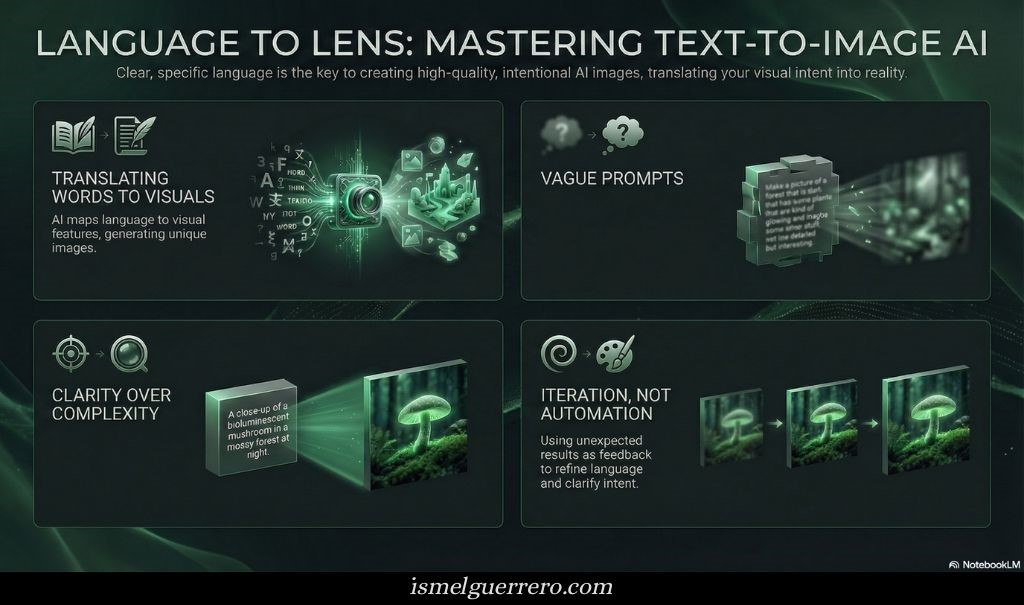
Text-to-image AI is a system that generates original images from written descriptions. Instead of searching for existing visuals, it creates new ones by interpreting the meaning, relationships, and visual implications of the words you provide.
These models are trained on large collections of images paired with text descriptions. Through that training, they learn how language maps to visual features, how words like texture, lighting, style, and emotion translate into shapes, colors, and composition. When you submit a prompt, the model uses those learned patterns to assemble an image that matches the description.
Importantly, the AI is not copying or retrieving a specific image. It is synthesizing a new result based on probability and pattern recognition. The output reflects what the model has learned about how similar ideas are typically represented visually, combined in a way that fits your instructions.
The quality of the result depends less on artistic skill and more on clarity. The more precisely an idea is described, the more accurately the system can translate language into visuals. This makes text-to-image AI less about automation and more about communication between human intent and machine interpretation.
The Role of the Prompt
In text-to-image AI, the prompt is not a command in the traditional sense. It is a description of intent. The system does not “understand” creativity the way a human does; it interprets language patterns and translates them into visual structure. The prompt is the bridge between what you imagine and what the model can generate.
A prompt works by narrowing possibilities. Every word adds context that guides the model toward certain visual outcomes and away from others. Broad prompts leave more decisions to the system, often producing generic or unexpected results. More specific prompts reduce ambiguity and make the output more predictable.
This is why prompts function more like creative briefs than search queries. A short, vague description gives the model little direction, while a clear description of subject, environment, style, and mood provides a framework the system can follow. The difference is not about length, but about clarity.
The prompt also sets the boundaries of interpretation. The model draws from patterns it has seen before, so it will often default to common visual associations unless guided otherwise. When a prompt is precise, it helps override those defaults and align the output more closely with the original idea.
In practice, prompt writing is an exercise in communication. The better the description reflects the intended visual outcome, the less the system needs to guess. This makes the prompt less about technical control and more about expressing an idea in a way the model can reliably interpret.

Crafting Your First Prompt: A Practical Starting Point
A strong prompt is built incrementally. Instead of trying to describe everything at once, it helps to layer information in a logical order. Each layer reduces ambiguity and gives the model clearer guidance about what matters most in the image.
At minimum, every prompt needs a subject. This is the core of the image and answers the question: what should exist in the scene. On its own, a subject is rarely enough to produce a specific or repeatable result, but it establishes the foundation.
Once the subject is clear, adding context narrows interpretation. Context can include what the subject is doing, where it is located, or how it relates to its surroundings. This moves the prompt from an abstract concept toward a concrete scene.
Style is the next layer. Style tells the model how the image should look rather than what it contains. This can refer to realism, illustration, photography, painting, or a recognizable visual tradition. Style choices influence texture, detail, color handling, and overall polish.
Mood and lighting further refine the result. These elements affect emotional tone and atmosphere, shaping how the image feels rather than how it is structured. Warm lighting, dramatic shadows, soft focus, or high contrast all push the output in different directions.
A well-constructed beginner prompt often follows this progression:
- Subject
- Action or context
- Visual style
- Mood or lighting
This structure mirrors how creative briefs work in professional settings. It helps the AI prioritize information instead of treating every word as equally important.
The goal at this stage is not perfection. It is control. By adding detail step by step, you can see how each change affects the output and develop an intuition for which descriptions carry the most weight. That feedback loop is how prompt skill develops.
Once you are comfortable building prompts this way, you can move beyond basic descriptions and start shaping composition, emphasis, and exclusions more deliberately.
Gaining More Control: How Advanced Prompting Actually Works
Once you understand the basics of prompt construction, the next level is not about adding more words. It’s about reducing ambiguity.
Advanced prompting is best understood as constraint management. The model is not guessing randomly; it is navigating probabilities. The clearer the boundaries you set, the less room there is for unintended interpretation.
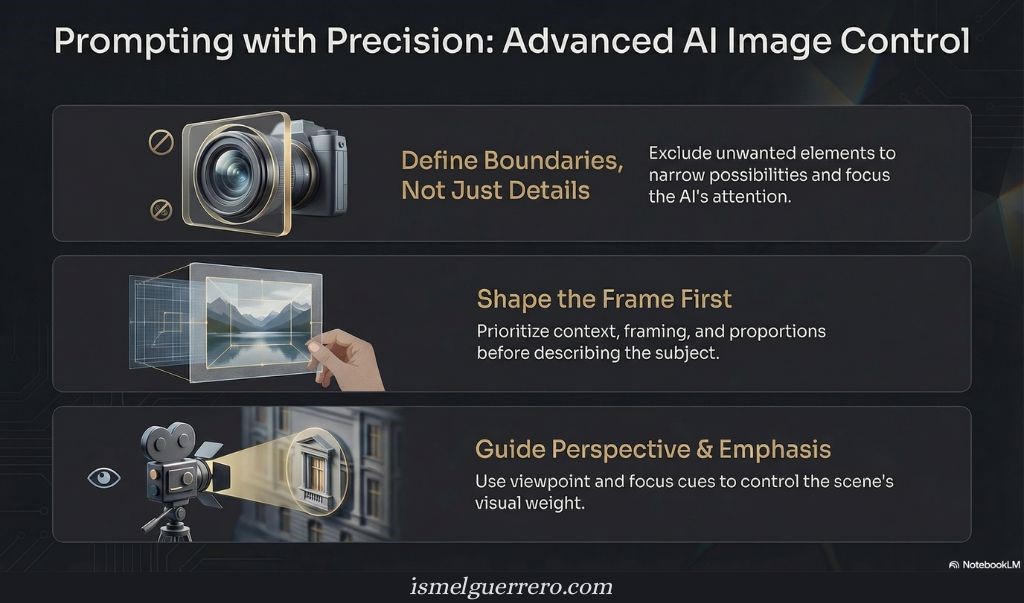
There are three high-level ways experienced users guide that process.
1. Defining boundaries, not just descriptions
A prompt doesn’t only tell the model what to include. It also benefits from clarity about what should not be present. This is less about correction and more about narrowing the solution space. When exclusions are stated plainly, the model reallocates attention toward the remaining elements.
The effect is cleaner composition and fewer distracting defaults.
2. Shaping the frame before the subject
Beyond subject matter, prompts can establish the context in which the image exists. This includes visual framing, proportions, and stylistic intensity. When these elements are specified early, the model prioritizes structural decisions before filling in details.
This is why images feel more intentional when the “frame” is defined first and the subject second.
3. Guiding perspective and emphasis
Text-to-image models respond strongly to cues about viewpoint and focus. Describing how the scene is observed close, distant, angled, isolated influences what the model treats as important.
This is not camera control in a technical sense. It is attention control. You are signaling what deserves visual weight.
A note on clarity and instruction structure
As prompts become more complex, structure matters more than length. Separating instructions from descriptions using clear phrasing or delimiters helps prevent the model from blending intent with content. This improves reliability, especially when prompts involve multiple conditions.
Why Results Don’t Always Match Intent
When an image does not align with a prompt, the cause is rarely randomness. It usually comes down to how the model interprets probability, language patterns, and prior training signals.
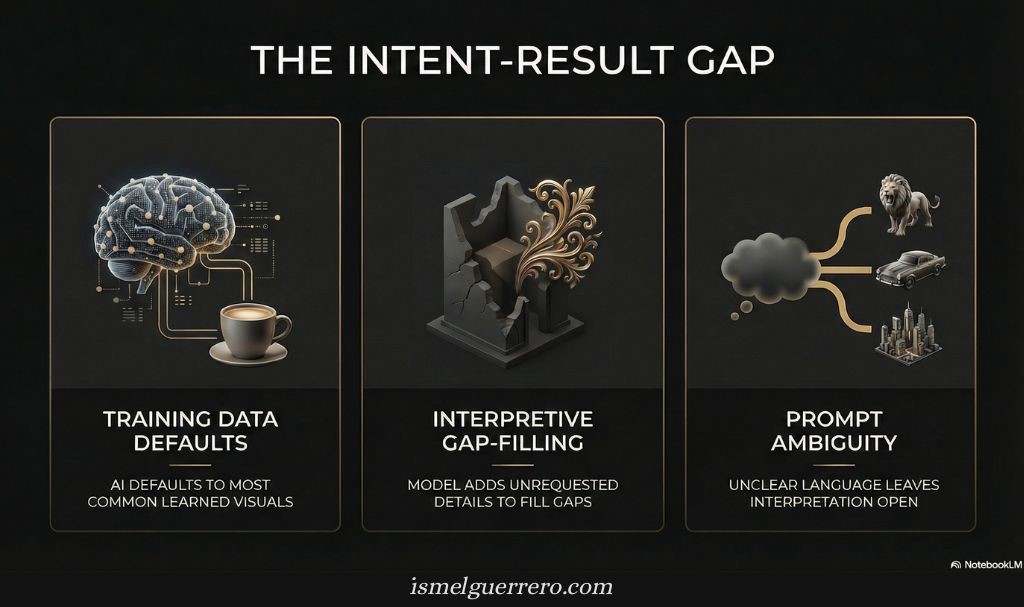
Two factors explain most mismatches.
Training patterns influence defaults
Text-to-image models learn from large collections of image–text pairs. As a result, they develop statistical associations between concepts and visual traits. When a prompt uses broad or commonly loaded terms, the model may default to the most frequently represented visual interpretation.
This is not intentional bias, but an outcome of pattern density. More specific descriptions reduce the likelihood of these defaults by shifting the probability toward less common interpretations.
Prompt interpretation is additive, not literal
Models like DALL·E 3 often expand or internally reframe prompts to produce richer images. This generally improves output quality, but it can also introduce elements the user did not explicitly request.
When a prompt is brief or ambiguous, the model fills gaps based on learned context. When a prompt is precise, there is less room for extrapolation.
How experienced users respond
Rather than treating unexpected results as errors, experienced users treat them as feedback. They adjust prompts to clarify intent, tighten scope, or remove assumptions that may be triggering unintended associations.
This iterative process is not a workaround. It is a normal part of working with generative systems that translate language into visuals.
Bottom line: Misalignment is usually a signal that the prompt left interpretive space open. Reducing that space is how consistency improves.
Conclusion: Clarity Is the Creative Advantage
Text-to-image AI does not replace creativity; it shifts where creativity happens. The outcome is no longer determined by technical drawing skill, but by how clearly an idea can be described. Words become the interface, and precision becomes the differentiator.
As you’ve seen, effective image generation is less about discovering hidden tricks and more about learning how the model interprets instructions. Clear prompts, deliberate constraints, and thoughtful iteration consistently outperform vague or overly complex inputs.
The most useful mindset is experimental, not performative. Treat each image as feedback. Adjust language, remove ambiguity, and refine intent. Over time, this process builds intuition about both the tool and your own ideas.
Text-to-image AI is most powerful when it’s used intentionally. When clarity guides the prompt, the output becomes predictable, repeatable, and genuinely useful.

Frequently Asked Questions (FAQs)
What is text-to-image AI, in simple terms?
Text-to-image AI is a system that generates original images based on written descriptions. Instead of searching for existing images, it creates new visuals by translating language into visual patterns learned during training.
Do I need technical or artistic skills to use AI image generators?
No. The primary skill is clear communication. While artistic knowledge can help refine prompts, beginners can produce strong results by learning how to describe subjects, styles, and contexts precisely.
Why does prompt wording matter so much?
Because the model interprets probability, not intention. Small wording changes shift how concepts are weighted internally, which directly affects composition, style, and detail in the final image.
Can AI image generators copy existing artists or images?
They do not reproduce specific copyrighted images. However, they can emulate general styles because they learn visual patterns across large datasets. Ethical use means avoiding prompts that intentionally imitate living artists too closely.
Why do results change even when I use similar prompts?
Image generation includes controlled randomness. This allows for creative variation but also means outputs are not identical. Increasing specificity in prompts reduces variation.
Is AI image generation replacing human artists?
No. These tools augment creative workflows rather than replace them. They are best understood as accelerators for ideation, visualization, and experimentation not substitutes for human judgment or originality.

0 Comments