A channel idea can sound promising until you try to make the first video. You have a subject, but nothing useful to show while you explain it. Or the format looks easy until every upload requires hours of footage you do not have.
Faceless YouTube channels remove the need to appear on camera. They do not remove the need to hold a viewer’s attention. The better starting question is: What can you explain, demonstrate, or show well without being on screen? This guide will help you choose a format that fits your subject and the work you can realistically do.
- Choose the format alongside the topic. An idea needs a clear way to show the viewer what they came to learn or see.
- Your face is optional; your contribution is not. Research, instruction, demonstrations, commentary, or original footage can give a channel its identity.
- Easy to make once is different from possible to make repeatedly. Consider the time, visuals, and access each future video will require.
- Stock footage cannot carry every subject. If the visuals do not help explain the point, a different format may serve the viewer better.
- Monetization depends on the content and the rules, not whether you appear on camera. Originality, repetition, reused material, and usage rights all matter.
- Early videos should teach you about the idea. Look at viewer response and the production workload before deciding whether to continue with the format.
Disclaimer: I am an independent Affiliate. The opinions expressed here are my own and are not official statements. If you follow a link and make a purchase, I may earn a commission at no additional cost to you.
What Is a Faceless YouTube Channel?
A faceless channel publishes videos without making the creator’s on-camera appearance part of the presentation. The viewer might see a screen recording, a demonstration filmed from above, animation, original footage, or graphics while listening to narration. Some videos need little or no speech.
That description covers very different channels. A software teacher can record their screen and explain each action. A history creator may need research, maps, archival material, and a carefully written script. Both can stay off camera, but they have different production demands.
Faceless also does not mean automated. A creator might use tools to speed up editing or make graphics, yet still make the decisions that shape the video: what question to answer, what information to trust, what to show, and what to leave out. Those decisions are often what make a channel recognizable.
Which Faceless Video Format Fits Your Subject?
Start with the viewer’s need. If they came to learn a task, show the task. If they came to understand an event or idea, give them visuals that make the explanation easier to follow.
| Format | Good fit for | Main production demand |
|---|---|---|
| Screen recording | Software lessons, website walkthroughs, digital tasks | A clear demonstration with readable screens and useful explanation |
| Narrated visuals | Stories, history, explainers, analysis | Strong research, writing, and visuals that support each point |
| Hands-only footage | Cooking, repairs, crafts, physical products | Clear filming that lets viewers see each important action |
| Animation and graphics | Processes, concepts, comparisons, data | Time to design visuals that make the idea clearer |
| Original footage | Places, nature, objects, processes, visual observations | Access to subjects worth filming and the ability to capture them well |
How to Choose an Idea You Can Keep Making Videos About
A useful channel idea has more than an interesting subject. It gives a particular viewer a reason to return. “Technology” is broad. Helping beginners understand the tools they already use gives the channel a clearer job and suggests specific video questions.
Before settling on an idea, consider four things:
- Viewer need: Can you name the questions, tasks, or interests the videos will address?
- Your contribution: Can you explain, demonstrate, research, test, or document something that improves the video?
- Visual material: Can you create or obtain what the viewer needs to see?
- Repeatability: Could you make several distinct videos without repeating the same points or stretching thin material?
Think beyond the first upload. A screen tutorial may be manageable if you know the software and can record your own work. A documentary format might be a poor fit if every topic demands extensive research and footage you cannot access. Neither is universally better. The right choice depends on what you can make well enough to keep doing.
It also helps to imagine actual videos rather than a channel label. “A channel about productivity” says little about the work ahead. “Show how to organize a crowded inbox using screen demonstrations” reveals the viewer, the format, and the production task. The idea becomes easier to judge once you can picture what appears on screen.
What Goes Into Making the First Few Videos?
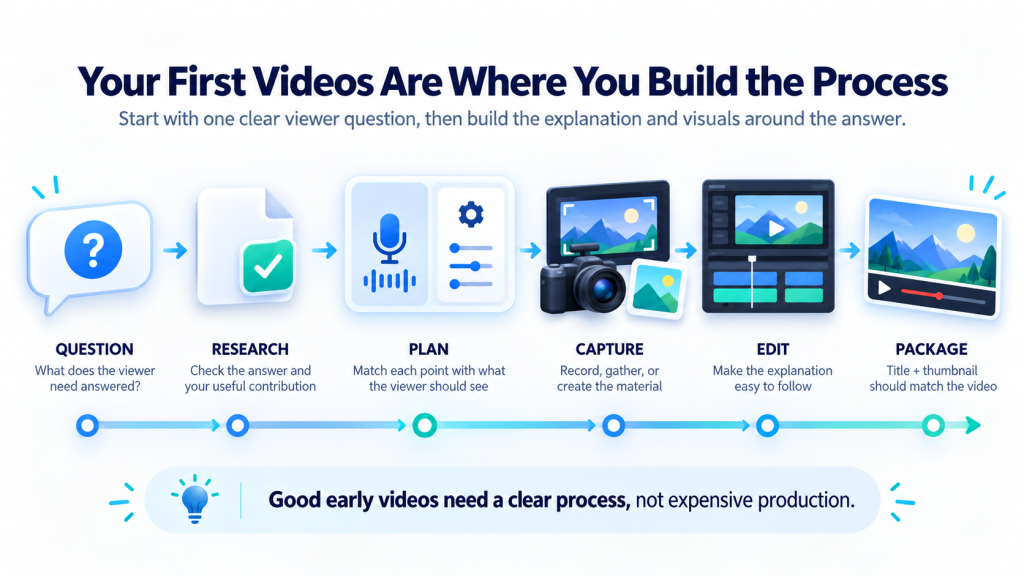
The first videos establish a workable production process. Start with a question narrow enough for one video, then decide what the viewer must see to understand the answer.
A practical sequence is:
1. Choose one clear viewer question.
Give the video a specific purpose rather than trying to cover the whole subject.
2. Research or demonstrate the answer.
Check factual claims and identify where your explanation or experience adds something useful.
3. Plan the visuals with the explanation.
Decide what should appear on screen as each point is made.
4. Record or gather the material.
Capture your screen or footage, make graphics, and confirm that you have the rights to use outside audio or visuals.
5. Edit for understanding.
Remove pauses and repetition, but also check whether the viewer can follow what they are seeing.
6. Write a title and choose a thumbnail that match the video.
They should make the subject clear without promising a payoff the video does not deliver.
Can a Faceless YouTube Channel Be Monetized?
Yes, a creator can apply to monetize a channel without appearing on camera. Facelessness itself is not the test. YouTube says content seeking monetization should be original and authentic, and it examines generic, repetitive, mass-produced, and reused content. A collection of borrowed clips with minimal changes may face problems even if the creator has permission to use those clips. YouTube’s channel monetization policies explain how these standards apply across a channel.
Rights are a separate consideration. A video may contain a useful original explanation but still use music or footage without the commercial rights needed to monetize it. Check the license for material you did not create, including assets described as royalty-free or Creative Commons. YouTube’s guidance on monetizable content explains the distinction.
AI can assist with ideas, outlines, captions, graphics, and production. It does not make a thin video original merely by generating its script or voice. YouTube also requires disclosure for certain realistic content that has been generated or meaningfully altered with AI, while ordinary production assistance such as outlining does not generally require that disclosure. Check YouTube’s AI disclosure guidance for the current examples and requirements.
None of this means a faceless channel must use one production style. It means the creator should be able to explain what they contributed, why the viewer benefits, and whether they have the right to use the material in the finished video.
How Do You Know Whether the Idea Is Working?
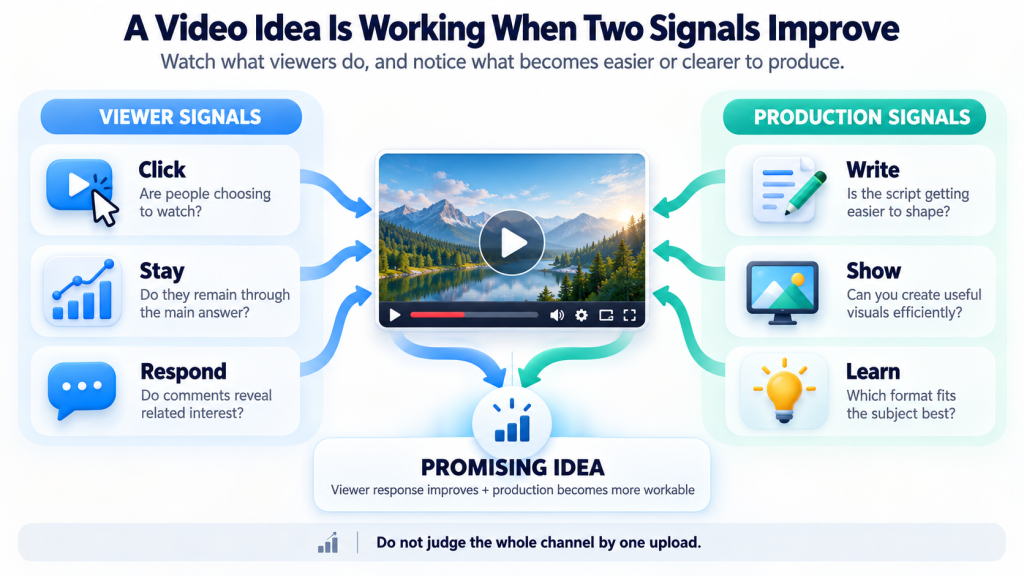
The first uploads give you two kinds of feedback.
One comes from viewers. The other comes from making the videos.
Feedback From Viewers
On the viewer side, look for signs that the subject and presentation connect.
- Are people choosing to watch when the video is shown to them?
- Do they stay through the part that answers the main question?
- Do their comments reveal interest in related questions?
YouTube Studio provides measures such as impressions, click-through rate, and key moments of audience retention, but a single number needs context.
YouTube’s Analytics guide explains where to find these reports.
Feedback From Production
On the production side, notice where the work becomes difficult. Perhaps the scripts are easy to write but suitable visuals take too long to make. Perhaps viewers respond to demonstrations more than narrated overviews. That feedback can point to a better format within the same subject.
Conclusion
The appeal of a faceless YouTube channel is clear: you can share what you know or make without becoming the on-camera subject. But staying off screen is only a presentation choice.
A stronger channel idea starts with a viewer need and a format that can meet it. When you can picture several distinct videos, identify the visuals each one needs, and see a realistic way to make them, you have something more useful than a promising niche.
You have the beginning of a channel you can actually build.
Frequently Asked Questions
Do You Need to Use Your Own Voice?
No. Some subjects work with on-screen text, demonstrations, natural sound, or other audio. Narration is useful when it helps the viewer follow an explanation, whether you record it yourself or use another suitable option.
Can You Use AI to Make Faceless Videos?
Yes, AI can support parts of production. You still need to check the output, shape the video for the viewer, and follow YouTube’s rules on originality and applicable AI disclosure.
Does a Faceless Channel Make You Anonymous?
Not necessarily. You can stay off camera while using your real name or voice. Your channel description, linked websites, footage, and personal details may also reveal who you are. Decide how public you want to be before choosing a channel identity.

0 Comments