Artificial Intelligence text‑to‑speech (often called AI TTS) is the technology that turns written text into spoken audio with voices that sound increasingly natural.
If you’ve ever heard a device read a message aloud, listened to an audiobook narration generated by software, or interacted with a voice assistant like Siri or Alexa, you’ve experienced text‑to‑speech in action. But modern AI text to speech goes further than robotic voices, bringing warmth, variation, and personality that can fit real‑world use cases.
Today, this tech is everywhere in accessibility tools, video narration, virtual assistants, and even customer support systems. This article will explain what AI text to speech is, how it works, why it matters, the best tools available, and how you can use it yourself.
Key Takeaways
- AI text to speech converts written text into spoken audio using advanced machine learning.
- Modern AI voices sound natural and expressive compared to older robotic-sounding systems.
- You’ll find AI TTS in accessibility tools, video production, virtual assistants, and business applications.
- Choosing the right tool depends on voice quality, language support, pricing, and customization needs.
- Getting started with AI text to speech usually involves inputting text, selecting a voice, and exporting the audio.
- There are both free and paid options, ranging from simple browser tools to developer-friendly APIs.
- Understanding a few simple tips can help you produce better audio results.
Disclaimer: I am an independent Affiliate. The opinions expressed here are my own and are not official statements. If you follow a link and make a purchase, I may earn a commission.
What Is AI Text to Speech?
At its core, AI text to speech (TTS) takes the words you write and turns them into spoken audio. Instead of reading text yourself or hiring a voice actor, the AI generates voice output that sounds like a human reading the material.
Traditional text‑to‑speech systems could be functional but noticeably artificial. Modern AI‑driven TTS uses neural networks and deep learning to produce voices that mimic natural speech patterns, tone, rhythm, and inflection. In other words, AI TTS doesn’t just read words aloud, it talks.
This makes it more pleasant to listen to and more versatile for things like narration, virtual assistants, or accessibility tools for people with visual impairments or reading challenges.
How AI Text to Speech Works
AI text to speech (TTS) might seem like magic, you type some text, and out comes a realistic human-sounding voice. But behind the scenes, it’s a combination of smart algorithms, deep learning, and a bit of linguistic finesse.
Let’s break it down into simple steps:
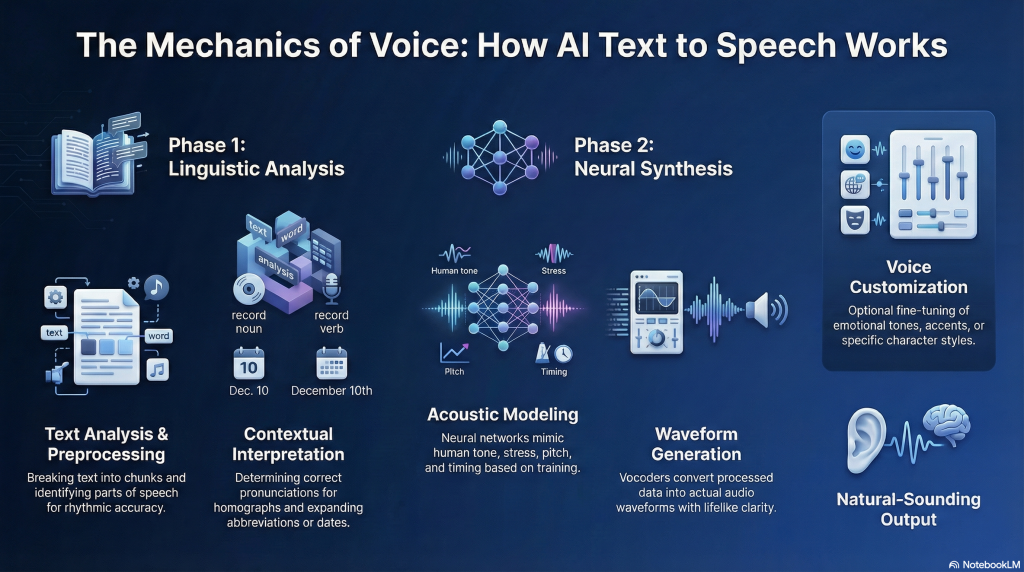
1. Text Analysis (Linguistic Preprocessing)
The process starts with your text being analyzed. The system breaks it down into manageable parts words, punctuation, sentence structures to understand how it should sound when spoken aloud. This stage includes:
- Tokenization (breaking text into chunks)
- Part-of-speech tagging (knowing if “read” is present or past tense)
- Punctuation handling (deciding where to pause or emphasize)
Basically, the AI reads your writing like a skilled narrator would, identifying rhythm and meaning.
2. Pronunciation & Context Interpretation
Next, the AI decides how to say each word, especially those tricky ones with multiple meanings or pronunciations. For example, is it “lead” (to guide) or “lead” (the metal)? Context matters, and the AI uses it to choose the correct version.
It also converts abbreviations (e.g., “Dr.” becomes “Doctor”) and handles dates, times, and numbers in a natural-sounding way.
3. Acoustic Modeling (The Voice Engine)
Here’s where the magic really happens: the AI uses a neural network, usually a deep learning model like Tacotron 2, FastSpeech, or VITS to generate the raw audio based on the processed text.
These models are trained on thousands of hours of real human speech, learning how to mimic tone, stress, pitch, and timing. This is what separates modern TTS from the robotic-sounding voices of the past.
You can think of this as a very advanced version of “reading aloud,” where the AI has learned how humans naturally speak and replicate it on command.
4. Waveform Generation (From Text to Sound)
Once the AI has planned out how the voice should sound, a second model called a vocoder (like WaveNet or HiFi-GAN) turns that data into an actual audio waveform.
This is the part where you finally hear the audio file that plays back a voice reading your text with lifelike clarity.
5. Voice Customization (Optional)
Many AI TTS platforms let users choose from different voice styles, accents, or even emotional tones (like “friendly,” “excited,” or “serious”). Some advanced systems even allow custom voice creation training the AI on a specific person’s voice with just a few minutes of audio.
This allows you to match the tone of the voice to your brand, mood, or audience whether you’re narrating an explainer video or reading bedtime stories.
⚡ TL;DR:
- The AI understands your text (structure, meaning, and pronunciation).
- It plans how a human would say it with pacing, emphasis, and tone.
- Then it synthesizes speech using deep learning to sound natural and clear.
Why AI Text to Speech Matters
AI text to speech isn’t just a cool convenience, it’s a transformative technology that’s reshaping how we consume, share, and interact with content. Whether you’re listening instead of reading, scaling your business communication, or improving accessibility, AI TTS plays a vital role.
Here’s why it matters more than ever in today’s digital world:
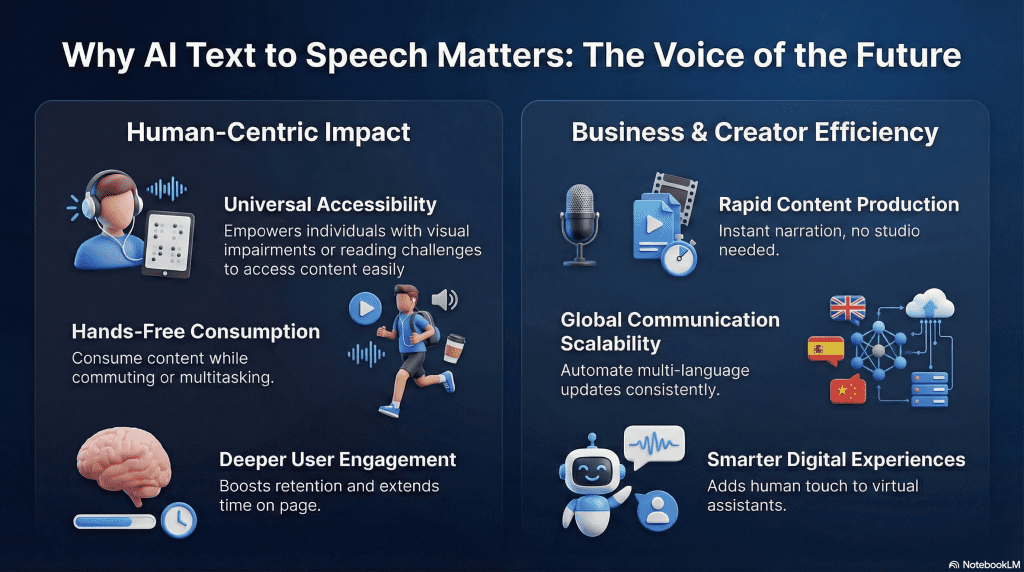
1. Makes Information More Accessible
One of the most powerful impacts of AI TTS is how it opens up content to more people. For individuals with visual impairments, learning disabilities like dyslexia, or other reading challenges, TTS offers a simple way to access written information without needing to physically read it.
It also helps non-native speakers by letting them hear how words are pronounced, supporting better comprehension. In a world aiming for inclusivity, this is a big step forward.
2. Saves Time and Resources for Content Creators
Recording voiceovers used to mean microphones, editing software, voice actors, and long hours of post-production. AI text to speech flips that script. With just a few clicks, creators can turn blog posts, scripts, or guides into polished audio narration.
Whether you’re a solo entrepreneur, YouTuber, educator, or marketer, TTS allows you to produce high-quality audio content without a studio saving both time and money.
3. Enables Hands-Free Consumption
People are busier than ever, and multitasking is the norm. AI TTS allows users to consume content while doing something else commuting, exercising, cooking, or just relaxing.
This is especially important for educational content, long-form articles, or internal business documentation. Instead of reading it, people can listen and learn on the go.
4. Powers Smarter Digital Experiences
Think of your last interaction with a voice assistant, smart device, or customer service chatbot. There’s a good chance AI TTS was behind that voice. It brings a human touch to digital interactions, making them feel more intuitive and friendly.
For businesses, this means better customer engagement. For users, it means quicker answers and smoother experiences.
5. Bridges the Gap Between Text and Voice-Driven Platforms
From podcasts to TikToks to voice-enabled apps, audio content is exploding. But not everyone wants (or can afford) to record their own voice.
AI TTS bridges that gap. It lets you convert written scripts into high-quality spoken audio, expanding your content to voice-first platforms without needing to speak a single word yourself.
6. Scales Communication for Businesses
Need to send updates, notifications, or instructions to thousands of users in different languages? AI TTS can automate that at scale with consistent quality and tone.
It’s particularly useful in:
- E-learning modules
- Virtual assistants
- Onboarding walkthroughs
- Automated phone systems
With AI TTS, businesses can scale human-sounding communication without hiring an army of voice talent.
7. Boosts Engagement Through Audio
Let’s face it, not everyone wants to read long blocks of text. But give them the option to listen, and you tap into a whole new level of engagement. Adding audio versions of your content increases accessibility, retention, and user satisfaction.
People stay longer. They consume more. And they remember what they heard.
Bottom Line:
AI text to speech matters because it turns static text into something dynamic, personal, and usable. It gives your words a voice literally. And in a world that’s becoming more digital, mobile, and voice-first by the day, that’s not just helpful… it’s essential.
Best AI Text to Speech Tools (Comparison)
Here’s a simple table comparing a range of popular AI text to speech tools. You can use this to quickly see which might fit your needs:
| Tool | Best For | Starting Price (Monthly) | Free Tier Limits | Key Feature |
|---|---|---|---|---|
| ElevenLabs | Creators & Narrators | Free / $5 mo | 10k chars/mo (~10 mins) | Industry-leading “human” realism & cloning. |
| Murf.ai | Video Explainers | $29 / mo | 10 mins generation (Trial) | Syncs audio directly to video/images timeline. |
| Play.ht | High-Volume Blogs | $39 / mo | 12,500 chars/mo | Massive library of 900+ voices & accents. |
| Descript | Podcasters | Free / $15 mo | 1 hour transcription/mo | Edit audio by deleting text (like a doc). |
| Google Cloud | Developers | Pay-as-you-go | 1M chars/mo (WaveNet) | Deep control via API & SSML tags. |
| Amazon Polly | App Builders | Pay-as-you-go | 5M chars/mo (1st year) | Extremely stable & scalable for apps. |
| Azure TTS | Enterprise | Pay-as-you-go | 500k chars/mo | High-end neural voices for business apps. |
Note: This table contains illustrative categories. Check specific product pages for the most current features, pricing, and language lists.
How to Choose the Right AI Text to Speech Tool
With so many AI text to speech tools out there, choosing the right one can feel overwhelming. Some are built for developers and enterprise applications, while others cater to creators, educators, or everyday users who just want natural-sounding voices without fuss.
Here’s how to narrow down your options and find a tool that fits your specific needs without wasting time or money.
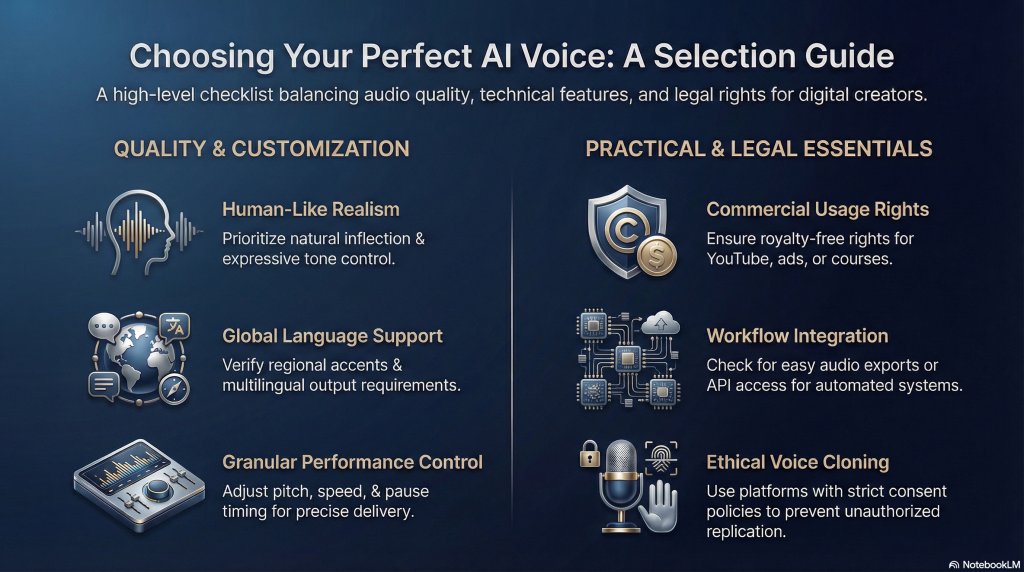
1. Voice Quality (It Has to Sound Right)
Start here this is the deal-breaker.
No matter how many features a tool offers, if the voices sound robotic or awkward, it won’t do the job. Look for tools that offer:
- Neural or “natural” voice options
- Expressive tone control (like cheerful, serious, calm, etc.)
- Sample previews Always listen before committing
Tip: Trust your ears. If it doesn’t sound human, it’s not worth it especially if you’re using it for content, branding, or customer-facing projects.
2. Language & Accent Support
Not all tools are created equal when it comes to multilingual or regional voice options. Ask yourself:
- Do I need this in more than one language?
- Do I care about regional accents (e.g., UK vs US English)?
- Will my audience connect better with a specific voice style?
Some platforms offer dozens of languages and dialects, while others focus more narrowly on English or just a few major languages. Make sure the tool can speak your audience’s language literally.
3. Customization Features
If you want more than a plug-and-play voice, look for platforms that allow deeper control, such as:
- Adjusting pitch, speed, and pause timing
- Inserting emphasis or emotional tone
- Using SSML (Speech Synthesis Markup Language) for granular control
- Custom voice training (for advanced users or businesses)
Customization gives your audio personality. It’s especially useful for content creators or brands trying to match a specific tone or mood.
Ethics Check: The Voice Cloning Rule
Just because you can clone a voice doesn’t mean you should.
As AI voice technology improves, platforms are cracking down heavily on deepfakes. Follow this simple rule to stay safe: Never clone a voice without that person’s explicit consent.
- Do not clone celebrities or public figures (this can lead to immediate bans).
- Do not clone friends or colleagues without asking.
- Do use your own voice or voices you have purchased the rights to use.
Breaking these rules can lead to account termination and, in some cases, legal action.
4. User Interface (Ease of Use Matters)
Not everyone is a developer, and not every user wants to deal with APIs and command lines.
If you’re a content creator, educator, or small business owner, choose a tool with a clean, intuitive interface where you can:
- Paste text
- Select a voice
- Preview and tweak
- Download with one click
For technical users, API access and integration options may matter more. Just make sure the tool suits your comfort level.
5. Licensing & Commercial Use
This is where many people get tripped up.
Not all “free” tools are free for commercial projects. If you plan to use the voiceover in:
- YouTube videos
- Podcasts
- Ads or client work
- E-learning courses you sell
…then double-check the tool’s commercial use policy.
Look for terms like:
- “Royalty-free”
- “Commercial rights included”
- “Usage-based pricing” (which may scale with audio output)
Better safe than sorry you don’t want a copyright issue down the road.
6. Pricing & Plans
AI TTS tools range from completely free to enterprise-level pricing. Your decision depends on your use case:
- Casual user: Look for a free or low-cost plan with basic features.
- Frequent creator or business: Choose a scalable plan with priority access to high-quality voices and commercial rights.
- Developer or SaaS builder: Focus on tools with API access and usage-based pricing models.
Pay attention to:
- Monthly character limits
- Audio download caps
- Voice library access (free vs premium voices)
And don’t just look at price, look at value.
7. Integration with Other Tools
If you’re using the audio for video, e-learning, or automation, integration matters. Ask:
- Can I export audio easily?
- Does it work with my video editor, LMS, or CMS?
- Can I automate text-to-speech through Zapier, API, or scripts?
Some tools are standalone. Others work better as part of a larger workflow.
Quick Checklist:
Before you decide, run through this list:
- Does it sound human?
- Does it support the language and accent I need?
- Can I tweak tone and pacing?
- Is it easy to use for my level of tech skill?
- Are commercial rights included?
- Does the price fit my usage?
- Will it integrate with my content or development stack?
Bottom Line:
There’s no one-size-fits-all answer and that’s a good thing. Whether you’re narrating a YouTube video, building a smart assistant, or simply making articles more listenable, the right tool is the one that fits your goals without overcomplicating the process.
Start by trying one or two tools with free plans. Listen to the voices, test your use case, and you’ll know pretty quickly which one clicks.
How to Get Started with AI Text to Speech
One of the best things about AI text to speech is how easy it is to try. You don’t need to be a developer, a voice actor, or an audio expert. If you can type a sentence, you can generate a voice. It’s that simple.
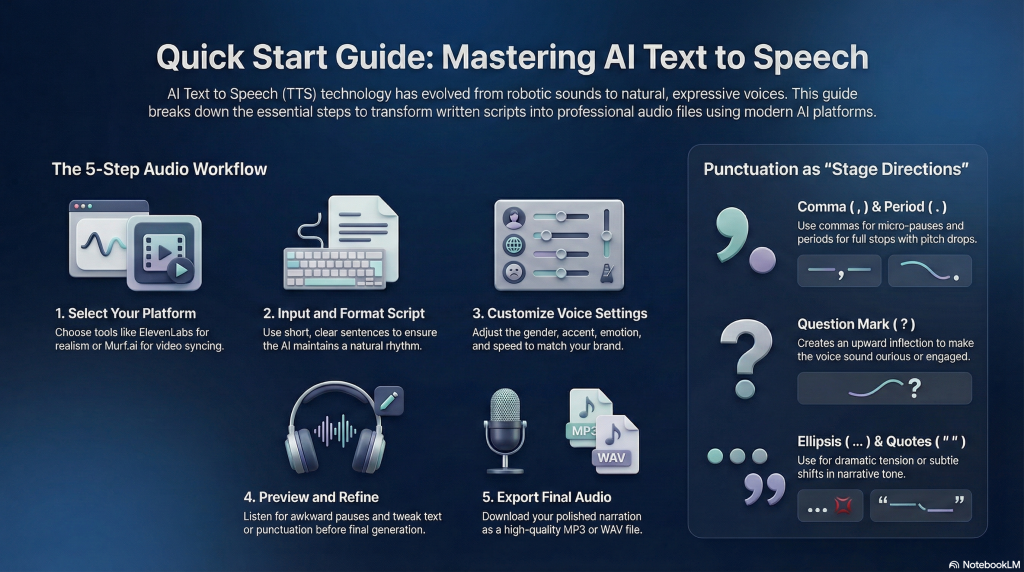
Here’s a step-by-step guide to help you get started:
1. Choose a Platform That Fits Your Needs
There are dozens of AI TTS tools out there, some are simple web-based apps, others are full-scale platforms for developers and businesses.
Start with a platform that matches your goal:
- Want to create voiceovers for videos? Try Murf.ai or Play.ht
- Need developer control or API access? Look at Google Cloud TTS or Amazon Polly
- Just want to experiment or narrate a blog post? ElevenLabs or Descript are great starting points
Most of these tools offer free plans or trial credits, so you can test them without paying.
2. Write or Paste Your Text
Once you’re inside the platform, enter the text you want to convert into speech. This could be a paragraph, a script, a blog post, or even bullet points.
Pro Tip: Keep sentences short and clear. Use punctuation like commas and periods to guide the rhythm of the speech. You can also add line breaks or pauses where you want the AI to breathe.
The Punctuation Cheat Sheet
AI models treat punctuation as “stage directions” for breathing and timing. Use this cheat sheet to control the flow without fancy code:
- Comma ( , ) = A micro-pause. Use this to break up long sentences so the AI “takes a breath.”
- Period ( . ) = A full stop. The AI will drop its pitch at the end, signaling a completed thought.
- Question Mark ( ? ) = An upward inflection. Use this even on non-questions to make the voice sound engaged or curious.
- Ellipsis ( … ) = A dramatic pause. Use this to create tension or a “thinking” moment.
- Quotation Marks ( ” ” ) = A tone shift. The AI often subtly changes its voice to sound like it is telling a story or quoting someone.
3. Choose Your Voice and Settings
Most tools let you choose:
- Voice (male/female, language, accent)
- Tone or emotion (e.g., cheerful, calm, serious)
- Speed and pitch (for fine-tuning delivery)
Take a minute to preview a few voices, some sound more natural than others, and the tone can really affect the feel of your audio.
4. Preview and Edit
Before generating the final audio, hit the “Preview” or “Play” button. Listen carefully. Does it sound natural? Are there awkward pauses or weird pronunciations?
If needed, you can:
- Rephrase your text
- Add pauses or emphasis (some tools use tags like <break> or SSML)
- Try a different voice style
This step is key to polishing the final output.
5. Generate and Download Your Audio
When you’re happy with the preview, click “Generate” or “Export.” Most tools will give you a downloadable audio file (MP3 or WAV) that you can use in your project.
You can now add it to a video, podcast, slideshow, website, or anywhere else you need spoken audio.
6. Optional: Use it in a Workflow or Automation
If you’re more advanced, some platforms let you:
- Automate TTS via API
- Create real-time voice responses for apps
- Embed voice in chatbots, tutorials, or customer support flows
But if you’re just starting, don’t worry about that yet. Focus on learning how to generate great audio with a few clicks; the rest can come later.
Quick Start Summary:
- Pick a tool that fits your purpose
- Paste in your text
- Choose a voice and adjust settings
- Preview and tweak
- Export and use your audio
Getting started with AI text to speech is less about tech skills and more about knowing what you want the voice to sound like. With a little testing, you’ll quickly find your rhythm and your voice.
Conclusion
AI text to speech has come a long way from the robotic voices of the past. Today’s tools are powered by advanced AI that can deliver speech that’s clear, natural, and emotionally expressive. Whether you’re a content creator, a business owner, an educator, or just someone looking to make content more accessible and engaging this technology is now at your fingertips.
With just a bit of text and a few clicks, you can turn your words into professional-quality audio. You don’t need fancy equipment or technical know-how. You just need the right tool and a purpose.
The best part? You can start small. Try out a free plan, experiment with voices, and see how it fits into your content or workflow. From narrating videos to making your website more inclusive, the use cases are endless.
The future of communication is not just written, it’s spoken. And with AI text to speech, your content can finally have a voice that speaks as clearly as your message.

Frequently Asked Questions
What is the difference between AI text to speech and traditional TTS?
Traditional TTS uses rule-based systems and sounds robotic or monotone. AI text to speech uses deep learning models to generate more human-like voices with natural rhythm, tone, and emotion.
Can I use AI text to speech for commercial projects like YouTube videos or online courses?
Yes, many tools allow commercial use, but always check the licensing terms. Some free plans are for personal use only, while paid tiers often include full commercial rights.
Do I need any special hardware or software to use AI TTS?
Nope! Most platforms are web-based and work in your browser. You just need an internet connection, a device, and your text.
How accurate is the pronunciation?
For the most part, very accurate, especially in English. Some tools even let you customize pronunciations or use phonetic spelling if something sounds off.
Are there free AI text to speech tools I can try?
Yes. Tools like ElevenLabs, Play.ht, and Murf.ai offer free plans or trials. Just be aware of usage limits, watermarks, or restrictions on commercial use.
Can I create a custom voice that sounds like me?
Some advanced platforms (like Descript Overdub or ElevenLabs VoiceLab) allow custom voice cloning, but this usually requires permission and voice training samples.

0 Comments