ChatGPT secret commands sound like hidden switches that change what the AI can do.
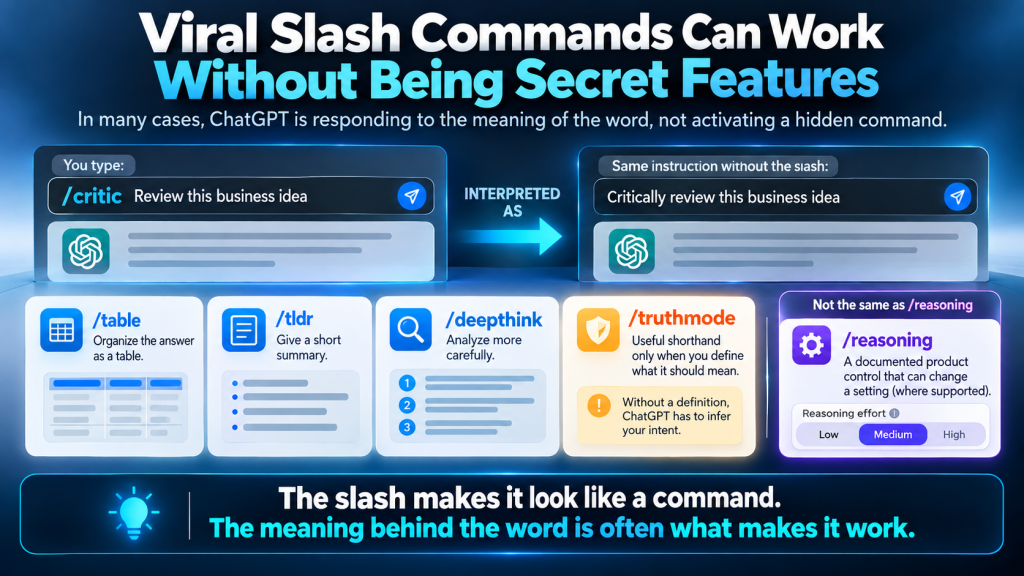
Some commands are real, but not in the way many viral lists suggest. ChatGPT has an official slash-command system, while shortcuts such as /human, /critic, /truthmode, and ELI5 usually work as prompt instructions rather than hidden features.
Knowing the difference helps you understand what is actually controlling ChatGPT, which shortcuts can still be useful, and when a supposed command is doing nothing more than giving the model another instruction.
- “Secret commands” can refer to very different things. Official slash commands invoke ChatGPT functions, while most viral codes are simply shortened prompt instructions.
- A real command can change more than the wording of the answer. Commands such as /plan, /reasoning, /model, and /compact are connected to supported product functions.
- Unofficial shortcuts can still be useful. /critic or /human may change the output because ChatGPT understands what the words imply, even though they are not hidden OpenAI commands.
- The same command is not necessarily available everywhere. ChatGPT web, the desktop app, Codex, and different account environments can expose different commands.
- The best test is to identify what changed. If the product switched a setting, mode, or workflow, you are probably using a real command. If only the requested response changed, you are probably using a prompt shortcut.
Affiliate disclosure: I am an independent affiliate. The views expressed here are my own and are not official company statements. If you make a purchase through a link in this article, I may earn a commission at no additional cost to you.
ChatGPT Commands: “Secret Commands” Can Mean Three Different Things
The phrase ChatGPT secret commands is useful for describing what people search for, but it can hide an important distinction.
There are really three different mechanisms that can look command-like inside ChatGPT.
| Type | Where the Behavior Comes From | Example | What It Changes |
|---|---|---|---|
| Native slash command | ChatGPT itself | /plan | A supported product function or workflow |
| Prompt shortcut | The words in your prompt | /critic | How ChatGPT interprets your request |
| Reusable custom workflow | A saved prompt or Skill | /prompts:<name> or $skill | A predefined set of instructions or actions |
Native slash command
A native slash command has a specific function built into the ChatGPT environment where it is supported.
Prompt shortcut
A prompt shortcut is different. The model reads the word and infers what you are asking it to do. Adding / may make the instruction easier to recognize or remember, but the slash does not create the capability.
Reusable custom workflow
Reusable prompts and Skills add a third layer. They let a defined set of instructions be invoked again instead of rebuilding the same workflow each time.

Real ChatGPT Slash Commands Change Product Behavior
Real slash commands are more than abbreviated prompts.
They are connected to functions ChatGPT can perform in the supported environment.
OpenAI currently documents commands including:
- /plan switches Plan mode on or off for multi-step planning.
- /goal creates a persistent goal ChatGPT can continue working toward.
- /reasoning lets you choose the reasoning effort for the current chat where supported.
- /model lets you choose the model for the current chat.
- /compact compacts the current conversation context.
- /side opens a temporary side chat without interrupting the main conversation.
- /status shows information such as chat ID, context usage, and rate limits.
- /memories controls whether the chat can use or generate memories where that feature is available.
- /project chooses a project for new chats.
- /task starts a chat without a project.
The full documented list also contains commands aimed more heavily at development and technical work, including /mcp, /review, /worktree, /local, /cloud, /ide-context, /init, and /fork.
These commands make the distinction easier to see.
Typing:
does not mean “please give me a shorter answer.” It invokes a context-management function.
Likewise:
is not an instruction to write differently. It opens model selection.
And:
controls a supported reasoning setting rather than merely telling ChatGPT to sound more thoughtful.
How to Check Any ChatGPT Command
You do not need to guess whether a command you found online is real.
A few checks can usually tell you what you are dealing with.
1. Type / in Your Current Chat
Start with the product itself.
If the command appears in the available menu, you know the interface recognizes it as something more than ordinary text.
Do not assume that a command available in someone else’s desktop app, Codex setup, or workspace will automatically appear in yours.
2. Check What the Command Is Supposed to Change
A real product command normally has a specific job.
For example:
- /model selects a model.
- /compact manages conversation context.
- /status displays session information.
- /plan changes the planning workflow.
Compare that with a supposed command such as:
- /expert
What product setting would /expert actually change?
Usually there is none. The word is simply telling ChatGPT what kind of perspective or depth you want.
3. Remove the Slash
This is one of the fastest tests for unofficial shortcuts.
Compare:
/critic Analyze this proposal.
with:
Critically analyze this proposal.
Or:
/human Rewrite this email.
with:
Rewrite this email so it sounds more natural.
If removing the slash leaves the instruction essentially intact, the slash probably is not activating a special feature.
4. Compare It With OpenAI’s Current Documentation
ChatGPT changes.
Commands can be introduced, removed, renamed, or limited to particular environments.
A social post that was accurate months ago may no longer match the current product.
For commands that claim to control an actual ChatGPT function, current product documentation is more reliable than a static command list.
5. Be More Skeptical When the Claim Gets Bigger
A shortcut that means “make this shorter” is easy to understand.
A command that supposedly unlocks unrestricted intelligence, forces perfect accuracy, reveals hidden system instructions, or activates an unknown model is making a much larger claim.
The larger the claimed effect, the more important it becomes to distinguish an actual product feature from an ordinary prompt.
Create Your Own Shortcuts for Work You Repeat
Once you understand how unofficial commands work, collecting hundreds of them becomes less important.
You can create shortcuts around the tasks you actually repeat.
For example:
/verify
Identify important factual claims. Separate verified facts from assumptions and inference. Check current claims against reliable sources when needed.
/brief
Give me the conclusion first. Include only the information necessary to understand or act on it.
/critic
Look for weak assumptions, missing evidence, contradictions, risks, and reasonable counterarguments.
/compare
Compare the options using the same criteria. Explain the important differences and which situations favor each option.
/simplify
Explain this in plain language for someone new to the subject. Define unfamiliar terms and use an example when it improves understanding.
The Useful Secret Is Knowing What the Command Controls
ChatGPT does have real commands.
It also responds well to short instructions that look like commands.
Those two facts explain most of the confusion around ChatGPT secret commands.
A command such as /plan, /model, or /compact is tied to a product function. A shortcut such as /critic, /human, or /truthmode usually changes the instruction the model is interpreting.
Both can be useful.
The advantage comes from knowing which one you are using.
Once you separate product commands from prompt shortcuts, you no longer have to memorize large lists or wonder whether a viral code is activating something hidden. You can use the real controls when they exist and build clearer shortcuts when they do not.
Frequently Asked Questions
Is /truthmode an Official ChatGPT Command?
No. /truthmode is not part of OpenAI’s current documented native slash-command list. You can still define it as your own shorthand for a fact-checking or skeptical review process.
Can I Create My Own ChatGPT Commands?
You can create your own prompt shortcuts and define what they should mean. That does not turn them into native ChatGPT commands, but it can make repeated prompting faster and more consistent.
Is /deepthink the Same as /reasoning?
No. /deepthink can be interpreted as a request for careful analysis, but /reasoning is a documented command for selecting reasoning effort where that product control is supported.
Why Does Someone Else Have a Slash Command I Cannot See?
Command availability can depend on the ChatGPT surface, account access, workspace, enabled features, and environment. A command available in the desktop app or a developer environment may not appear in your current ChatGPT interface.
Do Prompt Shortcuts Need the / to Work?
Usually not. If the shortcut is simply an instruction such as “critic,” “summarize,” or “simplify,” ChatGPT can understand the same request without the slash. The slash mainly makes the shortcut easy to recognize and reuse.

0 Comments