The Wix website builder has evolved far beyond its origins as a simple tool for beginners. In 2026, Wix represents a sophisticated dual ecosystem meticulously designed to cater to a broad spectrum of users, from first-time DIY creators to professional agencies delivering client projects at scale.
This pivot has created two distinct experiences: one focused on ease and speed, and another on advanced control and flexibility.
This guide provides a comprehensive analysis of Wix’s current features, its true costs, its standing against key competitors, and its most significant limitations, empowering you to determine if it aligns with their strategic goals and operational requirements.
Key Takeaways
- A Dual-Platform Ecosystem: Wix has bifurcated its offering into the user-friendly Classic Editor for rapid deployment and the advanced, CSS Grid-based Wix Studio for professional designers and agencies seeking granular control.
- An Integrated, All-in-One Solution: Wix provides a managed environment where hosting, e-commerce, marketing tools, and robust SEO features are built directly into the platform, simplifying the technical overhead for users.
- The “Walled Garden” Constraint: The platform’s most significant structural limitation is its proprietary nature, which prevents users from exporting their site’s code or content, making migration to another platform a difficult and manual process.
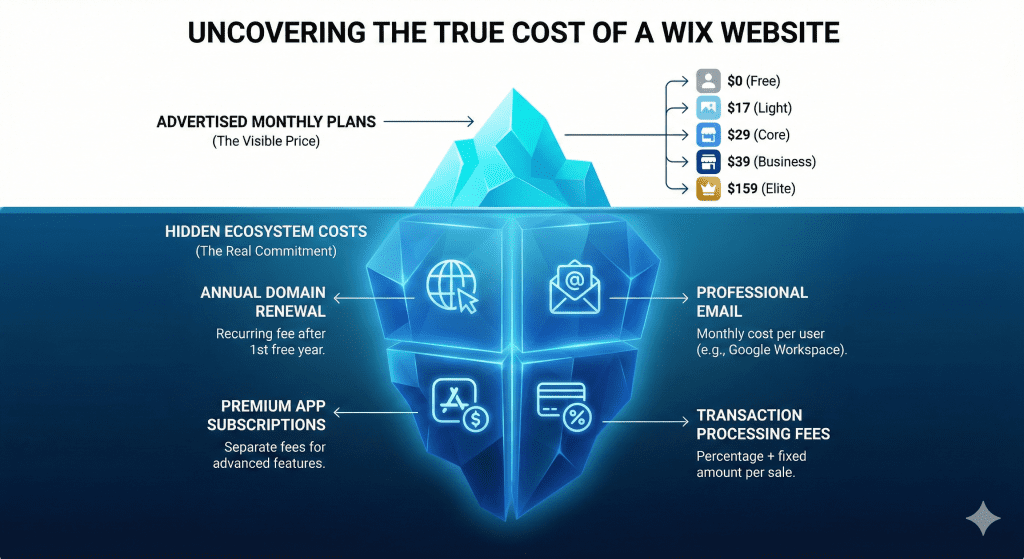
- Understanding the Total Cost of Ownership: Beyond the advertised monthly plan prices, the true cost of a Wix site can include domain renewal fees after the first year, professional email add-ons, and recurring subscriptions for premium apps.
- Vastly Improved SEO Capabilities: Wix has successfully shed its legacy reputation for poor SEO, now offering a competitive suite of tools, server-side rendering, and a strong technical foundation to achieve high visibility in search engine results.
Disclaimer: I am an independent Affiliate. The opinions expressed here are my own and are not official statements. If you follow a link and make a purchase, I may earn a commission.
What Is the Wix Website Builder in 2026? An Evolved Platform
Understanding the evolution of Wix is crucial for any modern evaluation. The platform has strategically shifted from a singular, entry-level drag-and-drop tool to a sophisticated, multi-faceted ecosystem.
This transformation fundamentally changes who the builder is for and what it can accomplish, moving it into direct competition with both simple site builders and more complex content management systems.
In 2026, choosing Wix means selecting one of two distinct, purpose-built environments designed for different user needs and technical skill levels.
The Two Faces of Wix: Classic Editor vs. Wix Studio
The core of Wix’s modern strategy lies in its dual-platform approach, allowing it to serve two different market segments without compromising the user experience for either.
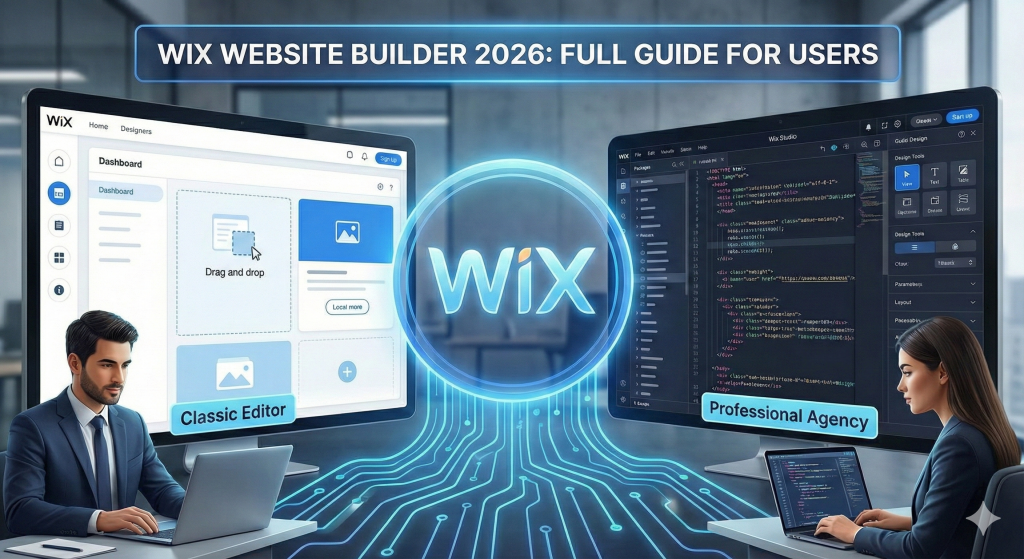
- The Classic Editor: This is the original, beginner-friendly Wix experience, designed for individuals and small businesses that prioritize speed and ease of use. It operates on a fixed-grid system, where elements can be placed with precision but within a structured container. This environment is ideal for users with minimal technical skills who need to build and launch a functional, visually appealing website quickly.
- Wix Studio: Positioned as the professional-grade solution, Wix Studio is built for agencies and freelancers. It leverages a modern CSS Grid system, offering true breakpoint-based responsiveness and the ability to create complex, overlapping layouts. Advanced features like Figma-to-web synchronization, no-code animations, and a centralized workspace for managing multiple client sites make it a powerful tool for professional workflows. This is not merely a technical upgrade; it has direct workflow implications, as industry research shows platforms using modern CSS Grid can reduce design iteration time by up to 40%.
This dual-stream ecosystem allows Wix to effectively target both individual creators seeking simplicity and professional agencies that demand advanced control and efficiency.
The Role of AI in the Wix Experience
Wix has deeply integrated generative artificial intelligence (AI) across its platform to streamline the creation and management process for all users. Key AI tools include an AI website generator that can build a multi-page site from a simple natural language prompt, an AI Marketing Agent that assists with keyword research and SEO optimization, and AI-powered responsiveness tools that automatically adjust layouts across different devices and screen sizes. This deep integration of AI is a strategic move to lower the technical barrier to entry and reduce “time to value,” directly countering the steeper learning curves of more complex competitors like WordPress and Webflow.
Bottom line: In 2026, Wix is no longer just a website builder; it’s a market-defensive ecosystem. The Classic Editor insulates it from entry-level competitors like Squarespace, while the feature-rich Wix Studio directly challenges professional-grade platforms like Webflow, allowing Wix to compete on two fronts simultaneously.
A Deep Dive into Wix’s Core Features
Evaluating a platform’s core features is essential to understanding its true capabilities. A website builder is more than just a design tool; it’s a comprehensive system for managing an online presence. This section breaks down Wix’s key functionalities in design, e-commerce, and SEO, providing a clear picture of its strengths and limitations.
Design and Customization
Wix has built its reputation on design flexibility, and its 2026 offering is the most powerful yet.
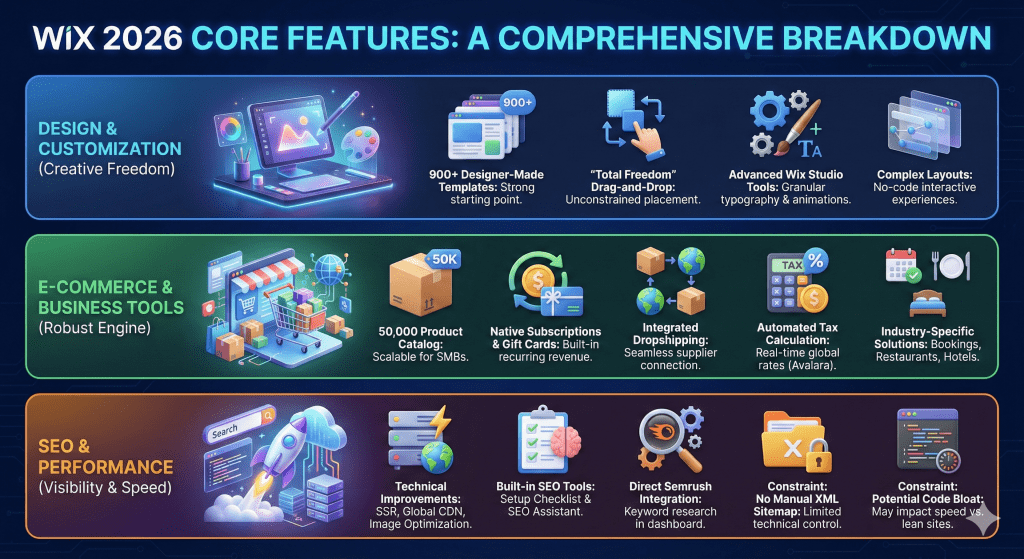
- The platform boasts an extensive library of over 900 designer-made templates, providing a strong starting point for nearly any industry or use case.
- Its signature drag-and-drop editor offers “total freedom,” allowing users to move any element to any position on the page, unconstrained by rigid block structures.
- For professionals using Wix Studio, the design capabilities are even more advanced. This includes granular control over typography, no-code scroll-based animations for creating interactive experiences, and the ability to design complex, overlapping layouts that were previously only achievable with custom code.
E-commerce and Business Tools
Wix provides a robust native e-commerce engine, Wix Stores, which is integrated directly into the platform and capable of supporting a catalog of up to 50,000 products. This makes it a viable solution for most small-to-medium-sized businesses. Beyond basic product sales, Wix offers a suite of specialized business tools.
Key e-commerce features include:
- Native Subscriptions & Gift Cards: Sell recurring products and offer digital gift vouchers as a built-in feature, reducing the need for third-party apps.
- Dropshipping Integrations: Seamlessly connect with major dropshipping suppliers, including Modalyst, Spocket, and Printful, to sell products without managing inventory.
- Automated Tax Calculation: An integration with Avalara provides real-time tax rates for over 100 regions, simplifying cross-border sales.
- Industry-Specific Solutions: Wix offers tailored tools like Wix Bookings for service-based businesses, Wix Restaurants for online ordering and reservations, and Wix Hotels for property management.
SEO and Performance
Wix has worked diligently to overcome its legacy reputation for poor SEO and is now a strong contender for businesses focused on achieving organic search visibility. The platform has implemented critical technical improvements, including server-side rendering (SSR) for better search engine crawlability, global CDN-powered hosting for faster load times, and automatic image optimization into modern formats like WebP.
Users have access to a suite of built-in SEO tools, including:
- The SEO Setup Checklist, which guides beginners through foundational optimization tasks.
- The SEO Assistant, which provides ongoing recommendations for improving page content and structure.
- A direct Wix-Semrush integration, allowing users to perform keyword research directly within the Wix dashboard.
Despite these significant advancements, some technical constraints remain. Users cannot manually edit the XML sitemap, and the platform’s proprietary code can sometimes result in “code bloat,” making it potentially slower than lean, self-hosted solutions like a custom-built WordPress site.
Bottom line: Wix provides a comprehensive and powerful feature set that is more than sufficient for most small-to-medium-sized businesses. With its much-improved SEO foundation and deep e-commerce capabilities, it stands as a formidable all-in-one platform.
True Cost: Wix Pricing and Plans Explained
Choosing a website platform is a long-term financial commitment, making it strategically important to understand the complete pricing structure beyond the advertised rates. While Wix offers competitive entry points, the total cost of ownership can grow depending on your needs. This section analyzes Wix’s subscription tiers, clarifies billing practices, and exposes potential “hidden” costs within the ecosystem to help you budget accurately.
Breakdown of Website and E-commerce Plans
Wix offers a tiered subscription model, with features and resources increasing at each level. Pricing reflects the monthly cost when billed annually, which is how Wix typically presents its plans.
| Plan Tier | Price (Annual / mo) | Primary Use Case |
|---|---|---|
| Free | $0 | Personal testing and hobbyist sites; includes Wix branding and ads. |
| Light | $17 | Portfolios and simple blogs; ad-free but no e-commerce features. |
| Core | $29 | Small shops and service businesses needing basic e-commerce functionality. |
| Business | $39 | Growing online stores requiring more storage and standard marketing tools. |
| Business Elite | $159 | High-volume retail and agencies needing unlimited storage and priority support. |
Pricing and plan details are based on analysis from early 2026. (Source: Analysis of Wix Ecosystem Dynamics, 2026; LitExtension, 2025)
Note: Plan names and features are frequently updated. While the ‘Core’ and ‘Business’ tiers represent the primary e-commerce entry points, naming conventions like ‘Business Basic’ may vary across Wix’s marketing materials.
Uncovering the Hidden Ecosystem Costs
The subscription fee is only part of the story. Users should budget for several additional costs that are common within the Wix ecosystem:
- Domain Name Renewal: While an annual plan includes a free custom domain for the first year, renewal costs approximately $14.95 per year thereafter.
- Professional Email: Integrating a professional email address (e.g.,
you@yourdomain.com) through Google Workspace is an add-on that costs around $6 per user per month. - Premium App Market Fees: While many apps are free, advanced functionality often requires premium apps from the Wix App Market, which come with their own separate monthly subscription fees.
- Payment Processor Fees: On its higher-tier plans, Wix does not charge its own commission on sales. However, you are still responsible for the standard transaction fees charged by your payment processor, such as Wix Payments, which is typically 2.9% + $0.30 per transaction in the US.
Bottom line: While Wix’s advertised plan prices are competitive, a realistic budget must account for ecosystem costs like domain renewals, professional email, and premium apps. Understanding these factors is key to calculating the true total cost of ownership over the long term.
Wix vs. The Competition: A 2026 Market Comparison
Choosing a website builder is a strategic decision that impacts everything from design flexibility to long-term scalability. No platform exists in a vacuum, and Wix’s value is best understood in context. This section compares Wix against its main rivals WordPress, Shopify, and Squarespace to highlight its unique position in the market and help you determine the best fit for your specific goals.
Wix vs. WordPress
The classic debate between Wix and WordPress is best framed as a choice between Freedom vs. Convenience. WordPress is an open-source platform offering limitless customization but requires users to manage their own hosting, security, and updates.
Wix provides a managed, all-in-one environment that simplifies the technical aspects at the cost of some control. While Wix’s App Market offers a curated selection of around 800 apps, WordPress provides access to a vast ecosystem of over 59,000 plugins.
| Metric | Wix (2026) | WordPress.org (2026) |
|---|---|---|
| Ease of Use | High (Drag-and-Drop) | Moderate (Requires Technical Overhead) |
| Data Ownership | Walled Garden (No Export) | Open (Full Portability) |
| Hosting | Included (Managed) | Third-Party (Self-Managed) |
| App/Plugin Count | ~800 Apps | 59,000+ Plugins |
| Support Model | 24/7 Platform Support (Higher Plans) | Community/Forum-Based |
Wix vs. Shopify
For businesses focused primarily on e-commerce, Shopify is often considered the specialized standard. It is built exclusively for high-volume retail and offers superior native features for inventory management, multi-channel selling (e.g., across Amazon and TikTok), and fulfillment networks.
Wix, by contrast, excels for businesses where e-commerce augments a primary service. It is a superior choice for salons using Wix Bookings, artists building portfolios with integrated print stores, or restaurants leveraging Wix Restaurants for online ordering scenarios where the website’s core purpose is broader than high-volume retail logistics.
Wix vs. Squarespace
Wix and Squarespace are the closest rivals in the “all-in-one” website builder category. The primary difference lies in their design philosophy. Squarespace is often preferred for its structured, highly aesthetic, and curated templates that guide users toward a polished and professional look.
Wix is favored by those who want total, unstructured drag-and-drop design freedom. Its editor allows any element to be placed anywhere, which provides maximum creative control but can sometimes be perceived as more “chaotic” for users who prefer a more guided design process.
Bottom line: Wix’s strategic position is one of a “specialized generalist.” It cedes pure retail scale to Shopify and ultimate code freedom to WordPress, but it wins by offering a more integrated and design-centric solution than either, making it the default choice for businesses where brand presentation is as critical as functionality.
The Pros and Cons of Building with Wix
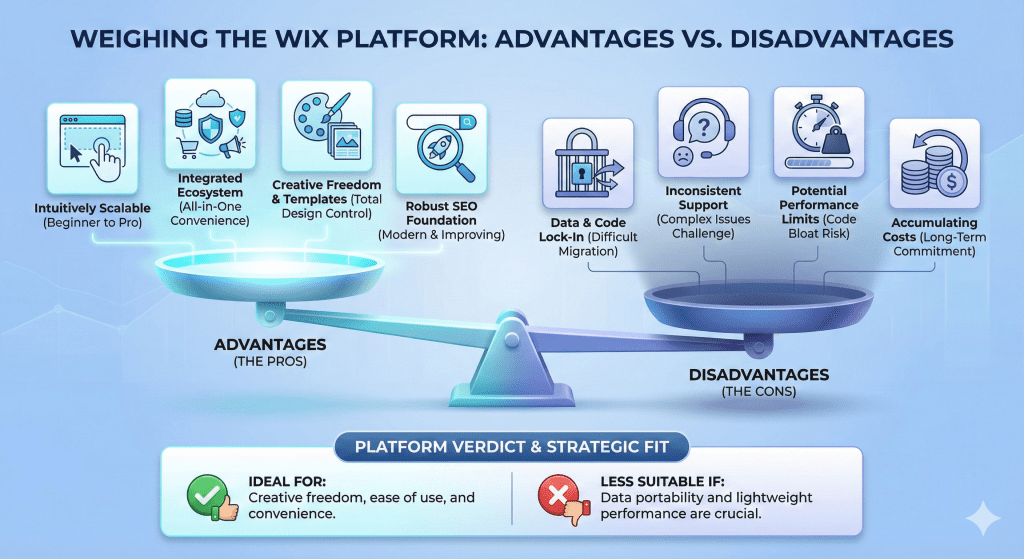
After analyzing its features, costs, and competitive standing, the final step is to weigh the advantages and disadvantages of committing to the Wix platform. This section distills all the previous analysis into a clear, balanced summary to help you make an informed decision about whether Wix aligns with your long-term goals.
The Advantages
- Ease of Use for All Skill Levels: With its intuitive drag-and-drop Classic Editor and helpful AI tools, Wix remains one of the most accessible platforms for beginners. Simultaneously, the introduction of Wix Studio provides the advanced capabilities and granular control that professional designers and agencies require.
- All-in-One Platform: The convenience of having hosting, security, e-commerce, marketing, and SEO tools integrated into one managed ecosystem is a major benefit. This eliminates the technical overhead of sourcing and managing separate services.
- Vast Design Flexibility: With a library of over 900 templates and a “total freedom” editor, Wix offers an exceptionally high degree of creative control, allowing users to build a site that truly matches their brand vision.
- Strong and Improving SEO: Wix has successfully overcome its past SEO limitations. It now provides a robust technical foundation with features like server-side rendering and a comprehensive suite of built-in tools to help websites rank competitively on search engines.
The Disadvantages
- The “Walled Garden” Lock-In: The single most significant structural constraint of Wix is the inability to export your site’s data or code, making migration a difficult and costly process, estimated to take 12-20 hours for even a modest 30-page site.
- Inconsistent Customer Support: User feedback indicates that customer support can be inconsistent. While representatives are often helpful for simple, common issues, resolving complex problems can be challenging. This inconsistency, as reported by users, appears most acute for complex technical or account recovery issues, suggesting support resources are optimized for common usability questions rather than the edge cases that arise in a large, proprietary ecosystem.
- Performance Concerns: The platform’s use of a proprietary codebase can sometimes lead to slower page load times or “code bloat” when compared to leaner, self-hosted alternatives like a well-optimized WordPress site.
- Potentially High Long-Term Costs: While starting costs are reasonable, the total cost of ownership can accumulate over time. The recurring fees for premium apps, domain renewals after the first year, and other professional add-ons can add up.
Bottom line: Wix is an excellent choice for users who prioritize creative freedom, ease of use, and the convenience of an all-in-one, managed system. However, it may not be the right fit for those who require full data portability, highly optimized, lightweight performance, or complete control over their hosting environment.
Conclusion
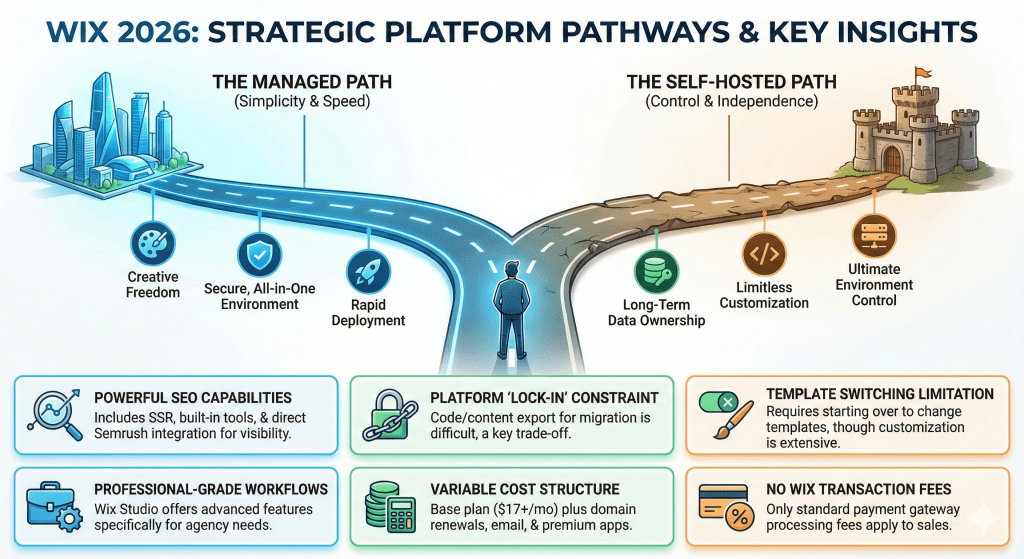
The Wix of 2026 is a powerful, mature, and remarkably versatile platform that has successfully broadened its appeal to serve a wide range of users, from complete beginners launching their first blog to professional agencies managing extensive client portfolios.
It has effectively shed its reputation as a “simplistic” builder and now stands as a competitive force in the web development landscape. Ultimately, the optimal choice is dictated by a trade-off between operational simplicity and long-term platform independence. If you value creative freedom, speed of deployment, and a secure, managed, all-in-one environment, Wix is one of the best choices on the market.
If, however, long-term data ownership, limitless customization through open-source code, and ultimate control are your top priorities, an alternative like WordPress may be a more suitable path. By weighing these factors against your specific goals, you can confidently decide if Wix is the right partner for your online journey.
Frequently Asked Questions
Is Wix good for SEO?
Yes, in 2026, Wix is very good for SEO. It has overcome its past reputation with modern features like server-side rendering, a full suite of built-in optimization tools like the SEO Assistant, and direct integrations with Google Search Console and Semrush for keyword research.
What is the main downside of using Wix?
The biggest downside is platform “lock-in.” Because Wix is a proprietary service, you cannot easily export your website’s code or content. This makes migrating to another platform in the future a manual, time-consuming, and potentially expensive process.
Can I switch my template on an existing Wix site?
No, once you have chosen a template and started building your site, you cannot switch to a completely different template without starting over. You can, however, extensively customize your chosen template’s design, layout, colors, and fonts.
Do professionals and agencies use Wix?
Yes, professionals and agencies increasingly use Wix, primarily through its Wix Studio platform. Studio offers advanced features such as CSS Grid control, custom code implementation, and multi-site management tools that are specifically designed for professional workflows.
How much does a Wix website really cost?
The cost varies based on your needs. An ad-free plan like the Light plan starts at $17 per month when billed annually. However, the total cost often includes a custom domain after the first year (around 15−20), a professional email subscription, and any premium apps you add from the App Market.
Does Wix charge transaction fees on its e-commerce plans?
Wix itself does not charge its own transaction fees or commissions on sales made through its Business & e-commerce plans. However, you will still pay the standard processing fees charged by your chosen payment gateway, such as Wix Payments or PayPal, which are typically around 2.9% + $0.30 per transaction.

0 Comments