Introduction
Most AI prompts break down when the task becomes complex, not because the model fails, but because the instructions are incomplete.
The CREATE framework prompt solves this by structuring complex AI requests around Character, Request, Examples, Adjustment, Type of Output, and Extras. This framework is designed for educational, analytical, or multi-step content where missing details cause weak results.
Instead of relying on trial and error, CREATE gives you deliberate control over every variable in the prompt. This guide explains how the CREATE framework works and when to use it for complete, reliable AI outputs.
Key Takeaways
- The CREATE framework prompt is designed for complex or educational AI tasks.
- Each CREATE component controls a specific part of the AI response.
- Character defines expertise and instructional perspective.
- Examples reduce interpretation errors in multi-step tasks.
- Adjustments tailor difficulty, audience, and scope.
- CREATE helps ensure no critical detail is missed.
Disclaimer: I am an independent Affiliate. The opinions expressed here are my own and are not official statements. If you follow a link and make a purchase, I may earn a commission.

What the CREATE framework prompt is
The CREATE framework prompt is a structured method for handling AI tasks that involve multiple requirements at once. It breaks a complex request into six clear components so the AI understands context, expectations, and constraints before generating any output. Each component controls a different variable, which reduces the risk of missing details or misaligned responses.
CREATE stands for Character, Request, Examples, Adjustment, Type of Output, and Extras. Character defines the expertise and perspective the AI should use. Request states the core task or objective. Examples show what acceptable output looks like. Adjustment refines difficulty, audience, or scope. Type of Output specifies format and structure. Extras add reasoning, explanations, or special constraints when needed.
This framework is most useful when clarity and completeness matter more than speed. Educational content, analytical work, and multi-step generation benefit from this level of control because the prompt leaves little room for interpretation.
Why complex and educational prompts often fail
Complex prompts fail when too many instructions compete for attention. Educational and analytical tasks usually involve objectives, audience level, examples, constraints, and formatting rules, but these elements are often blended into a single paragraph. When that happens, the AI responds to what is most obvious, not what is most important.
Another common issue is missing guidance. Without examples or clear output requirements, the model has to infer standards on its own. That inference varies, which leads to uneven depth, skipped details, or content that does not match the intended audience.
Structure solves this problem by forcing each requirement into its own place. When context, task, examples, and output rules are separated, the AI can process them in the right order. This is why a comprehensive framework like CREATE produces more complete and reliable results for complex work.

How the CREATE framework works step by step
The CREATE framework works by separating complexity into controlled inputs. Instead of asking the AI to juggle multiple decisions at once, each component answers a single question before the next one is introduced.
This order matters because it mirrors how the model prioritizes information. When each element is clear, the final output becomes more complete and predictable.
Character
Character defines the expertise, role, and instructional perspective the AI should adopt. This is where you set the level of knowledge, tone, and decision-making lens for the task. For educational content, Character often determines whether the output feels appropriate for beginners, undergraduates, or advanced learners. Without this step, the AI defaults to a generic voice.
Request
Request states the core task the AI needs to complete. This is the primary objective, stripped of constraints or formatting rules. A clear request prevents the model from drifting into related but unnecessary explanations. When the request is precise, the output stays focused on the actual goal.
Examples
Examples show the AI what acceptable output looks like. They reduce interpretation errors by providing concrete reference points. This is especially important for complex or educational tasks where quality standards matter. Even one short example can significantly improve alignment.
Adjustment
Adjustment refines the response for audience, difficulty, or scope. This is where you control complexity, depth, or instructional pacing. Adjustments help ensure the content fits the real-world context it is meant for. Without this step, the output may be technically correct but poorly suited to its audience.
Type of output
Type of Output specifies the structure and format of the response. This includes whether the output should be a numbered list, table, lesson plan, or discussion activity. Clear formatting instructions reduce rework and make the result immediately usable. This step answers the question of how the information should be delivered.
Extras
Extras add optional but important constraints. This can include explaining reasoning, avoiding certain assumptions, or following specific guidelines. Extras are not always required, but they provide fine-grained control when precision matters. Used carefully, they complete the framework without overloading the prompt.
CREATE framework prompt example for education
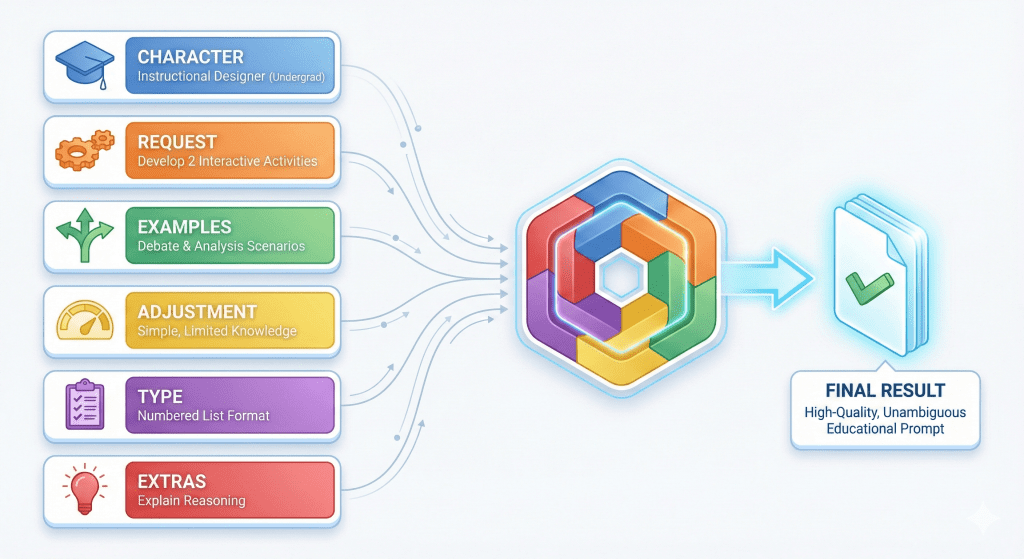
The CREATE framework is especially useful for educational tasks where clarity, structure, and completeness matter. The example below shows how each component works together to produce a controlled, high-quality result.
Instead of giving the AI a single overloaded instruction, the request is broken into clear, sequential inputs.
Character: You are an instructional designer experienced in undergraduate education.
Request: Develop two interactive discussion activities that encourage critical thinking.
Examples: Activity 1 could ask students to debate potential solutions to a real-world problem using evidence. Activity 2 could involve small-group analysis followed by a class-wide synthesis.
Adjustment: Keep the activities simple and appropriate for undergraduate students with limited prior knowledge.
Type of Output: Present the activities as a numbered list, with a short description for each.
Extras: Explain your reasoning for each activity and how it supports the learning objective.
When assembled into a single prompt, these elements give the AI clear direction without ambiguity. The framework ensures the task, audience, examples, and output rules are all accounted for before content generation begins. This is why CREATE performs well for instructional design and other complex use cases.

CREATE vs ERA Framework for AI Prompts
Both ERA and CREATE are structured prompting frameworks, but they are designed for different levels of task complexity. Comparing them side by side makes it easier to choose the right one without overthinking the decision. The table below focuses on practical differences that affect how you actually use each framework.
| Aspect | ERA Framework | CREATE Framework |
|---|---|---|
| Core goal | Get clear results quickly | Ensure nothing important is missed |
| Best suited for | Simple or routine AI tasks | Complex, educational, or multi-step tasks |
| Structure | Expectation, Role, Action | Character, Request, Examples, Adjustment, Type of Output, Extras |
| Prompt length | Short and direct | Longer and more detailed |
| Level of control | Basic but effective | High and deliberate |
| Handling complexity | Limited | Designed for it |
| Typical use | Daily work, drafting, planning | Teaching, analysis, instructional design |
| Relationship | Foundational framework | Builds on structured prompting concepts |
The ERA framework is usually the better choice when speed matters and the task is straightforward.
The CREATE framework becomes valuable when the task has multiple constraints, audiences, or quality standards that cannot be left to interpretation.
Understanding this distinction helps you choose the framework that matches the problem, instead of forcing one method to do everything.
Conclusion
The CREATE framework prompt is designed for situations where clarity alone is not enough. When a task involves learning objectives, audience constraints, examples, and strict output requirements, a simple prompt leaves too much to interpretation. CREATE solves this by giving every requirement a defined place, which reduces omissions and misalignment.
This framework is especially effective for educational and complex content because it prioritizes completeness over speed. By controlling character, task, examples, adjustments, output type, and extras, you guide the AI through the same decisions a human would need to make. When detail matters and rework is costly, CREATE provides the structure needed to get reliable results on the first attempt.

Frequently Asked Questions
What does CREATE stand for in AI prompting?
CREATE stands for Character, Request, Examples, Adjustment, Type of Output, and Extras. Each component controls a specific part of the AI’s response, which helps prevent missing details in complex tasks.
When should I use the CREATE framework instead of simpler methods?
CREATE is best suited for educational, analytical, or multi-step tasks where clarity alone is not enough. If the prompt involves audience constraints, examples, or strict formatting, CREATE provides better control.
Is the CREATE framework too complex for everyday use?
For simple tasks, CREATE can be unnecessary. It is most useful when the cost of incomplete or misaligned output is high and precision matters more than speed.
Can CREATE be combined with other prompting frameworks?
Yes. CREATE can be layered on top of simpler frameworks, such as ERA, to add control when a task becomes more complex.

0 Comments