AI writing prompts help you turn a rough request into clearer instructions.
Instead of asking an AI tool to “write something,” a good prompt gives it a goal, context, format, tone, and limits. That makes the output easier to guide, easier to revise, and more useful for real writing tasks.
This guide gives you 50 AI writing prompts for content creation, copywriting, brainstorming, editing, research, storytelling, and workflow planning. You will also learn what makes a prompt effective, how to choose the right prompt for the task, and how to refine AI output with follow-up instructions.
- AI writing prompts work best when they give the model a clear goal, useful context, and a specific output format.
- Strong prompts reduce guesswork by telling the model what to create, who the content is for, and how the response should be structured.
- Different writing tasks need different prompt styles, such as persona prompts, framework prompts, refinement prompts, constraint prompts, and formatting prompts.
- The 50 prompts in this guide can be adapted for blog posts, social captions, landing pages, editing, research, fiction, and productivity workflows.
- First AI responses should usually be treated as drafts, not final copy.
- Follow-up prompts help you improve tone, length, clarity, examples, structure, and accuracy.
- The best results come from clear instructions, useful constraints, and steady refinement.
Disclaimer: I am an independent Affiliate. The opinions expressed here are my own and are not official statements. If you follow a link and make a purchase, I may earn a commission.
What Are AI Writing Prompts?
AI writing prompts are instructions that tell an AI tool what to create and how to create it.
A prompt can be simple, such as asking for a short summary. It can also be more detailed, with context, audience details, formatting rules, tone guidance, examples, or constraints.
The clearer the instruction, the easier it is for the model to produce something useful.
A weak prompt leaves too much open to interpretation. A stronger prompt gives the model a specific job, such as outlining a blog post, rewriting a paragraph, creating headline options, summarizing research, or turning notes into a checklist.
Good prompts do not need to be complicated.
They need to be clear enough to reduce guesswork and flexible enough to match the task. That is why the best prompts usually include a goal, context, format, tone, and any limits the output should follow.
How To Write Effective AI Prompts
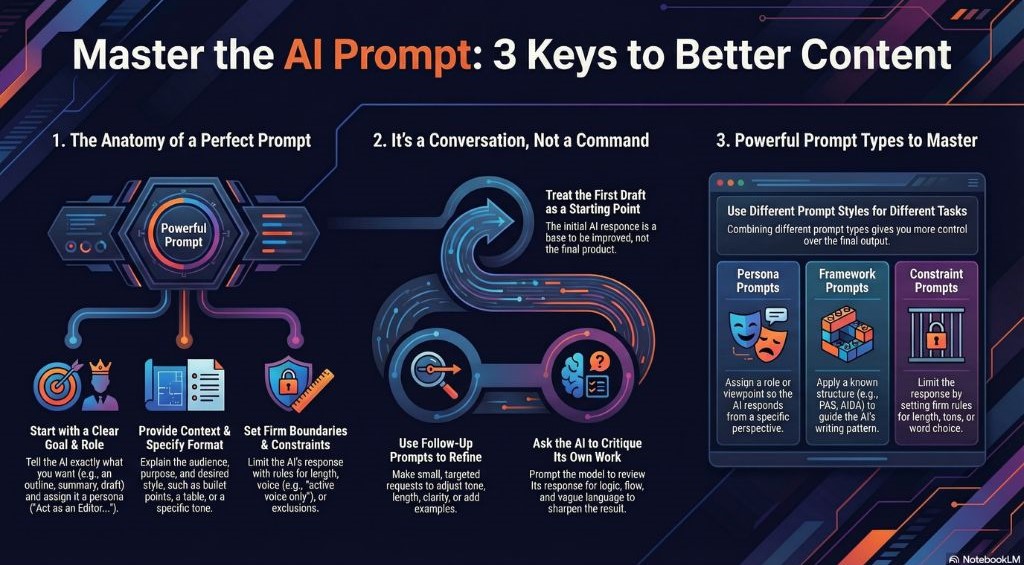
Effective AI prompts give the model enough direction to produce a useful response.
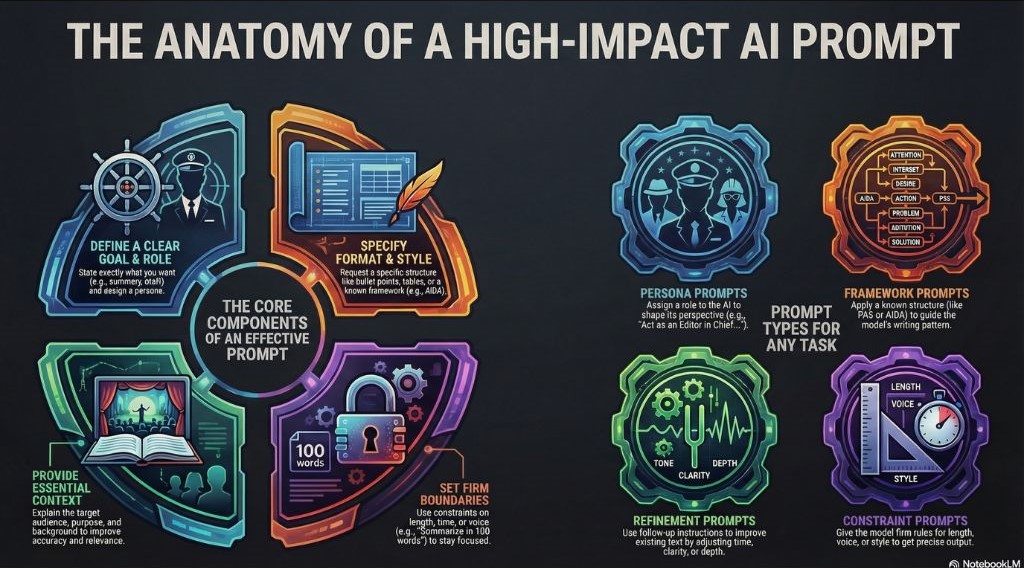
A strong prompt does not need to be long. It needs to tell the model what you want, who the content is for, how the answer should be shaped, and what limits it should follow.
Start With A Clear Goal
State the task directly.
Ask for an outline, summary, draft, rewrite, comparison, checklist, headline list, or critique. A clear goal reduces guesswork and helps the model focus on the right type of output.
For example:
“Create a beginner-friendly outline for an article about email marketing.”
That is stronger than:
“Write about email marketing.”
You can also assign a role when it helps the task. For example, asking the model to act as an editor, copywriter, researcher, teacher, or strategist can guide the tone and judgment of the response.
Add Useful Context
Context helps the model understand the audience, purpose, and situation behind the request.
Include details such as:
- Who the content is for
- What the reader already knows
- What the content should help them do
- Where the content will appear
- What source material or notes should be used
- What tone or level of detail fits the task
Even a small amount of context can improve the result.
A prompt for beginners should not produce the same response as a prompt for experienced professionals. A social caption should not sound like a blog introduction. A sales email should not read like a research summary.
Choose The Output Format
Tell the model how the response should be organized.
You may want a paragraph, list, table, outline, script, checklist, email, headline set, or step-by-step plan. Format instructions make the output easier to use.
For example:
“Turn these notes into a five-step checklist.”
Or:
“Create a table with three columns: prompt, best use, and example.”
The more specific the format, the less editing you usually need afterward.
Set Tone And Boundaries
Boundaries keep the response from drifting.
You can set limits around length, style, claims, reading level, structure, or wording. This is useful when you want the output to sound natural, stay concise, avoid hype, or follow a specific format.
For example:
“Rewrite this paragraph in plain language. Keep it under 120 words. Avoid jargon and exaggerated claims.”
Good constraints give the model guardrails without making the prompt too crowded.
Refine With Follow-Up Prompts
The first response is often only a starting point.
Use follow-up prompts to adjust tone, shorten the answer, add examples, improve structure, remove vague language, or make the output more specific.
For example:
“Make this more concise and remove any repeated ideas.”
Or:
“Keep the same meaning, but make the tone more conversational.”
Prompting works best as a process. Start with clear instructions, review the result, then refine the output until it matches the task.
Common Types Of AI Writing Prompts
Different writing tasks need different types of prompts.
A short command may be enough for a quick summary, but a detailed prompt is better when you need structure, tone, examples, or a specific format. Understanding the main prompt types helps you choose the right instruction for the job.
| Prompt Type | What It Does | Example Use |
|---|---|---|
| Persona prompts | Ask the model to respond from a specific role, viewpoint, or level of expertise. | “Act as an editor and review this article for clarity, flow, and structure.” |
| Framework prompts | Use a known structure to guide the response. | “Use the PAS framework to write a short product pitch for [AUDIENCE].” |
| Refinement prompts | Improve existing text by adjusting tone, clarity, depth, or structure. | “Rewrite this paragraph in plain language while keeping the original meaning.” |
| Constraint prompts | Set rules for length, tone, wording, format, or style. | “Summarize this article in 120 words using only active voice.” |
| Formatting prompts | Tell the model how the output should be organized. | “Turn these notes into a checklist with clear action steps.” |
These prompt types can also be combined.
For example, you might assign a persona, choose a framework, and set a length limit in the same prompt. That gives the model a clearer role, a stronger structure, and useful boundaries.
The goal is not to make every prompt complicated.
The goal is to give enough direction for the task.
50 AI Writing Prompts You Can Use
The prompts below are flexible templates.
Copy the prompt you need, replace the placeholders with your topic, audience, product, notes, or draft, then adjust the wording to match your task.
The stronger your input, the more useful the output will be.
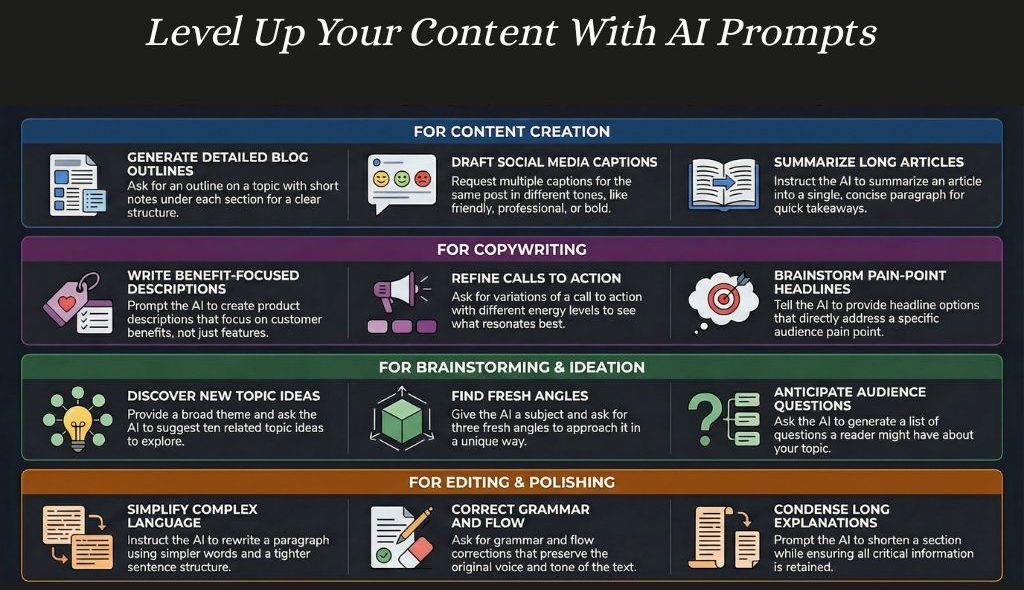
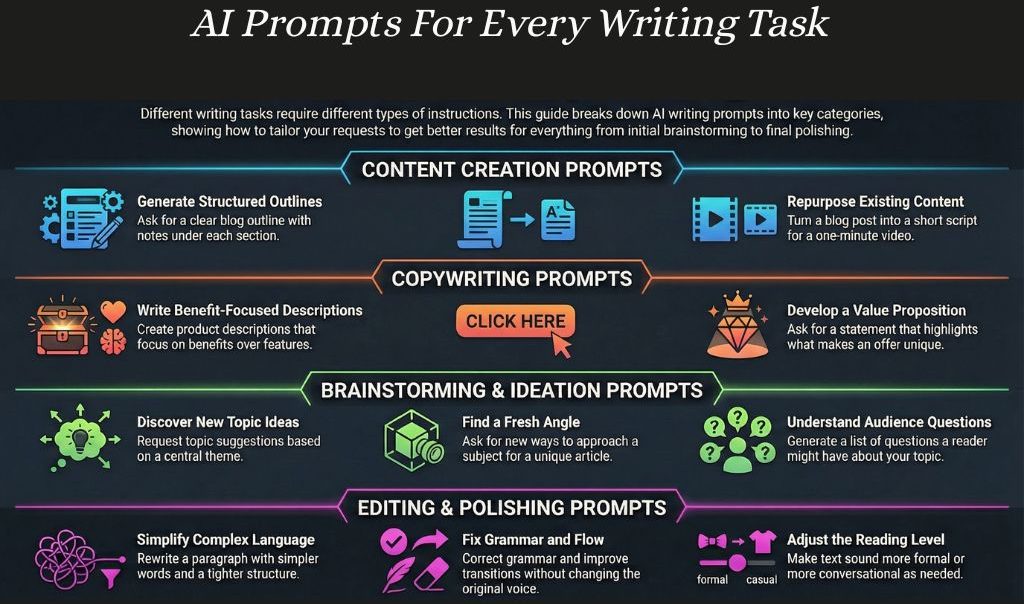
Content Creation Prompts
1. Beginner-Focused Blog Outline
Act as an experienced content creator. Create a clear blog outline for beginners on [TOPIC]. Structure the sections around real questions, doubts, and confusions a beginner would have. Add short notes under each section explaining what it should cover. Avoid generic textbook explanations.
2. Core Idea Summary
Act as a sharp editor. Summarize [ARTICLE, NOTES, OR TOPIC] in one concise paragraph. Focus on the main idea readers need to understand. Remove background, repetition, and filler.
3. Social Caption Variations
Act as a content creator with strong audience awareness. Write three social media captions about [TOPIC]. Create one friendly version, one professional version, and one bold but grounded version. Make each caption sound natural and specific, not like a generic brand post.
4. Scannable Rewrite
Act as an editor focused on clarity. Rewrite the following paragraph into a concise, scannable version using bullet points: [PASTE TEXT]. Remove repetition, filler, and vague language while keeping the original meaning.
5. Editor-Level Clarity Pass
Act as an editor-in-chief with strong reader judgment. Rewrite this section for clarity, flow, and usefulness: [PASTE TEXT]. Every sentence should serve the reader. Remove anything repetitive, vague, or unnecessary.
6. Value-Driven Headline Ideas
Act as an editor with strong headline judgment. Suggest five headline options for [TOPIC, ARTICLE, OR OFFER]. Each headline should communicate clear value without sounding promotional, exaggerated, or click-driven. Avoid generic phrasing.
7. One-Minute Video Script
Act as a short-form video creator. Turn [BLOG POST, ARTICLE, OR IDEA] into a natural one-minute video script. Focus on one clear idea. Write in a spoken style, not like a blog post being read aloud.
Copywriting Prompts
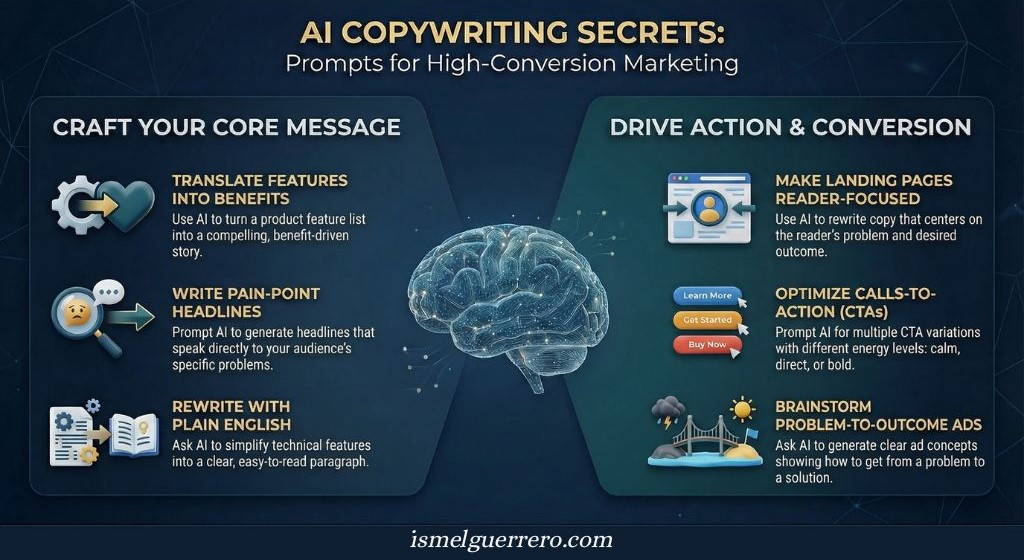
8. Feature-To-Benefit Rewrite
Act as a direct-response copywriter. Turn this feature list into a benefits-driven paragraph for [AUDIENCE]: [PASTE FEATURES]. Focus on how the reader’s situation improves. Avoid buzzwords, hype, and exaggerated claims.
9. Call-To-Action Variations
Act as a conversion-focused copywriter. Improve this call to action: [PASTE CTA]. Provide three versions with different energy levels: calm and reassuring, confident and direct, and bold but grounded. Make each version clear, natural, and specific.
10. Landing Page Section Rewrite
Act as a conversion copywriter. Rewrite this landing page section so it speaks directly to [AUDIENCE] and their main problem: [PASTE TEXT]. Keep the focus on the reader, not the company. Remove vague claims and unnecessary explanation.
11. Cold Email Introduction
Act as an experienced email copywriter. Write a short cold email introducing [OFFER] to [AUDIENCE]. Use a simple flow: attention, relevance, value, and next step. Keep the tone grounded, respectful, and free of pressure.
12. Pain-Point Headline Ideas
Act as an editor with strong audience judgment. Suggest five headline options for [OFFER, ARTICLE, OR LANDING PAGE]. Each headline should speak to a specific pain point for [AUDIENCE]. Avoid clever, vague, or overused phrasing.
13. Ad Concept Generator
Act as a direct-response marketer. Create three ad concepts for [PRODUCT OR SERVICE]. Each concept should move from a clear problem to a realistic outcome. Focus on clarity, relevance, and audience fit instead of persuasion tricks.
14. Plain-English Product Copy
Act as a copy editor who values simplicity. Rewrite this product description or feature list into one clear paragraph: [PASTE TEXT]. Explain what the product does, who it helps, and why it matters in plain language.
Brainstorming And Ideation Prompts
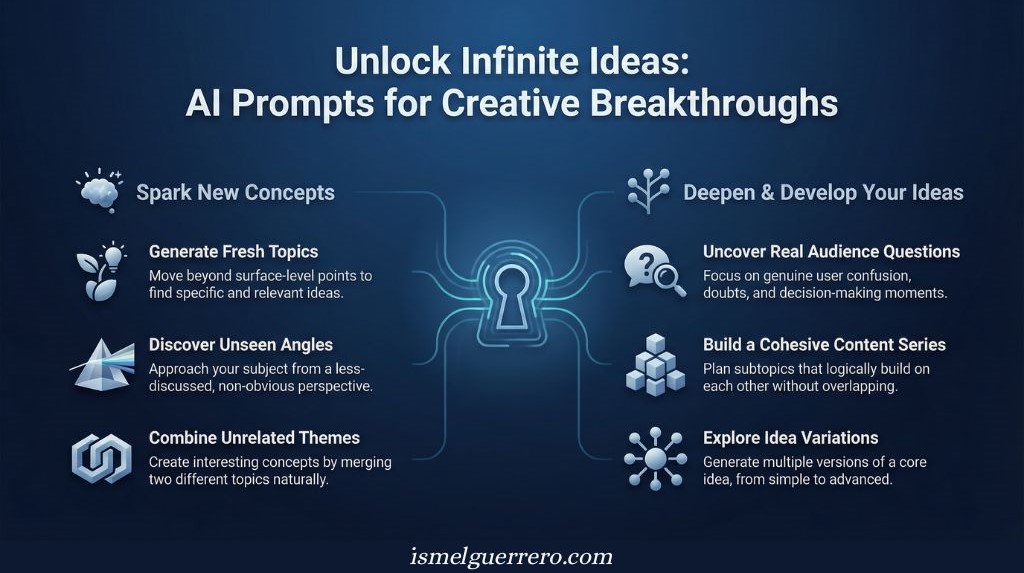
15. Fresh Topic Ideas
Act as a content strategist who understands what audiences are tired of seeing. Suggest ten fresh topic ideas about [THEME]. Avoid surface-level angles and common advice. Prioritize specificity, usefulness, and clear reader interest.
16. Non-Obvious Content Angles
Act as a strategist with strong creative judgment. Give me three distinct angles for an article, video, or post about [TOPIC]. Each angle should approach the subject from a less common perspective. Avoid ideas that feel generic or overused.
17. Content Series Builder
Act as an experienced content planner. Create a content series around [THEME]. Suggest [NUMBER] connected subtopics that build on each other logically without repeating the same idea.
18. Brand-Aligned Name Ideas
Act as a brand strategist with strong naming judgment. Generate name ideas for [PRODUCT, SERIES, NEWSLETTER, OFFER, OR PROJECT]. Match this tone: [DESCRIBE TONE]. Avoid trendy buzzwords, forced wordplay, and generic names.
19. Unexpected Concept Combinations
Act as a creative thinker. Suggest five content ideas that combine [TOPIC A] with [TOPIC B] in a way that feels natural and useful. Avoid gimmicks. Explain why each combination could work.
20. Audience Question Discovery
Act as someone who understands reader curiosity. Suggest realistic questions [AUDIENCE] would ask about [TOPIC]. Focus on confusion, doubts, objections, and decision-making moments rather than basic definitions.
21. Idea Variation Generator
Act as a creator exploring different depths of the same idea. Give me ten variations of this idea: [CORE IDEA]. Organize them from simple and beginner-friendly to more nuanced and advanced. Avoid repeating the same angle.
Editing And Polishing Prompts
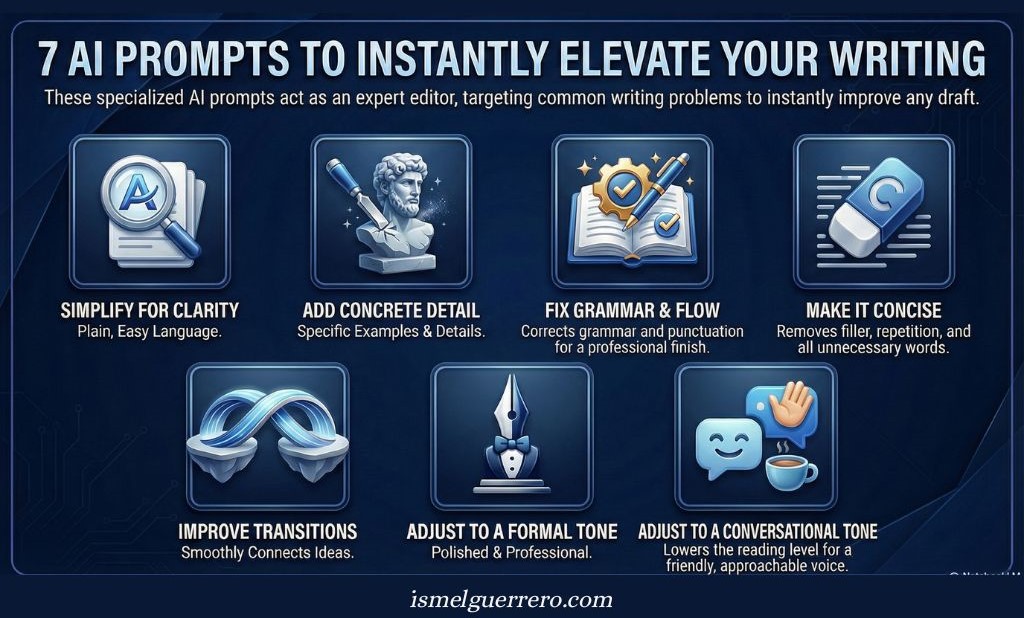
22. Plain-Language Rewrite
Act as an editor who values clarity. Rewrite this paragraph in simpler language while keeping the original meaning and voice: [PASTE TEXT]. Remove unnecessary complexity, jargon, and awkward phrasing.
23. More Specificity, Less Abstraction
Act as a skilled editor. Rewrite this paragraph with more concrete details and fewer vague statements: [PASTE TEXT]. Keep the message intact, but make the idea easier to understand and apply.
24. Grammar And Flow Cleanup
Act as a professional copy editor. Fix grammar, punctuation, sentence structure, and flow in this text: [PASTE TEXT]. Preserve the original tone and do not change the core message.
25. Concise Explanation Edit
Act as an editor focused on efficiency. Shorten this explanation while keeping every important idea: [PASTE TEXT]. Remove repetition, filler, and unnecessary qualifiers.
26. Transition Improvement
Act as a developmental editor. Improve the transition between these two paragraphs: [PASTE PARAGRAPHS]. Make the ideas connect smoothly and logically without adding unrelated content.
27. More Formal Version
Act as an editor adjusting for a professional audience. Rewrite this text in a more formal and polished tone: [PASTE TEXT]. Keep it clear, natural, and readable. Do not make it stiff or academic.
28. More Conversational Version
Act as an editor focused on readability. Rewrite this text so it feels more conversational and approachable: [PASTE TEXT]. Keep the meaning intact and avoid making it too casual or sloppy.
Research And Analysis Prompts
29. Tool Comparison Breakdown
Act as a neutral analyst. Compare [TOOL A] and [TOOL B] for [AUDIENCE OR USE CASE]. Focus on the practical differences that would affect a real decision, such as ease of use, pricing, features, limitations, and best fit. Avoid shallow feature lists.
30. Balanced Argument Summary
Act as a clear-minded researcher. Summarize the strongest arguments for and against [ISSUE OR DECISION]. Present both sides fairly in plain language. Do not exaggerate either position or force a conclusion.
31. Pattern Identification
Act as an analyst looking for useful signals. Review this data, feedback, or source material: [PASTE DATA OR NOTES]. Identify the main patterns and explain what they suggest in clear, concrete terms. Avoid speculation.
32. Complex Topic Breakdown
Act as an expert explainer. Break down [COMPLEX TOPIC] into smaller concepts a beginner can understand. Define each concept briefly and show how the ideas connect.
33. Insight Extraction
Act as a researcher with strong judgment. Extract five useful insights from this source: [PASTE SOURCE OR NOTES]. For each insight, explain why it matters and how it could affect a decision, article, or strategy.
34. Beginner-Friendly Research Overview
Act as an experienced educator. Turn this research document into a clear overview for beginners: [PASTE TEXT OR NOTES]. Focus on what readers need to understand first, why it matters, and which details are most important.
35. Risk And Consideration Analysis
Act as a cautious decision-maker. List the realistic risks, downsides, or considerations related to [DECISION, TOOL, STRATEGY, OR IDEA]. Prioritize practical concerns over rare edge cases. Include what someone should check before moving forward.
Fiction And Storytelling Prompts
36. Character Profile Builder
Act as a storyteller focused on believable characters. Develop a character profile for [CHARACTER IDEA]. Include the character’s goal, fear, internal conflict, defining traits, and what they want but may not admit. Prioritize psychological depth over surface description.
37. Three-Act Story Outline
Act as a narrative strategist. Turn [STORY IDEA] into a three-act outline. Make sure each act creates momentum, raises the stakes, and changes something meaningful for the main character.
38. Scene Rewrite For Tension
Act as a fiction editor. Rewrite this scene to increase tension: [PASTE SCENE]. Focus on what the character notices, feels, avoids, and risks. Use concrete details instead of explaining emotions directly.
39. Tone-Aligned Plot Twists
Act as a story consultant. Suggest plot twists for [STORY IDEA OR SCENE] that fit the established tone, theme, and character motivations. Avoid twists that feel random, forced, or included only for shock value.
40. Conflict Expansion
Act as a developmental editor. Expand this character conflict into a concise scene summary: [DESCRIBE CONFLICT]. Show what is at stake, why it matters now, and what each character wants from the moment.
41. Emotion-Driven Setting Description
Act as a visual storyteller. Describe [SETTING] in a way that reflects [CHARACTER]’s emotional state. Use concrete sensory details, atmosphere, and contrast instead of abstract emotional labels.
42. Genre-Specific Rewrite
Act as a genre specialist. Rewrite this scene in the style of [GENRE]: [PASTE SCENE]. Preserve the core characters, conflict, and purpose while adjusting the pacing, tone, and conventions to fit the genre.
Productivity And Workflow Prompts
43. Goal-To-Execution Plan
Act as a practical productivity strategist. Turn this goal into a clear action plan: [DESCRIBE GOAL]. Break it into realistic steps, prioritize what matters first, and avoid unnecessary complexity.
44. Task Breakdown
Act as an operations-minded planner. Break this large task into smaller actions: [DESCRIBE TASK]. Organize the steps in a logical order so the work feels clear, manageable, and easy to start.
45. Weekly Workflow Builder
Act as a workflow designer. Create a simple weekly workflow for [PROJECT OR GOAL]. Balance focused work, review time, and realistic capacity. Avoid overloading any single day.
46. Process Simplification Audit
Act as an efficiency consultant. Review this process: [DESCRIBE PROCESS]. Suggest practical ways to reduce friction, remove unnecessary steps, and preserve quality.
47. Meeting-To-Action Summary
Act as an execution-focused assistant. Turn these meeting notes into a prioritized action list: [PASTE NOTES]. Include the task, owner, deadline, and next step when that information is available.
48. Structured Project Outline
Act as a project organizer. Turn these notes into a clean project outline: [PASTE NOTES]. Make the goal, scope, priorities, milestones, and next actions clear.
49. Completion Checklist
Act as a systems thinker. Create a concise checklist for completing [TASK OR PROJECT]. Include only the steps that move the work forward from start to finish.
50. Sustainable Routine Designer
Act as a productivity coach. Design a daily or weekly routine for [GOAL, PROJECT, OR RESPONSIBILITY]. Make it realistic for this schedule and energy level: [DESCRIBE SCHEDULE]. Avoid idealized productivity advice.
How To Choose The Right AI Prompt
The right prompt depends on the task.
A short instruction may be enough when you need a quick summary, headline idea, or simple rewrite. A more detailed prompt is better when you need structure, audience fit, tone control, examples, or a specific format.
Start with the purpose.
Are you trying to brainstorm, draft, revise, analyze, or organize something? Each task needs a different level of direction.
- For brainstorming, give the model a theme, audience, and angle to explore.
- For drafting, include the goal, format, audience, tone, and any key points to cover.
- For editing, paste the text and explain what should improve, such as clarity, length, flow, specificity, or tone.
- For research or analysis, provide the source material and ask for patterns, comparisons, risks, or insights.
Audience matters too.
A prompt written for beginners should not produce the same output as one written for professionals. A prompt for a social caption should not produce the same structure as a blog outline or research summary.
Use more detail when you need more control.
Use fewer constraints when you want broader ideas.
The best prompt is not always the longest one. It is the one that gives the model enough direction to produce the kind of output you can actually use.
How To Refine AI Output With Follow-Up Prompts
The first response from an AI tool is usually a draft.
It may have the right direction but still need better tone, clearer structure, stronger examples, or tighter wording. Follow-up prompts help you improve the output without starting over.
Use them to make specific adjustments.
Change The Tone
Ask for a different tone when the message is useful but does not sound right.
For example:
“Keep the same meaning, but make this sound more conversational and less formal.”
Or:
“Rewrite this in a calm, professional tone without sounding stiff.”
Tone prompts are useful for emails, social posts, landing pages, captions, and article introductions.
Tighten The Length
If the response is too long, ask the model to shorten it with clear limits.
For example:
“Shorten this by 30 percent while keeping the main ideas.”
Or:
“Rewrite this in one concise paragraph without losing the key point.”
Length prompts help remove repetition and make the output easier to use.
Add Specific Examples
If the response feels too broad, ask for examples.
For example:
“Add three concrete examples that would make this easier for beginners to understand.”
Or:
“Give me practical examples for a small business owner using this idea.”
Examples make abstract advice clearer and more useful.
Improve Structure
If the output feels scattered, ask for a cleaner format.
For example:
“Reorganize this into a clear outline with H2s and short notes under each section.”
Or:
“Turn this into a checklist with action steps in the right order.”
Structure prompts are helpful when you need a blog outline, content brief, project plan, comparison table, or workflow.
Check For Weaknesses
You can also ask the model to critique its own output.
For example:
“Review this draft for vague language, repetition, missing context, and weak transitions. Then suggest improvements.”
This helps you find problems before rewriting.

Common Mistakes To Avoid With AI Prompts
Small gaps in a prompt can lead to unclear, generic, or unusable output.
Most problems come from giving the model too little direction, too many mixed instructions, or no clear way to improve the first response.
Using Vague Goals
A prompt such as “write about this topic” leaves too much room for interpretation.
Be specific about the task. Ask for an outline, summary, draft, rewrite, checklist, comparison, or critique.
A clear goal helps the model understand what kind of output you need.
Leaving Out Context
Without context, the model has to guess who the content is for and why it matters.
Add details about the audience, purpose, tone, platform, product, or source material. Even a short sentence of background can make the response more useful.
For example, a prompt for beginners should not produce the same output as a prompt for experienced marketers, writers, or business owners.
Giving Contradictory Instructions
Mixed instructions create weak results.
Asking for a short answer and a detailed explanation in the same prompt can confuse the output. So can asking for a formal tone and a casual tone at the same time.
Choose one main direction.
If you need two versions, ask for them separately.
Overloading The Prompt
A long prompt is not always a better prompt.
Too many instructions, examples, rules, and side requests can make the task harder to follow. If the request is complex, break it into smaller steps.
Start with the main output first, then use follow-up prompts to refine tone, structure, examples, or length.
Skipping Revision
Many people treat the first AI response as the final version.
That usually leaves useful improvements on the table.
Review the output for clarity, accuracy, repetition, tone, and structure. Then use follow-up prompts to tighten the result.
A strong prompt starts the process. Revision makes the output usable.
Conclusion
AI writing prompts help you give clearer direction before the writing starts.
A useful prompt tells the model what to create, who the content is for, how the response should be structured, and what limits it should follow. That clarity makes the output easier to guide and easier to revise.
The 50 prompts in this guide can help with content creation, copywriting, brainstorming, editing, research, storytelling, and workflow planning. Use them as starting points, then adjust the details to fit your audience, topic, format, and goal.
Prompting improves with practice.
The more you test different instructions, the easier it becomes to see what changes the output. Small adjustments to tone, context, structure, or constraints can make a noticeable difference.
AI tools will keep changing, but clear instructions and thoughtful revision will remain the foundation of useful results.

Frequently Asked Questions
What Is An AI Writing Prompt?
An AI writing prompt is an instruction that tells an AI tool what to create and how to shape the response.
A prompt may include the topic, goal, audience, tone, format, length, examples, or limits. The clearer the instruction, the easier it is for the model to produce useful output.
How Specific Should An AI Prompt Be?
An AI prompt should be specific enough to reduce guesswork.
For simple tasks, a short instruction may be enough. For more complex tasks, include the audience, purpose, format, tone, and any details the output should follow.
The goal is not to make every prompt long. The goal is to give the model enough direction for the task.
Why Does The First AI Response Miss The Mark?
The first response may miss the mark when the prompt is too vague, lacks context, or leaves the model to guess what you want.
It can also happen when the task needs more detail than the prompt provides. Follow-up prompts help refine tone, structure, length, examples, and accuracy.
Can AI Prompts Improve Content Quality?
Yes, strong prompts can improve structure, clarity, and consistency.
They help the model understand the goal before generating the response. However, prompts do not replace judgment. You still need to review the output for accuracy, tone, originality, and usefulness.
Do Different AI Tools Need Different Prompting Styles?
The same basic principles apply across most AI writing tools.
Clear goals, useful context, and specific formatting instructions usually improve results. Some tools respond better to short commands, while others handle detailed briefs well. Testing a few prompt styles can show what works best for the tool you use.
How Do I Fix Unclear AI Responses?
Start by identifying what is wrong with the response.
Then use a follow-up prompt that asks for one clear improvement. You can ask the model to simplify the language, add examples, shorten the answer, reorganize the structure, remove repetition, or make the tone more natural.
Which Writing Tasks Work Best With AI Prompts?
AI prompts work well for outlines, summaries, headlines, social captions, email drafts, editing, brainstorming, research overviews, story ideas, and workflow planning.
They are most useful when the task has a clear goal and the output can be guided with structure, examples, or constraints.

0 Comments