Introduction: Why Your Output Is Only as Good as Your Input
Artificial Intelligence is only as smart as the prompt you give it.
Whether you’re using ChatGPT, Claude, Gemini, or any other language model, your results depend on the clarity, context, and intent behind your input. A vague prompt gets you a vague answer. But a focused, well-structured prompt? That’s where the magic happens, and the productivity boost too.
This guide moves beyond theory into practical AI prompt examples you can use immediately, organized by real use cases. You’ll find foundational prompts that work in almost any situation, workflow-style prompts for common business departments, and high-ROI “micro prompts” that help you write faster, communicate better, and clean up messy drafts in seconds.
Key Takeaways
- AI output quality is driven by prompt quality. Clear, structured prompts consistently outperform vague instructions.
- The Prompt Formula works across use cases: using Role + Task + Context + Constraints + Format leads to more accurate, usable results.
- Foundational prompt types are building blocks. Summarization, extraction, classification, reasoning, and conversation prompts can be combined for complex tasks.
- AI prompts are most powerful when tied to real workflows. Department-specific and website prompts solve practical business problems, not just content creation.
- Small “power prompts” deliver outsized ROI. Simple prompts for tone, clarity, and summarization can save hours each week.
- Templates are a starting point, not the finish line. Adding context, voice, and format is what turns generic prompts into effective ones.
- Speed comes from iteration, not perfection. Test, tune, and reuse prompts to build a personal prompt library that compounds over time.
Disclaimer: I am an independent Affiliate. The opinions expressed here are my own and are not official statements. If you follow a link and make a purchase, I may earn a commission.
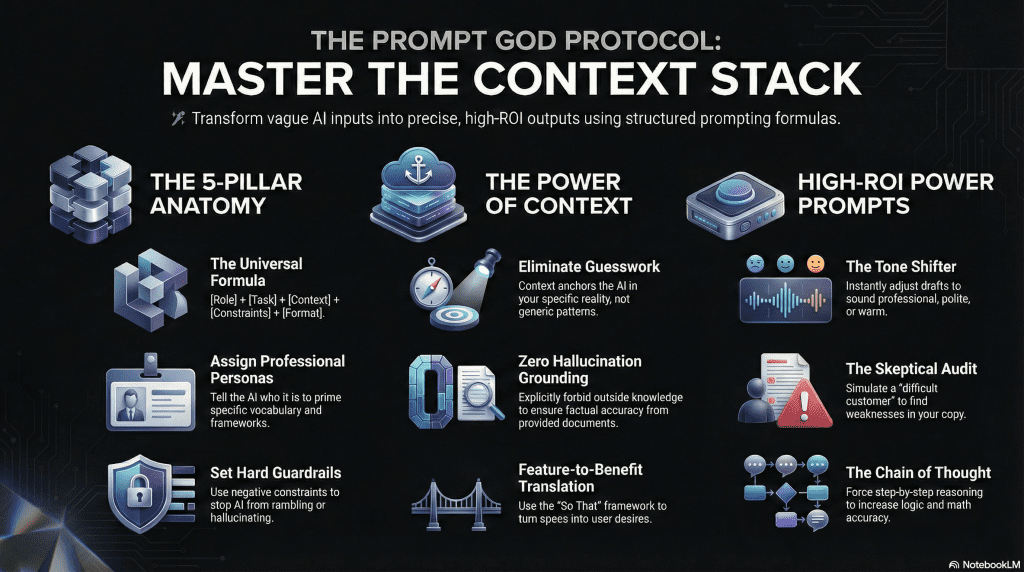
What Makes a Good AI Prompt?
A good AI prompt isn’t just a question; it’s a set of instructions.
While modern models like Gemini and ChatGPT are incredibly smart, they lack telepathy. If you leave room for interpretation, the AI will guess and it will usually guess wrong. To get consistent, high-quality results, you need to structure your request like a delegation to a skilled intern, not a Google search.
The most effective prompts follow a specific architecture. We call this the “Context Stacking” formula:
The Prompt Formula: [Role] + [Task] + [Context] + [Constraints] + [Format]
Here is why each component is critical and how to use it:
1. Role (Who is the AI?)
Don’t just ask the AI to “write.” Tell it who is writing. Assigning a persona primes the model to use specific vocabulary, tone, and frameworks associated with that job.
- Weak: “Write a blog post about SEO.”
- Strong: “Act as a Senior Content Strategist with 10 years of experience in B2B SaaS.”
2. Task (What is the action?)
Be hyper-specific with your verbs. Vague instructions lead to generic fluff. Avoid words like “think about” or “look at.”
- Weak: “Help me with this email.”
- Strong: “Proofread this email for clarity and tone errors. Do not rewrite the whole thing, only fix the awkward sentences.”
3. Context (The Background Data)
This is where most prompts fail. You must give the AI the “Context Stack” the background info it needs to make decisions. The more you feed it, the sharper the output.
- Weak: “Write a product description.”
- Strong: “I am selling a productivity app for freelancers who struggle with ADHD. The key feature is a ‘Focus Timer’ that blocks distractions.”
4. Constraints (The Guardrails)
Telling the AI what not to do is often more powerful than telling it what to do. Constraints stop the AI from hallucinating or rambling.
- Weak: “Keep it short.”
- Strong: “Strictly limit the response to 3 sentences. Do not use buzzwords like ‘game-changer’ or ‘innovative’. Do not use hashtags.”
5. Format (The Output Structure)
Don’t make the AI guess how you want the data presented. If you need a table, a list, or code, ask for it explicitly.
- Weak: “Give me a list of keywords.”
- Strong: “Output the result as a Markdown Table with columns for ‘Keyword’, ‘Search Volume’, and ‘Difficulty Score’.”

See the Difference:
The Lazy Prompt:
“Write an email to get new leads.”
The Perfect Prompt:
“[Role] Act as a Cold Outreach Specialist.
[Task] Write a first-touch sales email to a Marketing Director.
[Context] We are selling an AI tool that automates reporting. Their main pain point is spending too much time on Excel.
[Constraints] Keep it under 100 words. Be casual, not salesy.
[Format] Structure it with a hook, a value prop, and a low-friction question.”
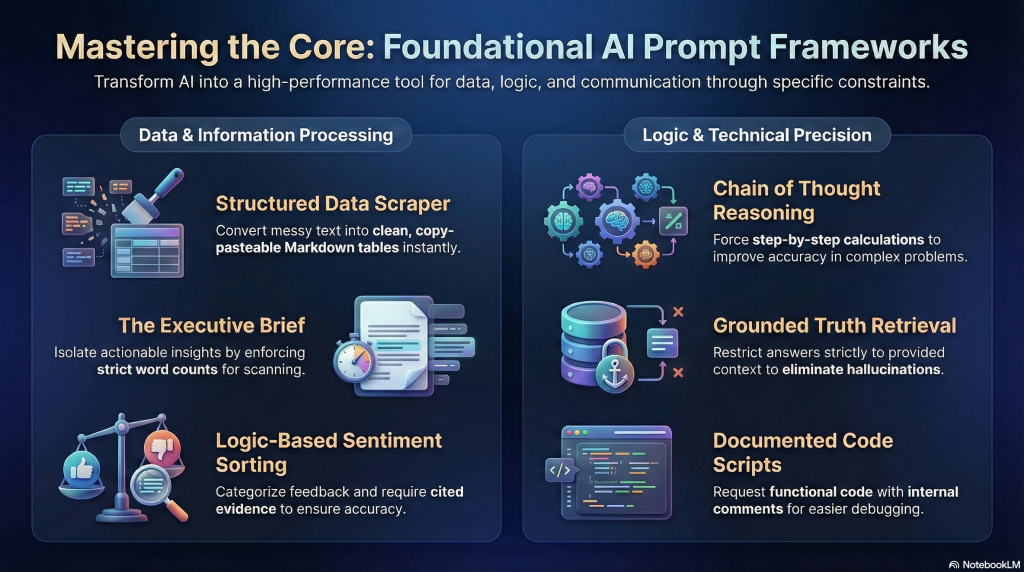
Foundational AI Prompt Examples (By Core Function)
These prompts cover the essential capabilities of modern LLMs. Whether you’re analyzing data, coding, or summarizing long reports, these foundational examples are designed to be precise, adaptable, and most importantly reliable.
Each example below includes a constraint or a formatting instruction to ensure the AI gives you exactly what you need on the first try.
1. Text Summarization (The “Executive Brief”)
Don’t just ask for a summary; ask for the value. This prompt forces the AI to cut the fluff and isolate actionable insights.
Prompt: “Summarize this [article/report] into a bulleted list of the top 5 key takeaways. Focus on actionable insights rather than general descriptions. Keep each bullet under 15 words for quick scanning.”
- Why it works: Setting a word count constraint (“under 15 words”) prevents the AI from rambling, while asking for “actionable insights” ensures you get value, not just a recap.
2. Information Extraction (The “Data Scraper”)
AI is excellent at turning messy text into structured data. Use this when you need to pull specific entities from emails or transcripts.
Prompt: “Analyze the text below and extract all [Names], [Dates], and [Action Items]. Format the output as a Markdown table with three columns. If a category is missing, write ‘N/A’.”
- Why it works: Asking for a “Markdown table” makes the data instantly copy-pasteable into Excel or Notion. Telling it to write ‘N/A’ prevents the AI from making up information to fill the gaps.
3. Question Answering (The “Grounded Truth”)
This is crucial for querying internal documents. You must explicitly tell the AI not to use its outside training data.
Prompt: “Answer the question below using only the context provided. Do not use outside knowledge or assumptions. If the answer is not present in the context, strictly state: ‘Information not available in text’.”
[Insert Context] [Insert Question]
- Why it works: This is known as “Grounding.” By forcing the AI to admit when it doesn’t know the answer, you eliminate hallucinations and false information.
4. Classification (The “Sentiment Sorter”)
Use this to process customer feedback or survey data at scale.
Prompt: “Classify the following customer review into one of these three categories: [Positive], [Neutral], or [Negative]. After the classification, provide a one-sentence explanation citing the specific words that led to your decision.”
- Why it works: Asking for the “one-sentence explanation” forces the model to “show its work,” which usually results in higher accuracy than just asking for the label alone.
5. Conversational (The “Role-Play”)
This is useful for drafting emails or simulating difficult conversations.
Prompt: “Act as a senior customer support agent for a SaaS platform. Draft a response to the customer query below. Use a tone that is empathetic but firm, acknowledge their frustration, but stick to company policy regarding refunds. Keep the response under 100 words.”
- Why it works: Giving tone directions like “empathetic but firm” helps the AI navigate complex social nuances that a generic prompt would miss.
6. Code Generation (The “Junior Developer”)
When asking for code, always ask for comments. It makes debugging easier later.
Prompt: “Write a Python script that cleans a CSV file by removing rows with null values and dropping duplicate entries based on the ’email’ column. Include comments explaining each step of the logic.”
- Why it works: Requesting comments ensures the code is documented, and often results in cleaner logic because the model is “explaining” the code to itself as it writes.
7. Reasoning (The “Chain of Thought”)
For math or logic problems, you must force the AI to slow down and think step-by-step.
Prompt: “Solve the following problem. Do not just give the answer. Walk through your logic step-by-step, showing all calculations and reasoning. Double-check your final number before outputting it.”
- Why it works: This technique is called “Chain of Thought” prompting. Large Language Models are significantly more accurate at math and logic when they are forced to break the problem down into steps.
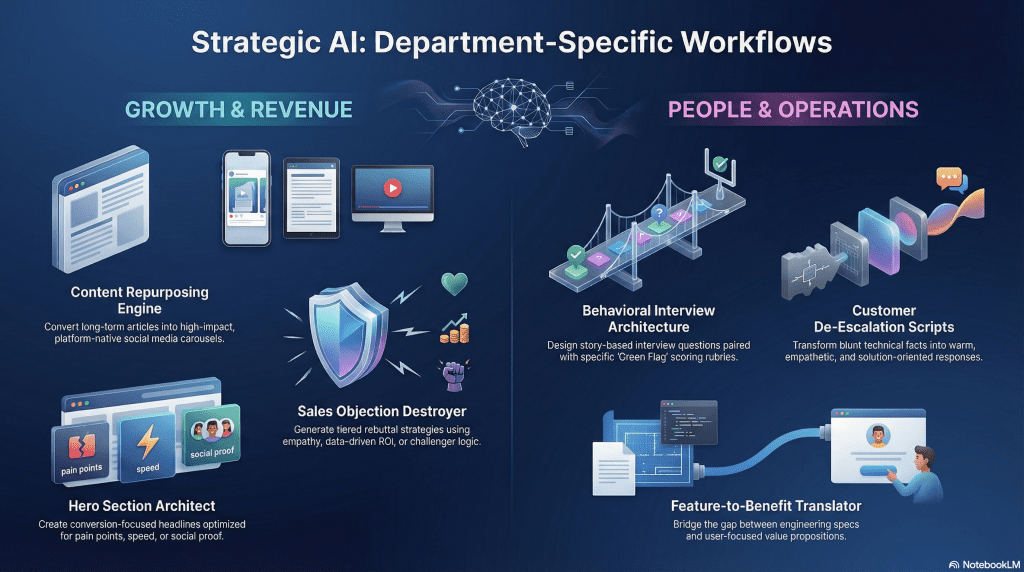
Department-Specific Prompts (Real Business Workflows)
AI isn’t just a general-purpose assistant; it becomes exponentially more valuable when you tailor it to specific departmental KPIs. The following examples move beyond simple drafting and into strategic problem solving.
1. Marketing: The “Content Repurposing Engine”
Marketers don’t need more content; they need better distribution. This prompt turns one asset (like a blog post or transcript) into a platform-native social media piece.
Prompt: “Act as a Social Media Strategist. I am pasting a section of a blog post below. Rewrite this content into a text-based LinkedIn Carousel structure with 5 slides.
- Slide 1: A controversial or ‘hooky’ statement to stop the scroll.
- Slides 2-4: The core value points, simplified for a 5th-grade reading level.
- Slide 5: A specific Call to Action (CTA) asking a question to drive comments.
- Constraint: Keep each slide under 30 words.
[Insert Content Here]“
- Why it works: It enforces “Platform Native” constraints. It stops the AI from just pasting a wall of text and forces it to think in “slides,” saving the marketer 20 minutes of editing.
2. Sales: The “Objection Destroyer”
Generic cold emails rarely work. The real money in sales is made handling objections. This prompt treats the AI as a sales coach to help you navigate a tough “No.”
Prompt: “Act as a Senior Sales Coach. I am selling [Product/Service] to a [Job Title] at a [Industry] company. They just gave me the following objection: ‘[Insert Objection, e.g., We don’t have the budget right now]’.
Provide 3 distinct rebuttal approaches:
- The Empathy Approach: Acknowledge and pivot.
- The Data Approach: Use logic/ROI to reframe the cost.
- The Challenger Approach: Ask a hard question that exposes the risk of not buying.
Keep each response under 3 sentences.”
- Why it works: Instead of one generic reply, it gives the salesperson options (tactics). It turns the AI into a sparring partner to practice negotiation.
3. Human Resources: The “Behavioral Interview Architect”
Writing a job description is easy; interviewing is hard. This prompt helps HR managers and founders identify if a candidate actually has the skills they claim to have.
Prompt: “Act as a Technical Recruiter. We are interviewing candidates for a [Role, e.g., Senior Project Manager]. We need to test for [Specific Skill, e.g., Conflict Resolution].
Generate 3 behavioral interview questions that force the candidate to tell a specific story from their past. For each question, provide:
- The Question: (e.g., ‘Tell me about a time…’)
- Green Flags: What a great answer sounds like.
- Red Flags: Warning signs that the candidate is faking or lacks experience.”
- Why it works: It solves the biggest problem in hiring: knowing what to look for after you ask the question. It provides a scoring rubric, not just a script.
4. Customer Support: The “De-Escalation Script”
Support agents often struggle to sound empathetic when they are tired. This prompt rewrites blunt facts into a solution-oriented response.
Prompt: “Act as a Senior Support Agent. Rewrite the draft response below to be warmer and more reassuring.
- Goal: Acknowledge the user’s frustration regarding [Issue], apologize without accepting liability, and clearly explain the next step.
- Tone: Professional, calm, and ‘human’ (avoid robotic phrases like ‘We understand your concern’).
[Insert Rough Draft or Bullet Points]“
- Why it works: It separates the “facts” (what needs to happen) from the “feelings” (how it is communicated), ensuring the customer feels heard even if the answer is “no.”
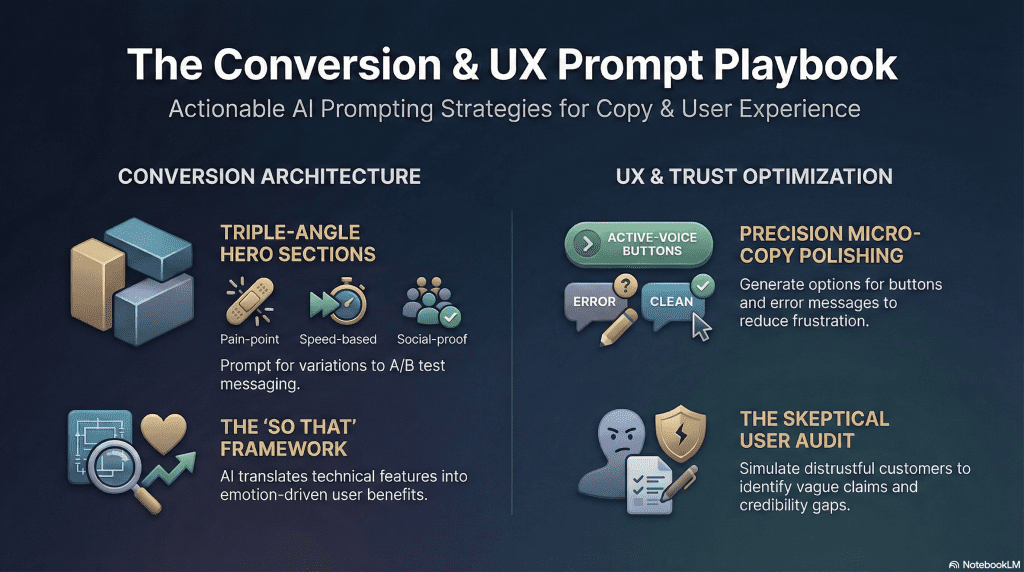
Website & Product Prompts (UX & Conversion Copy)
From landing pages to error messages, every word on a screen contributes to the user experience. These prompts are designed to speed up the creation process while keeping messaging clear, customer-focused, and conversion-oriented.
1. The “Hero Section” Architect (Above the Fold)
The top of your homepage is the most valuable real estate you own. This prompt forces the AI to focus on clarity and the specific problem you solve, rather than catchy slogans that mean nothing.
Prompt: “Act as a Conversion Copywriter. Write 3 variations of a ‘Hero Section’ (Headline + Subheadline + CTA Button) for a [Product/Service] that helps [Target Audience] achieve [Main Goal].
- Variation 1: Focus on the ‘Pain Point’ (the cost of not buying).
- Variation 2: Focus on ‘Speed/Ease’ (how fast they get results).
- Variation 3: Focus on ‘Social Proof’ (trust and authority).
- Constraint: Headlines must be under 8 words. Subheadlines must be under 20 words. No buzzwords like ‘unleash’ or ’empower’.”
- Why it works: It generates distinct angles, allowing you to A/B test different psychological triggers rather than just testing different words for the same idea.
2. The “Feature-to-Benefit” Translator
Engineers describe what a product does. Marketers must describe why it matters. This prompt bridges that gap, translating technical specs into user desire.
Prompt: “Act as a Product Marketing Manager. I have listed the technical features of our product below. Rewrite this list into a ‘Benefits’ checklist for a non-technical user.
- Rule: Use the ‘So that’ framework. (e.g., instead of ’10GB Storage’, write ‘Store 10,000 photos so that you never have to delete a memory’).
- Tone: Exciting but grounded.
[Insert List of Features]“
- Why it works: It solves the “Curse of Knowledge.” It forces the copy to focus on the user’s life outcome, which is the only thing that drives a sale.
3. The “Micro-Copy” Polisher (Buttons & Errors)
Small words make a big difference. “Click Here” is a weak button. “Get My Free Plan” is a strong one. Use this for the tiny bits of text that guide user behavior.
Prompt: “Act as a UX Writer. I need 5 options for a [Button / Error Message / Tooltip] text.
- Context: The user is trying to [Action, e.g., reset their password] but they [Problem, e.g., entered the wrong email].
- Goal: Reduce frustration and guide them to the solution immediately.
- Constraint: Maximum 40 characters. Use active voice.”
- Why it works: UX writing requires extreme brevity. This prompt generates options that fit inside small UI elements while maintaining a helpful, human tone.
4. The “Skeptical User” Audit
Before you publish a page, use AI to simulate a user who doesn’t trust you.
Prompt: “Act as a skeptical potential customer who is tight on budget. Review the website copy below.
- Task: Identify 3 areas where the copy is confusing, vague, or sounds ‘too good to be true.’
- Output: Quote the specific sentence and explain why it makes you hesitate to buy.
[Insert Landing Page Copy]“
- Why it works: You cannot read the label from inside the bottle. This prompt gives you an outside perspective, highlighting weak arguments or “fluff” that you missed because you are too close to the project.
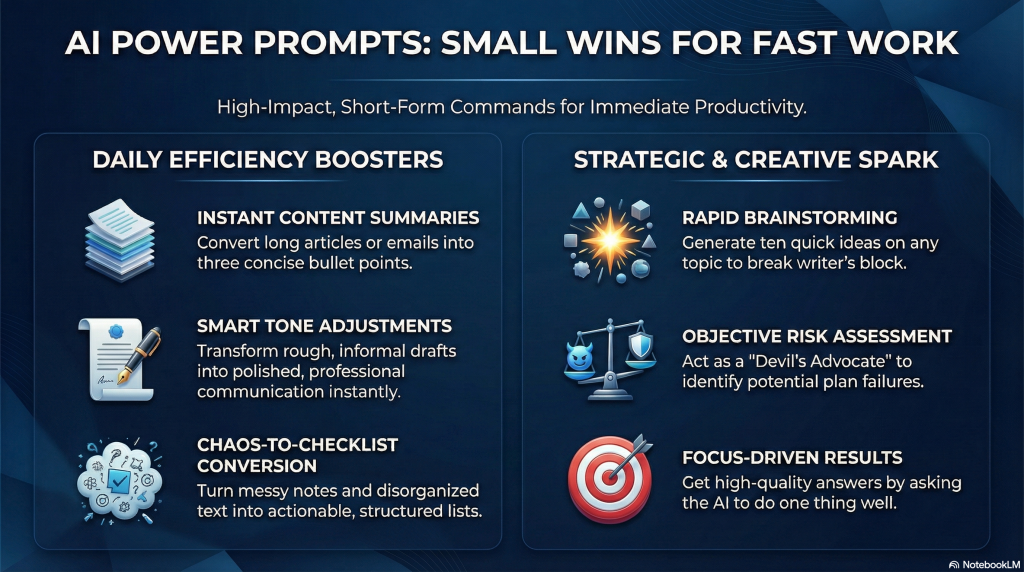
Power Prompts: Small Wins for Fast Work
You do not need complex instructions to get great results from AI. Often, the shortest commands provide the most value. We call these “power prompts.” They are simple questions that solve specific problems in seconds. These small wins add up to hours of saved time each week.
Use these prompts to clear small hurdles in your day.
- The Summarizer Paste a long email or article. Type: “Summarize this in three bullet points.” This lets you grasp the main idea without reading every word.
- The Tone Shifter Paste a rough draft of a message. Type: “Rewrite this to sound professional and polite.” This fixes your grammar and adjusts your mood instantly.
- The List Maker Paste a block of messy text or notes. Type: “Turn this into an organized checklist.” This converts chaos into a clear plan of action.
- The Idea Spark Stuck on a blank page? Type: “Give me 10 ideas for [Topic].” This breaks writer’s block. You do not have to use all ten ideas. You only need one good one to get moving.
- The Devil’s Advocate Before you make a decision, check your logic. Type: “Tell me three reasons why this plan might fail.” This helps you spot risks you might have missed.
Why This Works
These prompts work because they are focused. They ask the AI to do one thing well. You stop wasting time on formatting or overthinking. You simply get the answer and move to the next task.
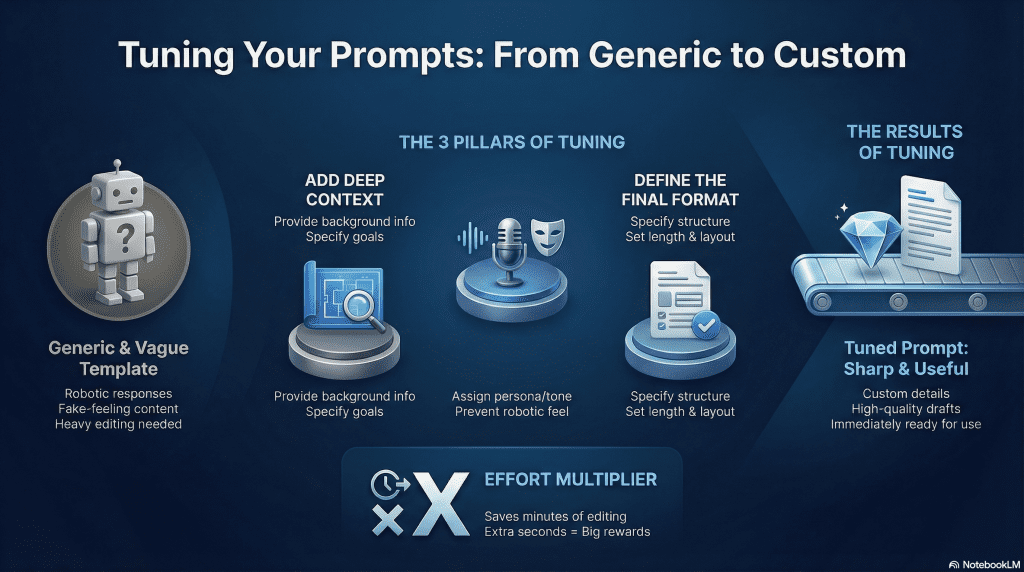
From Template to Custom: How to Tune Your Prompts
Templates are good starting points. They save time. But they are often too general. A template does not know your specific job, your style, or your goal. To get the best results, you must change the template to fit your needs. We call this “tuning.”
Tuning turns a generic request into a perfect answer. You can tune any prompt by adding three specific details.
1. Add Context
The AI does not know what you know. You must give it background information. Do not just ask for “an email about the meeting.” Tell the AI what happened in the meeting. Tell it what needs to happen next. Context helps the AI understand the full picture.
2. Set the Voice
Tell the AI who is speaking. This changes the words it chooses. You might want to sound like a professional expert. You might want to sound like a friendly coach. If you do not choose a voice, the AI will sound like a robot.
3. Define the Format
Tell the AI what the final answer should look like. Do you want a list? Do you want a table? Do you want two short paragraphs? Be specific about length and structure. This prevents the AI from writing too much or too little.
The Difference in Action
Here is how tuning changes the result.
- The Template: “Write a response to this customer complaint.” (This produces a generic apology that feels fake.)
- The Tuned Prompt: “Act as a helpful support agent. Write a short email to a customer who received a broken mug. Offer a full refund or a free replacement. Keep the tone warm and apologetic.” (This produces a specific, useful draft that is ready to send.)
Start with the template. Then add your details. This takes a few extra seconds. It saves you minutes of editing later.

Conclusion: Speed is a Choice
You now have the tools. You know how to use Power Prompts for quick wins. You know how to tune those prompts for specific results.
But knowledge is not speed. Action is speed.
Reading this guide does not save you time. Using these methods does. Do not try to change your whole workflow today. That leads to burnout.
Start small. Pick one prompt from this guide. Use it on your next email. Use it for your next brainstorming session. Notice how it feels to save those ten minutes.
Then do it again.
AI is a multiplier. It takes your effort and expands it. But anything multiplied by zero is still zero. You must provide the spark.
Close this guide. Open your tools. Go fast.

FAQs: Understanding Prompts and Context
What is the specific difference between a prompt and context?
Think of the prompt as the specific task you want the AI to perform right now. The context is the background information the AI needs to understand that task. If you ask the AI to “write a thank you note” (Prompt), the context would be “the gift was a blender, and it is for my Aunt Sally who loves baking.”
Why is context considered more important than the instruction itself?
Context reduces guesswork. Without it, the AI relies on generic patterns, which often leads to bland or irrelevant answers. Context anchors the AI in your specific reality. It narrows down the millions of possible answers to the few that actually fit your situation.
Where should I place the context in my prompt?
It is usually best to place context at the beginning. This “primes” the AI before it reads the specific instruction. A standard structure is: [Role/Persona] + [Background Information/Context] + [Specific Task].
What is a “context window”?
This refers to the memory limit of the AI model. It is the maximum amount of text (measured in tokens) the AI can consider at one time. If a conversation goes on too long or you paste a massive document, the AI will “forget” the earliest information because it falls outside the context window.
Does previous chat history count as context?
Yes. In a continuous chat thread, the AI reads the previous messages as context for the new response. This is why you don’t need to repeat yourself in every message. However, if you start a “New Chat,” that history is gone, and the context resets to zero.
What happens if the context contradicts the prompt?
This often confuses the AI. It creates a “logical conflict.” Usually, the AI will try to follow the most recent instruction (the prompt) but the quality will suffer. It is important to ensure your background information aligns with the current request to get a coherent result.
How do I format context so the AI sees it clearly?
Use delimiters. These are punctuation marks that separate the background info from the instructions. You can use triple quotes (“””), headers (###), or XML tags (<context>). This helps the AI distinguish between what it needs to learn (the context) and what it needs to do (the prompt).

0 Comments